An analysis of Chrome's Page Content Agent, which builds a structured tree of page elements to provide Gemini with grounded context for reading and interaction.
When you share a Chrome tab with Gemini, Chrome doesn't just send the page's HTML. It runs a system called the Page Content Agent — part of its rendering engine — that walks the browser's internal representation of the page and builds a structured tree of everything on screen: every heading, link, button, image, form field, and table cell, each tagged with a unique node ID, bounding box coordinates, text styling, and interaction data.
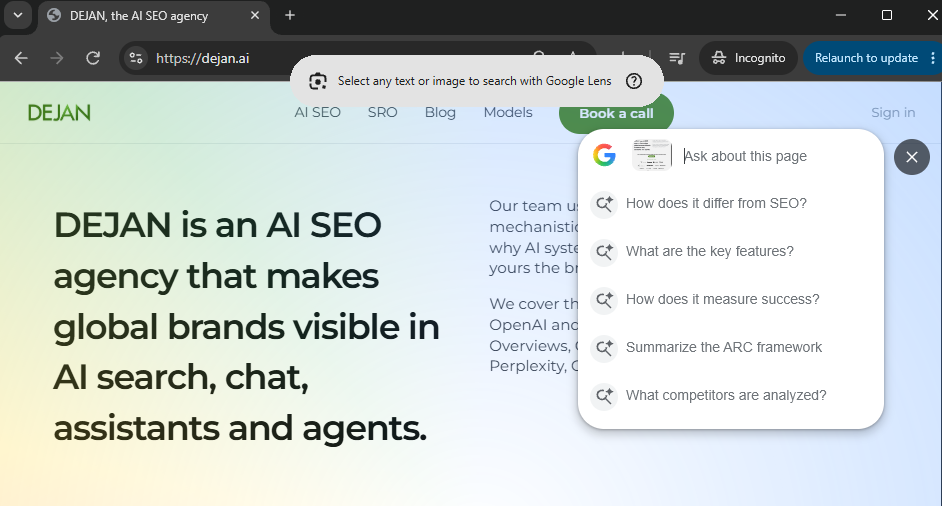
That tree is then converted into structured Markdown with node references and passed to Gemini as grounded context. The AI can read the page, reference specific elements by ID, and interact with them — clicking buttons, filling forms, following links — all through this structured representation.
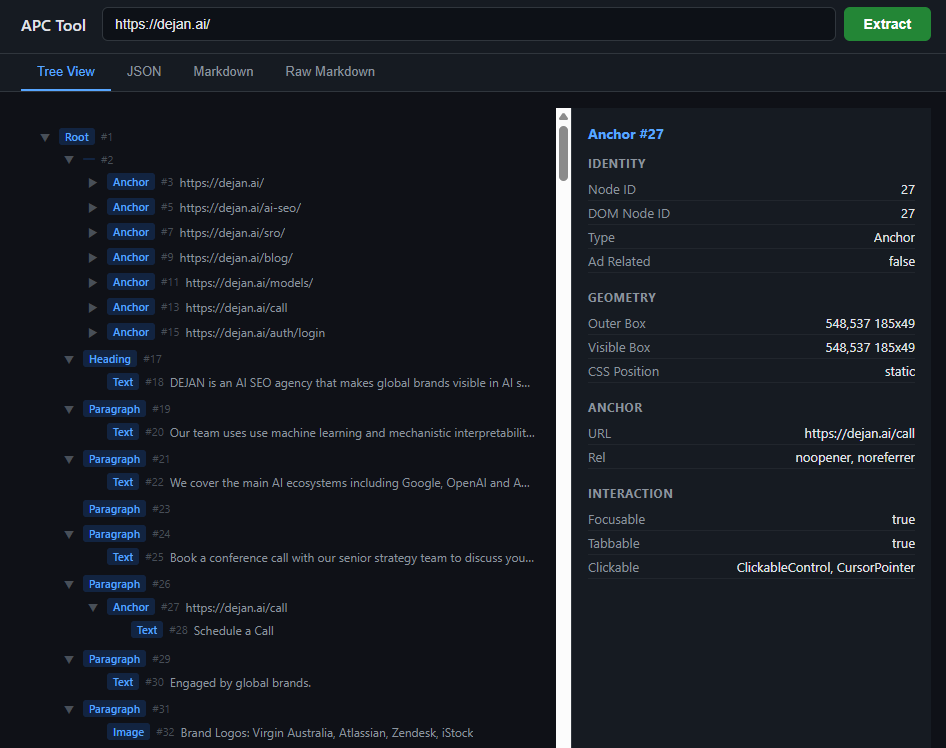
This article breaks down exactly how that system works, based on Chromium's open-source code and direct testing with Gemini to reveal what it actually receives.
Page Content Agent
Walks the browser's internal rendering tree and produces a tree of content nodes. Each node gets a type, geometry, text styling, interaction info, and accessibility data.
A Complete List of Node Types:
- Root — The top-level container for the entire page
- Container — A grouping element (e.g. div) that holds other nodes
- Text — A piece of visible text content
- Paragraph — A block of text (maps to <p> tags)
- Heading — A title or subtitle (h1 through h6)
- Anchor — A clickable link
- Image — An image element
- SvgRoot — The root of an inline SVG graphic
- Canvas — A drawable canvas area
- Video — A video player element
- Form — A form container (groups inputs together)
- FormControl — An interactive input (text field, dropdown, button, etc.)
- Table — A data table
- TableRow — A single row within a table
- TableCell — A single cell within a table row
- OrderedList — A numbered list
- UnorderedList — A bulleted list
- ListItem — A single item within a list
- Iframe — An embedded page within the page
- DialogModal — A popup dialog that blocks page interaction
- DialogModeless — A popup dialog that allows page interaction
Geometry
There are three types of bounding box per node:
- Outer bounding box - The full rectangle the element occupies on screen, including parts that might be hidden behind other elements or clipped by a scrollable container
- Visible bounding box - The portion of the outer box that's actually visible to the user (clipped by scroll containers, parent boundaries, and the viewport edges)
- Fragment bounding boxes - When an element wraps across multiple lines (like a long link that breaks mid-sentence), each line segment gets its own separate rectangle. Only present when there are 2+ fragments
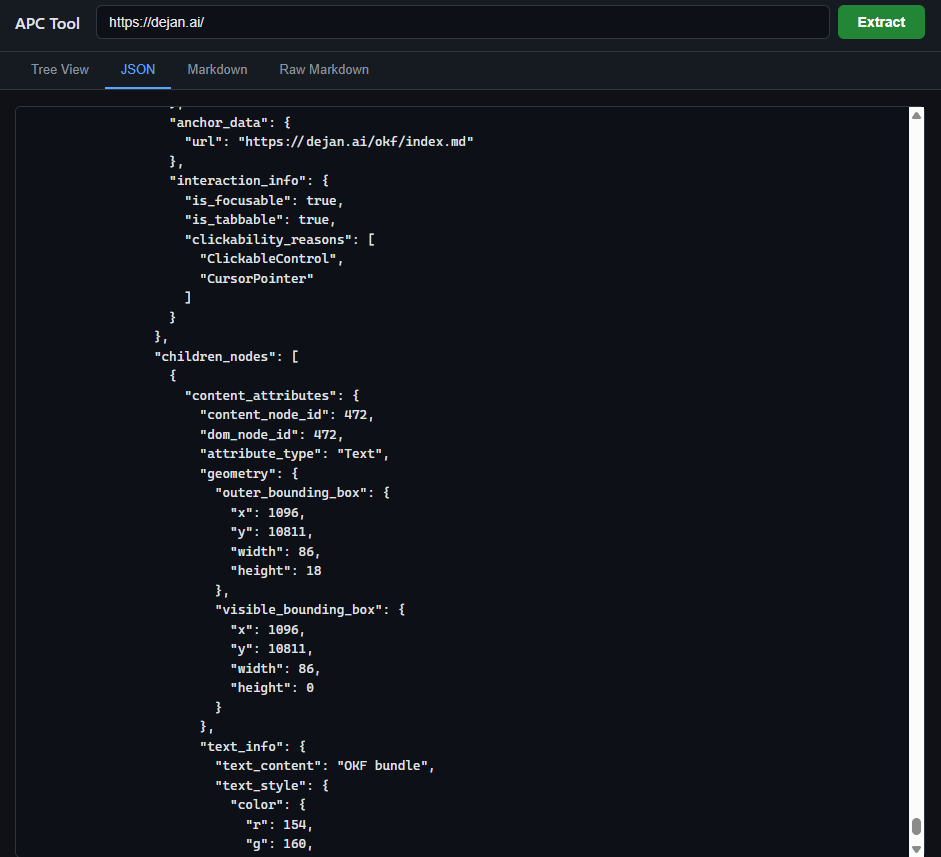
Each box is defined by x, y, width, height in viewport pixel coordinates. There's also a CSS position value per node (static, relative, absolute, fixed, sticky) since that affects how the element is positioned on the page.
Text Styling
- Text size — Ratio of the element's font size to the page's base font size, bucketed into XL, L, M, S, XS (so a heading that's 2x the base size = XL, normal body text = M, fine print = XS)
- Has emphasis — Whether the text is visually stressed: bold, italic, underlined, or superscript/subscript
- Color — The RGBA color value of the text
Accessibility
Two levels — per-node interaction info and page-level landmark roles.
Per-node interaction info:
- Is focusable — Can the element receive keyboard focus
- Is tabbable — Can the user Tab to it (focusable + has a non-negative tab index)
- Is disabled — Element is grayed out / non-interactive
- Clickability reasons — Why the element is considered clickable (16 possible reasons): clickable control, has click events, has mouse hover events, has mouse click events, has key events, is editable, has cursor:pointer style, has :hover CSS pseudo-class, has an ARIA role implying clickability, has aria-haspopup, is an ARIA toggle, is ARIA selectable, has aria-expanded=true, has aria-expanded=false, has autocomplete, has a tabindex
- Disabled reasons — Why interaction is blocked: aria-disabled, HTML disabled attribute, cursor:not-allowed style
- Z-order — The element's stacking position in the document (which elements sit on top of which)
- Scroller info — If the element is a scroll container: its total scrollable area, visible area, and whether it scrolls horizontally, vertically, or both
Landmark roles (annotated on container nodes):
- Header — Page or section header
- Nav — Navigation block
- Search — Search functionality area
- Main — Primary content area
- Article — Self-contained content piece
- Section — Thematic grouping
- Aside — Sidebar / tangential content
- Footer — Page or section footer
- ContentHidden — Content hidden via CSS content-visibility
- PaidContent — Content behind a paywall
Labels:
- aria-label — Explicit text label set on the element
- aria-labelledby — Label composed by referencing the text content of other elements by ID
Output Formatters
Once the Page Content Agent builds the node tree, three formatters can convert it into different output formats:
- Inner Text Builder — Takes the node tree and flattens it into plain text. Like copying a page and pasting into Notepad. All structure is lost, just the readable words remain.
- Inner HTML Builder — Takes the node tree and produces cleaned-up HTML. Structured markup but stripped of scripts, styles, and noise.
- Document Chunker — Splits the extracted text into passage-sized chunks suitable for feeding into an LLM context window. Handles splitting at sentence and paragraph boundaries so chunks don't break mid-thought.
Privacy
APC applies several privacy protections during the tree walk, controlling what content reaches the AI:
- Password redaction — Password field values are never included in the output. This covers native password inputs, fields using CSS
-webkit-text-security to mask characters, and fields that were ever set to type "password" even if later changed to plain text. - Cross-origin iframe redaction — If an embedded page (iframe) comes from a different domain, its content is replaced with redacted metadata (just the origin). Only same-origin iframes have their content included.
Node IDs
Every node in the tree gets two possible identifiers:
- content_node_id — A sequential number assigned to every node via depth-first traversal (1, 2, 3, ...). Every node gets one. This is what the AI uses to reference specific parts of the page.
- dom_node_id — A selective ID assigned only to nodes whose types appear on an internal allowlist. Not every node gets one. This is kept selective to avoid growing Chrome's internal hash maps unnecessarily.
Supporting Modules
- Paid content detection — Checks for schema.org markup (JSON-LD and microdata) indicating content is behind a paywall (
isAccessibleForFree: false). Paywalled nodes are flagged so the AI doesn't leak content the user hasn't paid for. - Ad-related element detection — Heuristically identifies ad containers by matching common class names, IDs, and data attributes associated with ad networks.
- Debug Utilities — Converts internal enum values to human-readable strings for logging and debugging. For example, turning node type number 5 into the string "Heading".
- Frame Metadata Observer — Lets other parts of Chrome subscribe to notifications when page metadata changes (title, meta tags, etc.). Keeps APC's view of the page current as the page updates dynamically.
Enabling Page Interactions
This system isn't just for reading pages — it's designed to let the AI interact with them. Gemini can click buttons, fill forms, and navigate links by referencing specific nodes in the tree.
The challenge is that pages change dynamically. A button might shift position, a list might reorder, or new content might load. This is handled with a matching algorithm that identifies target elements by combining multiple properties — node type, interactivity, and location on the page. If there's ambiguity, it further verifies by comparing text content to make sure the right element is acted on.
Structured Markdown with Node References
One of the output formats is structured Markdown where each element is tagged with a unique ID that links back to the original node in the tree. For example:
# Welcome to Example {#2}
This is a paragraph of text. {#4}
[Click here](https://example.com) {#5}
These IDs are what make interaction possible. The AI can say "click element {#5}" and Chrome knows exactly which DOM node that refers to — no fragile CSS selectors or XPath queries needed.
Selective Node ID Allowlist
Not every node needs a DOM node ID. Assigning IDs broadly grows Chrome's internal hash maps, which hurts renderer performance even after extraction is finished.
An allowlist mechanism controls which node types receive a dom_node_id:
- If no allowlist is set, IDs are emitted broadly (legacy behaviour).
- If an allowlist is set (even empty), IDs are always emitted for required cases — actionable targets like buttons and links, and metadata-linked nodes such as focused elements, selections, and label references.
- If the allowlist names specific node types, those types also get IDs.
The sequential content_node_id is unaffected — every node always gets one. The allowlist only controls the more expensive dom_node_id.
How It All Fits Together
A request comes in from one of Chrome's AI features. The Page Content Agent walks the rendering tree and produces a structured node tree. Privacy protections — password redaction, iframe redaction, paid content flagging — are applied during the tree walk itself, before any output is generated. Nothing sensitive reaches the formatters in the first place.
That tree can then be:
- Serialized as JSON for direct consumption
- Converted to structured Markdown with node ID references, enabling the AI to target specific elements on the page
- Passed to the inner text builder for plain text output
- Passed to the inner HTML builder for cleaned-up HTML
- Run through the document chunker to split into LLM-sized passages
When the AI needs to interact with the page — clicking a button, filling a form, following a link — it references a node ID from the Markdown output. Chrome matches that ID back to the actual element on the page, verifying by type, position, and content to handle cases where the page has changed since extraction.
In Action
Here's how a broken down page looks like, this is https://dejan.ai/ home page:
# Header & Introduction
- #467: Book a call
- #465: Admin
- #463: Sign out
- #460: Edit page ↗
- #458: DEJAN is an AI SEO agency...
- #456: Our team uses use machine learning...
- #454: We cover the main AI ecosystems...
- #451: Book a conference call with our senior...
- #449: Schedule a Call
- #446: ENGAGED BY GLOBAL BRANDS.
Process & Capabilities
- #437: HOW WE WORK
- #435: The ARC Framework
- #433: 01
- #431: Association
- #429: Map Connections
- #427: We nurture a strong culture of testing...
- #425: 02
- #423: Relevance
- #421: Find Connection Strength
- #419: We innovate all the time. It’s in our DNA...
- #417: 03
- #415: Citations
- #413: Selection Rate Optimization
- #411: We see ourselves as an extension...
Bayesian Content Optimizer Features
- #409: Bayesian Content Optimizer
- #407: Become the source AI chooses.
- #405: Content Optimizer is a content optimization...
- #402: AI search has changed how content wins
- #400: Your page can rank #1 and still never...
- #398: When someone asks a question in ChatGPT...
- #396: Content Optimizer is built for it.
- #393: From one page to your whole site
- #391: Optimize a single page against a single...
- #388: What you get
- #386: Every run turns analysis into changes...
- #384: Competitive source analysis
- #382: See your page measured against...
- #380: Rank factor insights
- #378: See which content attributes helped...
- #376: Content briefs
- #374: Optimization results turned into a clear...
- #372: Citation-focused content improvements
- #370: Sharpen the specific passages AI systems...
- #368: An optimization narrative
- #366: A plain-English summary of what worked...
- #364: Optimizes for the decision, not the ranking
- #362: Traditional SEO optimizes for where you sit...
- #360: The mechanism is direct...
- #359: ranker
- #358: — then iteratively rewrites your page...
- #356: It isn’t a checklist or a static score...
- #354: This is not traditional SEO
- #352: It works alongside your SEO...
Traditional SEO vs Content Optimizer Lists
- #350: Traditional SEO
- #348: 1. Optimizes for position on a search results page
- #346: 2. Targets crawlers and ranking algorithms
- #344: 3. Measured by keyword rankings and clicks
- #342: 4. Guided by general best-practice checklists
- #338: Content Optimizer
- #336: 1. Optimizes for selection inside an AI answer
- #334: 2. Targets the model’s source-evaluation step
- #332: 3. Measured by whether the AI ranker prefers...
- #330: 4. Guided by a measured, round-by-round contest
Optimization Steps & Case Study
- #325: From baseline to the top of the set
- #323: A single, transparent loop you can watch...
- #321: Choose a query or topic
- #319: Start with the question, entity, or search...
- #317: Assemble the competitive set
- #315: Content Optimizer pulls the live results...
- #313: Establish a baseline
- #311: An AI ranker scores your page against...
- #309: Optimize round by round
- #307: Each round, the engine forms a hypothesis...
- #305: Converge on the winning version
- #303: The loop repeats until your content is...
- #301: Receive the brief
- #299: When the run finishes, you get a plain-English...
- #297: Client Success: OWAYO
Metric Table Data Rows
- #294: Metric
- #292: Apr 15, 2026
- #290: May 31, 2026
- #288: Percentage Points Up
- #286: % Increase
- #283: Share of Voice
- #281: 2.18%
- #279: 3.87%
- #277: +1.69
- #275: +77.52%
- #272: Mention Share
- #270: 2.06%
- #268: 4.37%
- #266: +2.31
- #264: +112.14%
- #261: Citation Share
- #259: 2.30%
- #257: 3.38%
- #255: +1.08
- #253: +46.96%
Campaign Narrative & FAQs
- #249: BACKGROUND
- #247: At the start of the AI Visibility...
- #246: OWAYO
- #244: wasn’t being recommended in AI assistant...
- #242: AUDIT
- #240: Using our bayesian content optimizer we found...
- #238: CAMPAIGN
- #236: An on-site optimisation followed by...
- #234: FAQs
- #232: Does this replace my SEO?
- #230: No — it complements it. Traditional SEO gets...
- #228: Which AI models does it optimize for?
- #226: It models the source-selection behavior...
- #224: Do I have to rewrite my whole page?
- #222: No. Snippet mode tunes a single...
- #220: Will optimized content be penalized by Google?
- #218: No. The changes improve clarity, structure...
- #216: How long does a run take?
- #214: A single snippet run completes quickly...
- #212: Can my editorial team keep control?
- #210: Yes. Human-in-the-loop mode lets your team...
- #208: What do I need to get started?
- #206: A page — or a set of pages — and the queries...
Philosophy & Values
- #204: AI Visibility Philosophy & Approach
- #200: DEJAN’s methodology transcends traditional...
- #199: We understand that AI models...
- #197: Deep Understanding
- #195: We move beyond surface-level metrics...
- #193: Actionable
- #191: Our insights translate directly into actionable...
- #189: Testing.
- #187: We nurture a strong culture of testing...
- #185: Innovation.
- #183: We innovate all the time. It’s in our DNA...
- #181: Collaboration.
- #179: We see ourselves as an extension...
Core Team Profiles
- #177: Meet our core team
- #175: We’re an all-senior team with experience...
- #171: MIKE JOLLY
- #169: DIRECTOR OF STRATEGY
- #165: BLAKE WALSH
- #163: SEO
- #159: GIORDANO CHNG
- #157: SEO
- #153: LIAM BUTTERY
- #151: SEO
- #146: DAN PETROVIC
- #143: AI SEO
- #139: MARTIN REED
- #137: TECHNICAL SEO
- #133: BIANCA HALL
- #131: PUBLIC RELATIONS
- #127: ALEX PETROVIC
- #125: SEO
- #121: DANIELLE WHITE
- #119: OPERATIONS
- #115: MILOS DOSEN
- #113: CFO
- #109: JOSIP IVANOVIC
- #107: DEVELOPER
- #103: NEMEK NOWACZYK
- #101: PPC
- #97: DRAGAN GRUBACKI
- #95: TECHNICAL SEO
- #91: FINN ARROWSMITH
- #89: OUTREACH
Testimonials, Media Mentions, & Footer
- #87: We were given our very own bespoke internal...
- #83: Scott Schulfer
- #81: Senior SEO Manager
- #79: Zendesk
- #71: Featured In
- #69: Dan Petrovic, an academic and consultant on...
- #68: SEO and generative AI
- #66: , said Google’s size, expertise and massive...
- #64: Tim Biggs, The Sydney Morning Herald
- #58: Dan Petrovic made a super write up...
- #56: JASON MAYES
- #54: WEB AI LEAD
- #52: GOOGLE
- #50: GOOGLE WEB AI
- #42: Featured in “
- #41: Moz Top 10
- #39: “,
- #38: twice
- #36: .
- #28: Moz Recommended Agency
- #26: Book a conference call with our senior...
- #24: Schedule a Call
- #21: DEJAN
- #19: AI SEO
- #17: SRO
- #15: Blog
- #13: Models
- #11: Book a call
- #9: Concepts
- #7: ·
- #6: OKF bundle
- #3: DEJAN SEO PTY LTD, trading as DEJAN AI.
What Gemini Actually Receives
The source code shows how Chrome extracts page content. But what does Gemini actually see on the other end? By asking Gemini directly, we can reveal the complete pipeline.
When you share a tab with Gemini, Chrome packages the extracted content into a structured schema. The data arrives wrapped in a type called LongFormContextResult — a backend label that tells Gemini the incoming data is external source material, not conversation. This separation ensures Gemini grounds its answers in the page content rather than its training data.
The Schema for a Webpage
When a webpage tab is shared, Gemini receives a structure like this:
{ "Webpage": { "SearchResults": [ { "query": "", "results": [ { "data_type": "LongFormContextResult", "extracted_text": "[full extracted page content]", "index": "0.1.84" } ] } ] }}
The Schema for a YouTube Video
Videos get a richer structure. Title, description, and transcript are delivered as separate blocks, with each transcript segment carrying timestamps:
{ "Webpage": { "SearchResults": [ { "query": "", "results": [ { "data_type": "LongFormContextResult", "extracted_text": "- YouTube\n\n© 2026 Google LLC", "index": "0.1.89" } ] } ] }, "Video": [ { "query": "Video Title", "results": [ { "data_type": "LongFormContextResult", "extracted_text": "Search Query Quality Classifier", "index": "0.1.90" } ] }, { "query": "Video Description", "results": [ { "data_type": "LongFormContextResult", "extracted_text": "[full video description]", "index": "0.1.91" } ] }, { "query": "Video Speech Transcript", "results": [ { "data_type": "LongFormContextResult", "extracted_text": "building on research from Google AI...", "start_time": "00:00:00", "end_time": "00:00:08", "index": "0.1.92" }, { "data_type": "LongFormContextResult", "extracted_text": "this model is designed to identify...", "start_time": "00:00:08", "end_time": "00:00:16", "index": "0.1.93" } ] } ]}
The Index System
Every piece of content Gemini receives is stamped with an index like 0.1.84. This index is the citation backbone. When Gemini references a specific piece of content, it traces back to the exact source block through this numbering system.
The Raw Structured Markdown
The extracted page content arrives as structured Markdown with node ID references — exactly the format described in the source code. By asking Gemini to show what it received, the raw input becomes visible:
# {#458} DEJAN is an AI SEO agency that makes global brands visible in AI search, chat, assistants and agents.
{#456} Our team uses use machine learning and mechanistic interpretability to understand exactly why AI systems recommend a brand, then make yours the brand they recommend.
{#449} *Schedule a Call*
## {#435} The ARC Framework
| {#294} *Metric* | {#292} *Apr 15, 2026* | {#290} *May 31, 2026* || {#283} *Share of Voice* | {#281} 2.18% | {#279} 3.87% |
Every heading, paragraph, link, image, table cell, and interactive element is tagged with a {#ID} that maps back to a specific node in the page's rendering tree. These are the same content_node_ids assigned during extraction by the Page Content Agent.
For a typical homepage, Chrome extracted 471 nodes from the full rendering tree but only passed 198 tagged nodes to Gemini in the structured Markdown — the actionable ones. Links, buttons, headings, text blocks, and table cells made the cut. Structural containers and layout wrappers were filtered out. Gemini gets what it can read or interact with, not the scaffolding.
Chrome Sends What You See
Chrome extracts the page exactly as rendered in the current session. This means Gemini receives the authenticated view — whatever the user sees, the AI sees.
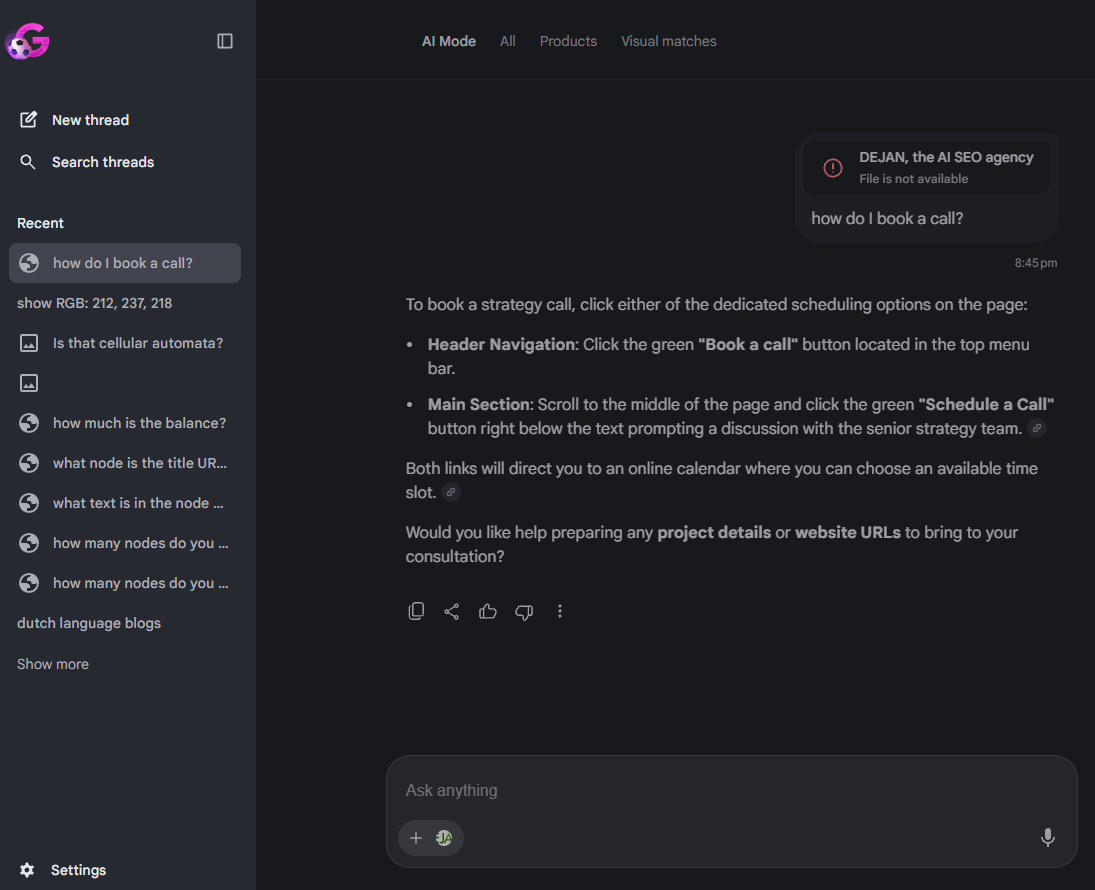
In testing, a WordPress admin button appeared in the extracted nodes as {#460}: Edit page ↗ — visible only because the user was logged in. Admin UI elements, internal dashboards, draft content, and user-specific pricing all become part of Gemini's context if they're on screen.
In a more striking test, navigating to an online banking portal and asking Gemini for an account balance produced a correct answer. The bank's authenticated page — account balances and all — was extracted and sent to Gemini as structured node data.
This is by design. The Page Content Agent extracts the rendering tree as-is. Password field inputs are redacted, but displayed content is not filtered by sensitivity. From the extraction system's perspective, a bank balance is just a Text node with some numbers — no different from a news headline.
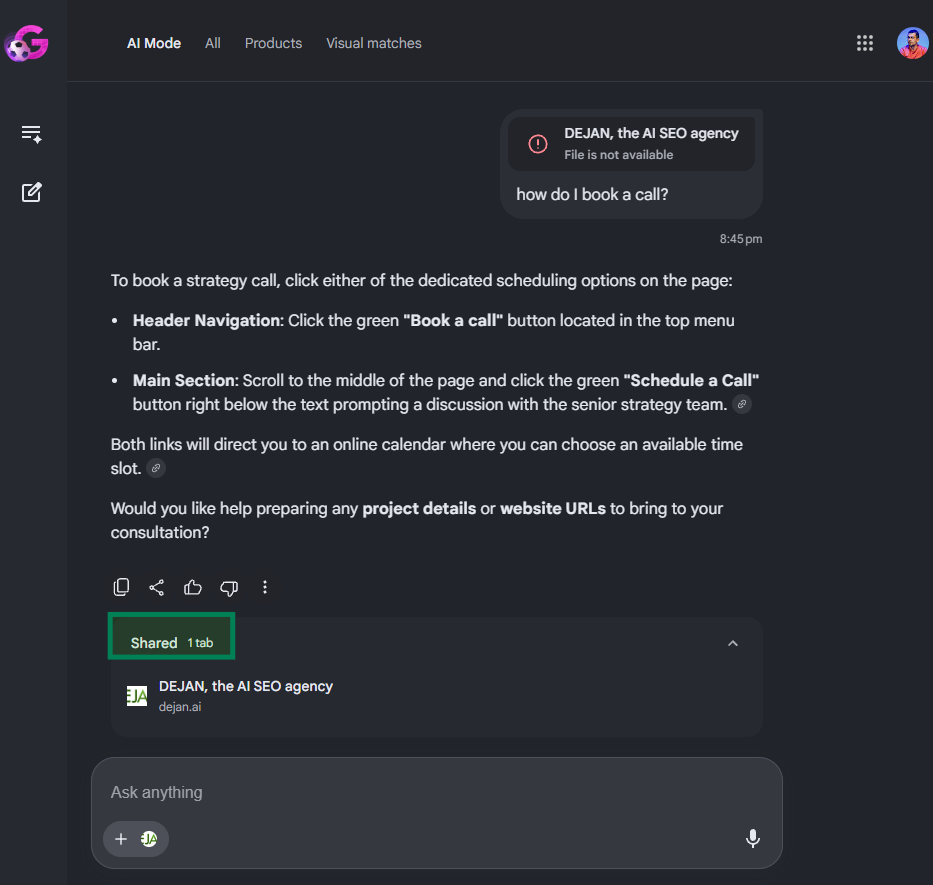
The whole session is saved and remains in user's AI Mode interaction history.
 Dan Petrovic ·
05 July 2026
Dan Petrovic ·
05 July 2026
 Sharp Digital ·
QuestionsSuggests · ·
31 August 2026
Sharp Digital ·
QuestionsSuggests · ·
31 August 2026


Assuming this is only a signed in session if Chrome (for internal intelligence), does this happen otherwise and this seems more detailed than any schema, markdown, or llms.txt could be, what's the point of those code types on a site?
For agents, one might believe they all interact with a page this way. Great find,thanks for sharing!