
Guerilla SEO: BitTorrent
The content of this article goes a bit like this: Download BitTorrent -> Something, Something -> Profits! There's also a picture of a cute cat in it.


Guerrilla marketing is an advertising strategy in which low-cost unconventional means (graffiti, sticker bombing, flash mobs) are utilized, often in a localized fashion or large network of individual cells, to convey or promote a product or an idea. Wikipedia
TL;DR
- Download BitTorrent
- Something, Something.
- Profits!
Part I: Download BitTorrent
Marketing professionals and SEOs, tend to hop on their rails and churn tasks on autopilot. Although this saves time and energy, it also makes you grey. You want to be purple. I promised myself to be more creative and innovative in 2013 and have finally decided to try out one of my “todo list” ideas from a few years back.
BitTorrent Protocol
Common association with BitTorrent is pirated movies, but I’ve always seen it as an interesting protocol. In 2011 I proposed an archiving model where BitTorrent is used in combination with PageRank algorithm to create cloud-like redundancy and determine archiving priority in large collections of documents in a distributed computing environment. Speaking of which, you can download the article I’m talking about on torrent and as a PDF.
I also see BitTorrent as an underutilised content distribution channel with great potential for viral and educational content.
Getting Started
To get started download and install a popular torrent client such as µTorrent. If you’re not entirely familiar with the protocol here’s a handy video for you and promise your next step is not downloading pirated movies.
Part II: Something, Something.
Creating a Torrent File
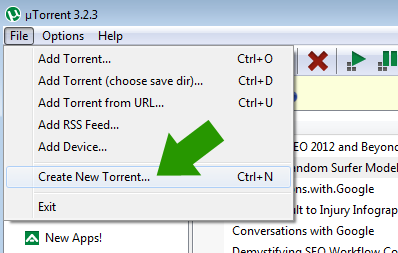
Load µTorrent, click “File” and then “Create New Torrent…”.
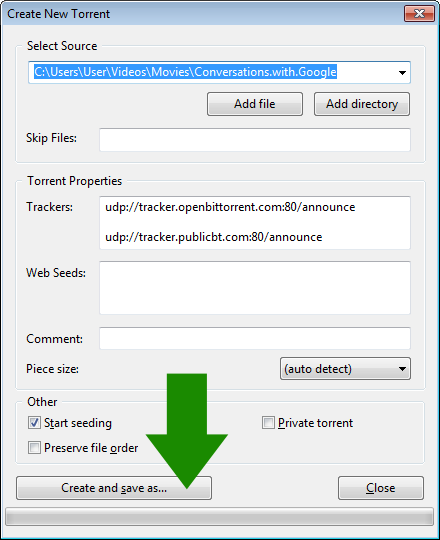
A new window will open, browse and select the file you wish to distribute and hit “Create and save as…” button. Ensure that you have “Start seeding” ticked. If you have the file available via http already you can add it as a web seed too, just drop the full URL of the file in the “Web Seeds” field:
A torrent file will be saved and also added to your µTorrent list. You’re now the only person seeding the file and others can leech from you. You can also upload the torrent file up on the web and promote it, those with a BitTorrent client will be able to download it and in the future you’re likely to see the number of downloads (seeds, peers..etc) grow.
This, however, could take time.
What you need to do is tell the world that your torrent file exists and get it out there. One way of doing that is to visit all the BitTorrent websites out there and submit your content to each…or… find a significant torrent hub and apply as a content producer.
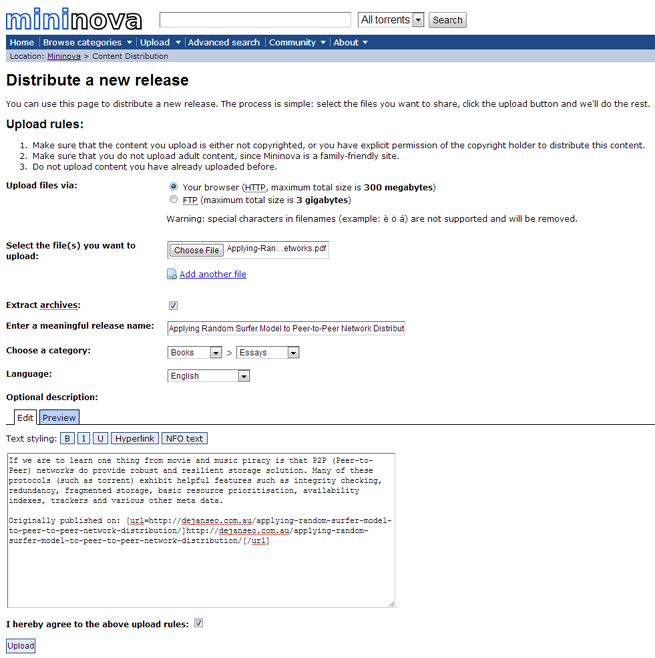
Fly my lovelies, fly….!
Once you’ve set up all your torrents and are seeding them, you can sit back and watch them distribute across the P2P universe.
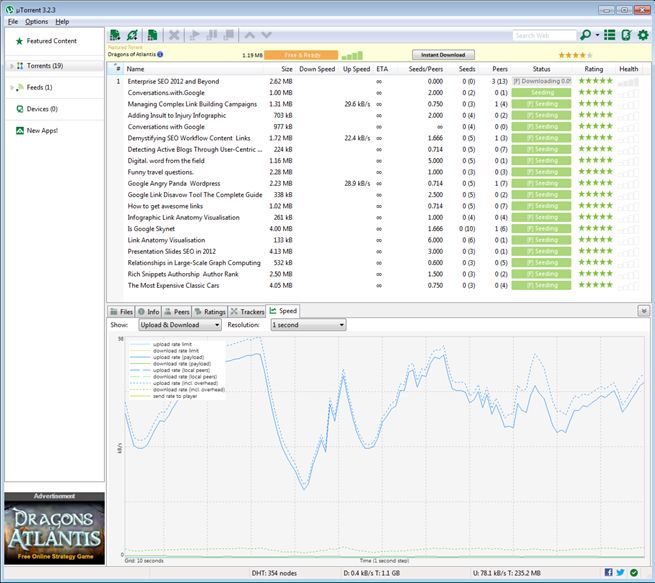
It’s a satisfying feeling to see it take off after all that fiddling and set-up.
Part III: Profits!
Well, I don’t know about profits, but I think if your content gets exposed to 2000+ people within a few hours for free is pretty cool. Especially if you remembered to include your link in that PDF file that will be uploaded and re-uploaded everywhere now. Yeah, links in all your PDFs – there’s a pro tip for you.
Statistics
So let’s look at the first few hours of me uploading a bunch of my PDF documents.
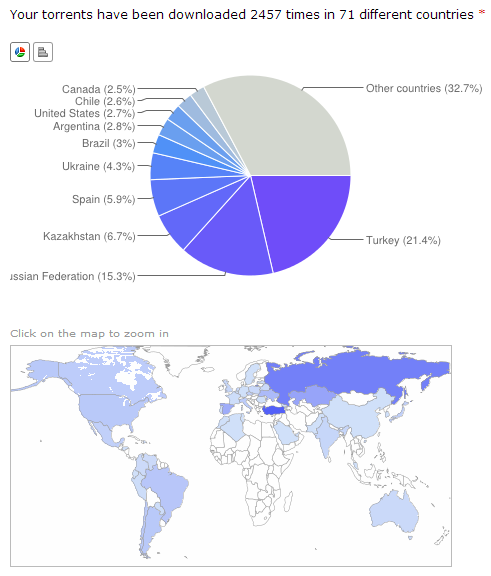
I love that it is exposing your content to a completely new audience that would otherwise have never seen your work before. Alistair Lattimore
All right! 2457 8,340 downloads from… Turkey… and…. Russia and… Kazakhstan… hmmm….
It looks like demographic targeting in the P2P environment (or any control for that matter) is zero, but it’s a first day, first few hours in fact. Time for me to walk away and go plot another guerrilla marketing scheme. I will revisit the torrent statistics in a week or so to see how my content has been distributed. I’m already getting Google Alerts for “Dejan SEO” on various torrent websites.
Let’s hope Google doesn’t get a wrong idea…
30 Days After
I just logged into my torrent distribution dashboard and this is what I’m seeing:
“Your torrents have been downloaded 262,219 times in 180 different countries.”
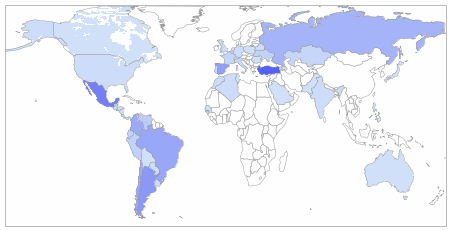
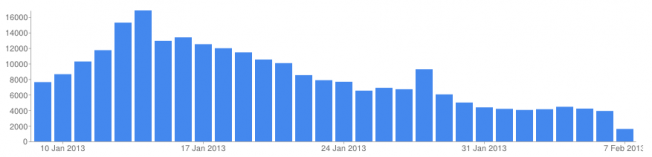
The peak day was at just over 16,000 and the lowest at around 4,000 downloads:
Impact on link profile: Thousands of links, mainly nofollow.
Impact on rankings: Insignificant.
Impact on referral/direct traffic: None.
Increase in customer enquiries: None.
Impact on branded searches: None.
So far it seems that the impressive distribution of over 1/4 million downloads hasn’t really hit any useful marketing objectives other than securing document availability through redundancy. I’ll continue to monitor the potential impact on a monthly basis but at this stage don’t have any high expectations from this distribution method.
Comments
Sign in with Google to comment and annotate this content.