Help Me Write is Google Chrome's AI-powered assistant that generates context-aware text suggestions for short-form content like emails, posts, and forms.
Introduction
“Help Me Write” is Google Chrome’s AI-powered writing assistant designed to help users create short-form content directly within their web browser. Launched with Chrome version 121, this feature leverages artificial intelligence to generate text suggestions based on user prompts and the context of the webpage you’re viewing.
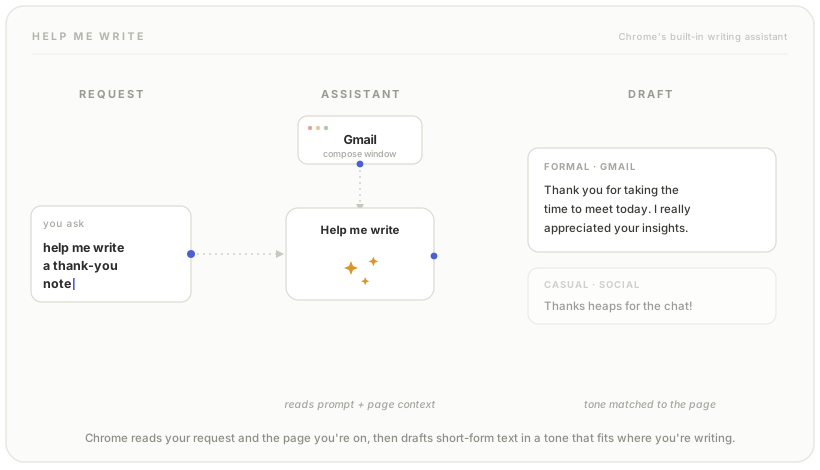
How Does Help Me Write Work?
The feature operates as an intelligent writing companion that understands both your input and the surrounding web page content. When activated, it:
- Analyzes your prompt: Takes your writing request or starting text as input
- Considers page context: Examines the content of the current webpage to provide relevant suggestions
- Generates suggestions: Creates contextually appropriate text for forms, comments, emails, and other short-form writing tasks
- Adapts to your needs: Offers suggestions that match the tone and style appropriate for the platform you’re using
Key Features and Capabilities
Context-Aware Suggestions
Unlike generic AI writing tools, Help Me Write understands the specific webpage you’re on. Writing a professional email in Gmail? It’ll adopt a formal tone. Commenting on social media? It can match a more casual style.
Short-Form Content Focus
The feature is optimized for everyday writing tasks such as:
- Email compositions and replies
- Social media posts and comments
- Form responses
- Product reviews
- Brief messages and notes
- Quick professional communications
Seamless Browser Integration
Help Me Write is built directly into Chrome, meaning you don’t need to switch between tabs or applications. It appears right where you need it, when you need it.
Privacy and Data Settings
Google offers three distinct privacy settings for Help Me Write, allowing users and organizations to control how their data is used:
1. Standard Mode (Default for Personal Users)
- The feature is fully enabled
- Google may use your prompts, inputs, outputs, and feedback to improve its AI models
- Data may be reviewed by humans for quality improvement
- Provides the most refined AI experience through continuous learning
2. Privacy-Enhanced Mode (Default for Enterprise and Education)
- Full feature functionality remains available
- Your content (prompts, inputs, outputs, feedback) is NOT used for model improvement
- Ideal for sensitive business or educational environments
- Default setting for Google Workspace and Google Admin console managed accounts
3. Disabled Mode
- The feature is completely turned off
- No AI assistance is provided
- No data is collected or processed
How to Access and Use Help Me Write
While the specific activation method may vary depending on the website and text field, typical ways to access the feature include:
- Right-click in text fields: Look for the “Help me write” option in the context menu
- Keyboard shortcuts: Use designated shortcuts when available
- Browser suggestions: Chrome may proactively offer the feature in compatible text areas
Benefits for Different Users
For Personal Users
- Save time on routine writing tasks
- Overcome writer’s block
- Improve writing clarity and structure
- Get inspiration for creative content
For Business Professionals
- Draft professional emails quickly
- Maintain consistent communication tone
- Create polished responses to inquiries
- Generate initial drafts for review
For Students and Educators
- Assistance with proper formatting
- Help structuring thoughts coherently
- Support for various writing styles
- Privacy-protected mode for academic integrity
System Requirements
- Browser Version: Chrome 121 or later
- Operating Systems: Available on desktop Chrome and Chrome OS
- Account Types: Works with personal, business, and educational Google accounts
Important Considerations
Data Processing
When using the standard mode, be aware that your writing and prompts may be used to improve Google’s AI models. For sensitive information, consider using the privacy-enhanced mode or disabling the feature entirely.
Appropriate Use
Help Me Write is designed for short-form content. For longer documents, essays, or complex technical writing, dedicated word processors or specialized AI tools may be more suitable.
Review and Edit
Always review AI-generated content before submitting. The feature provides suggestions, but human judgment is essential for accuracy, tone, and appropriateness.
Managing Help Me Write Settings
Organizations can configure Help Me Write through:
- Google Admin Console for enterprise users
- Google Workspace settings for education accounts
- Chrome browser settings for individual users
- GenAiDefaultSettings policy for broader AI feature management
 Dan Petrovic ·
27 August 2025
Dan Petrovic ·
27 August 2025


Helo Dejan! Just throwing it out there…. I’m guessing you have, but have you tried Built-in AI APIs?
https://developer.chrome.com/docs/ai/built-in-apis#api_status