 Dan Petrovic ·
27 July 2026
Dan Petrovic ·
27 July 2026
Show 100 people a photo of your product and ask what they would type into Google. A survey on Zoysia Tenuifolia grass returned 68 terms: 24 already on the top-ranking page and 44 it had never used.
Marketers are well aware of pros and cons of so called “long tail” queries usually implying, longer, more complex search terms. Google representatives have stated that around 15% of daily queries have never been asked before. That’s roughly 500 million new things!
“Every single day 15 per cent of the questions people ask of Google are questions we’ve never seen before,” John Wiley, Google

In addition to completely new search terms there are queries that may at first appear unusual or unrelated to our content. It’s what people search for when they’re unfamiliar with a subject, product, service or a brand. These “new tail” queries represent an enormous opportunity.
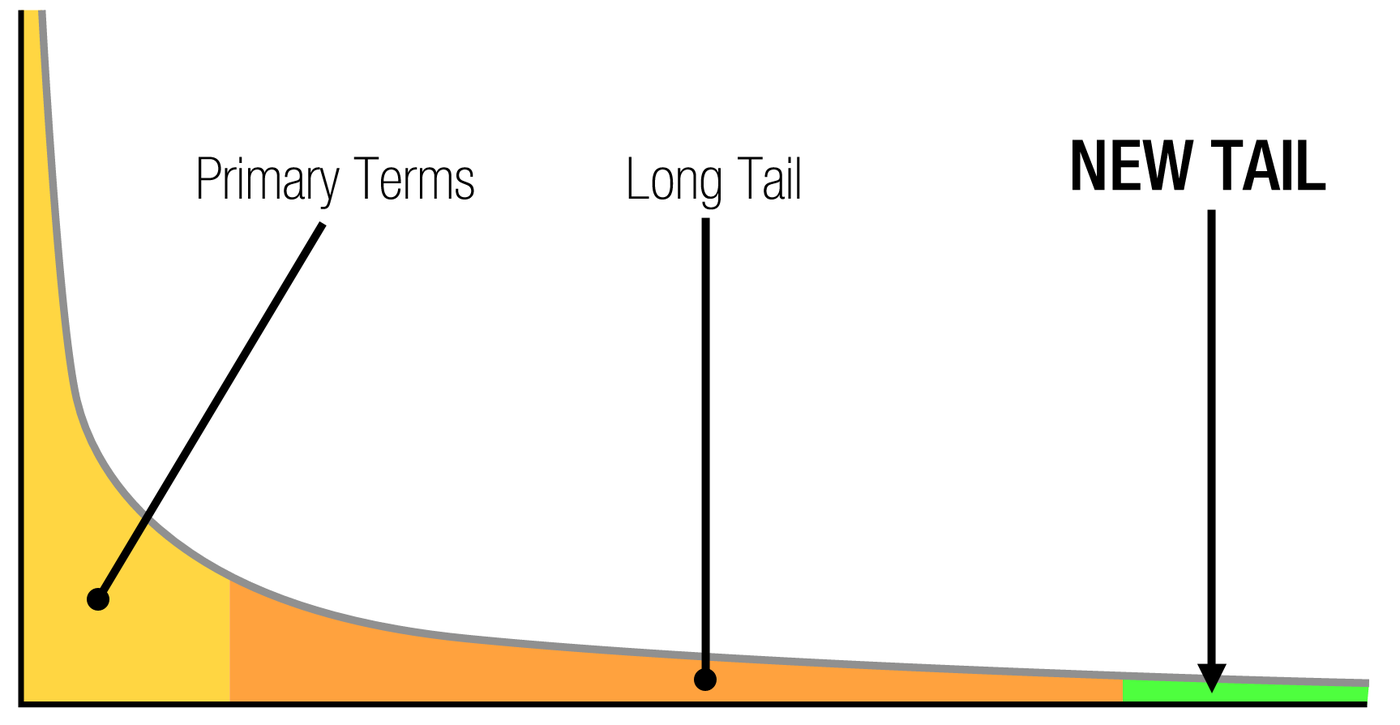
No, they’re not even longer than long tail search terms. In fact they could be quite short. One thing that characterises them is that they almost always belong to the initial stage of someone’s research. For example, Zoysia Tenuifolia is my favourite type of grass.
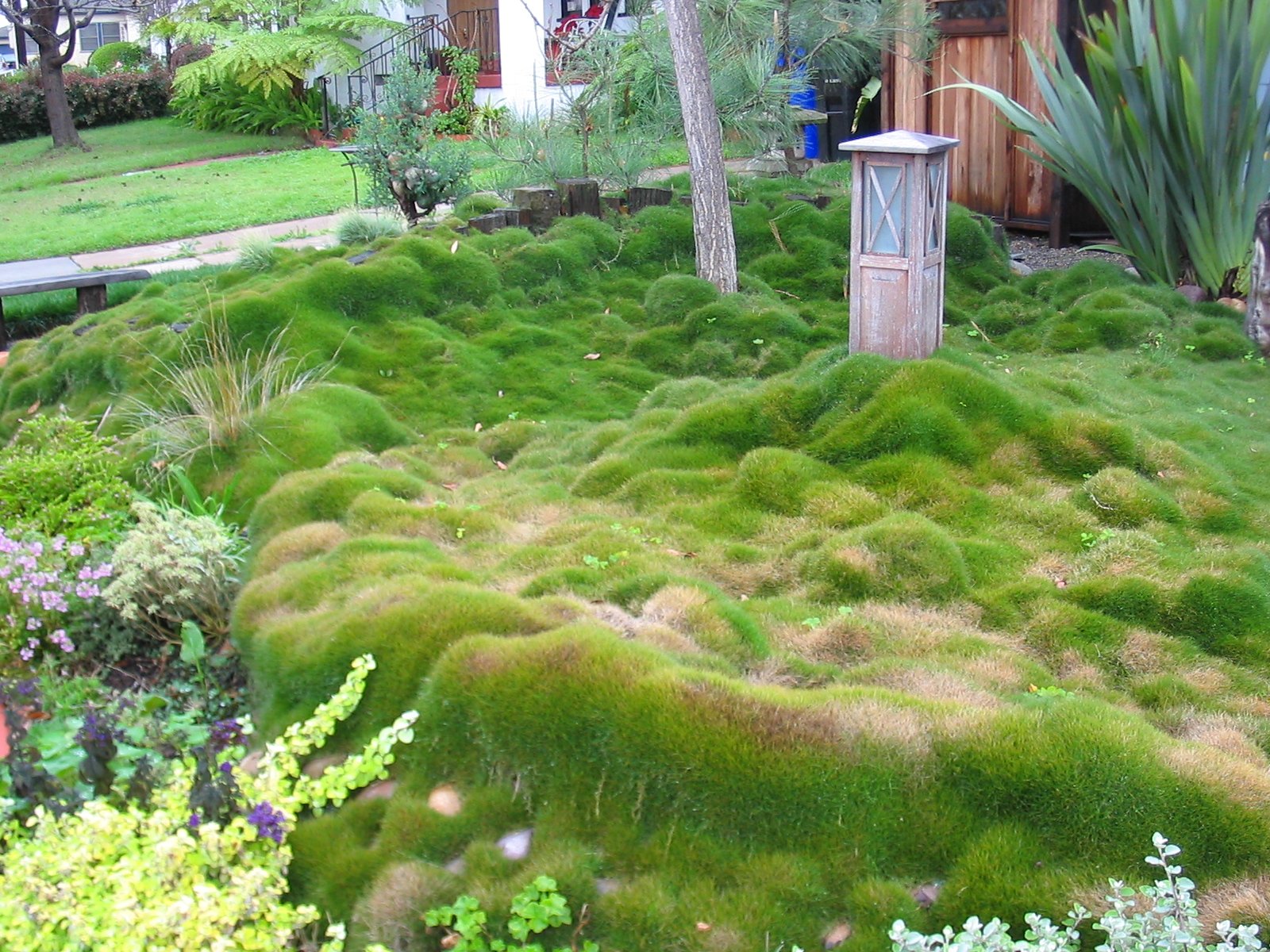
I’ve seen it a couple of times around Brisbane but didn’t know its name, resulting in series of new tail queries including:
I’ve used terms which include location, application, properties and even analogy. None of the websites that sell this grass actually mention any of the above terms but there are perhaps many people looking for it in a similar way. A missed opportunity!
Another example is when people seek solutions to their problems instead of describing products. This is often the case with new or little known products that are only just attempting to become a household name.
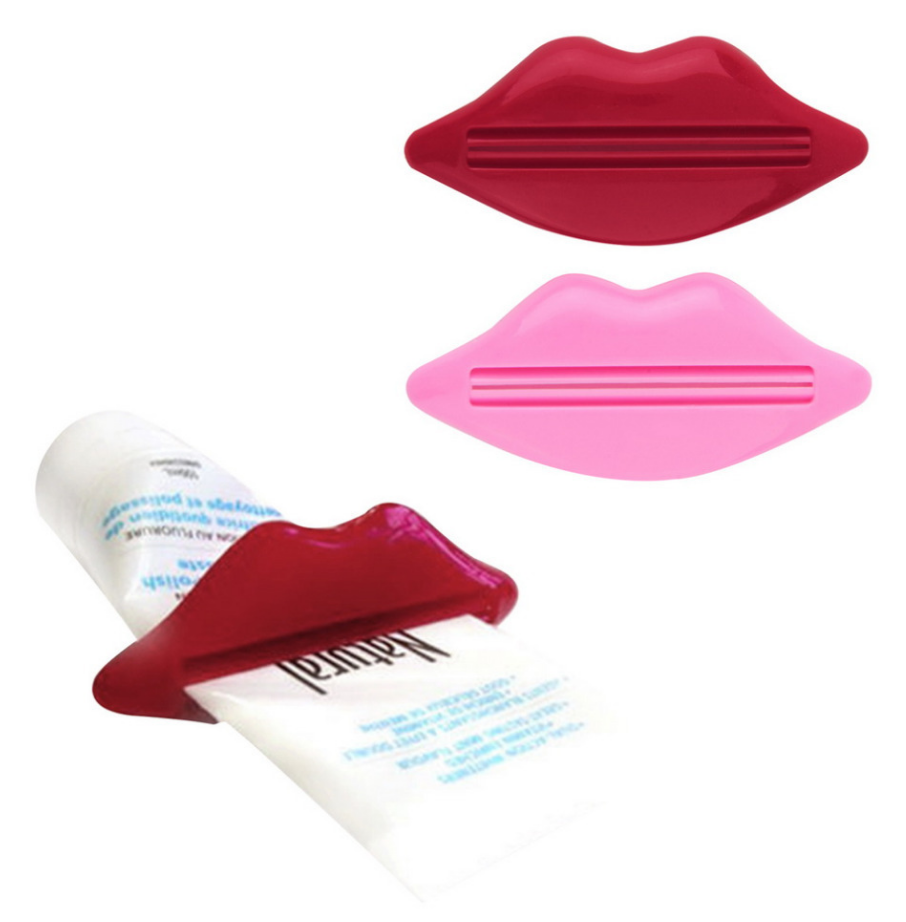
What do you call this?
The best way to discover new tail keywords is to simply ask a lot of people what they would search for if they were looking for your product or service. Show them a product and ask them to find it in Google. I use Google Surveys for this but other platforms such as Survey Monkey will do just fine.
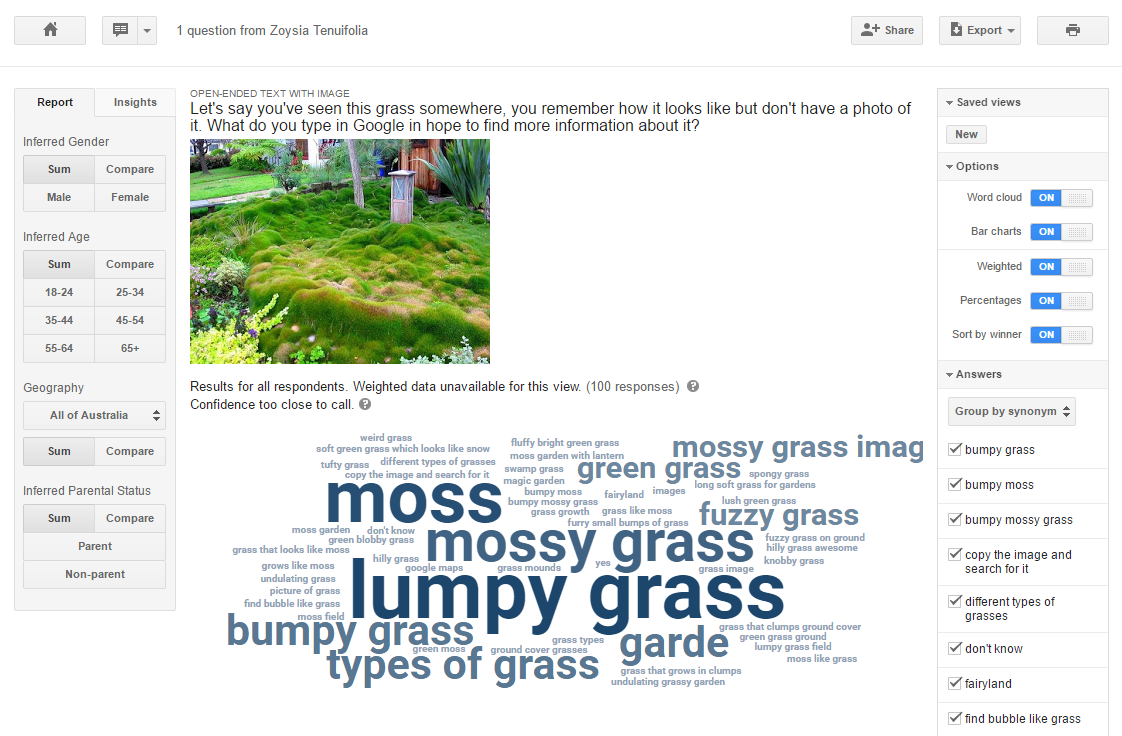
For around $10 you can survey 100 people, resulting in numerous new descriptions for the product (gras in this case) including terms like: lumpy, mossy, fuzzy, bumpy, mounds, undulating, furry, bubble, clumpy, blobby, hilly, lush, magic, fairyland, knobby, soft, spongy, swamp, tufty and weird. Ensure you’re using “image + open-ended” mode where respondents are required to type in their answer instead of selecting pre-set answers.
Content analysis of the top result in Google for this type of grass showed only 35% match with the survey data. A total of 24 keywords matched both the page and survey results with 44 missed keyword opportunities.
The analysed page heavily focused on “No Mow” element of this grass, which is an example of an internal information bubble. The site owner perhaps believes that their customers care mainly about the fact that this grass does not require mowing. Our data shows that there exist a whole new range of keywords this business hasn’t considered.
| Terms | Match | Missed |
|---|---|---|
| 68 | 24 | 44 |
Matching keywords in the highest ranking document are of rather general nature and don’t appear to be useful in early stage research and concept discovery.
| Keyword | Occurrences | % |
|---|---|---|
| grass | 71 | 32.27 |
| green | 8 | 3.64 |
| of | 6 | 2.73 |
| like | 6 | 2.73 |
| garden | 5 | 2.27 |
| grasses | 3 | 1.36 |
| image | 3 | 1.36 |
| that | 3 | 1.36 |
| ground | 3 | 1.36 |
| for | 2 | 0.91 |
| on | 1 | 0.45 |
| it | 1 | 0.45 |
| in | 1 | 0.45 |
| cover | 1 | 0.45 |
| bright | 1 | 0.45 |
| search | 1 | 0.45 |
| with | 1 | 0.45 |
| which | 1 | 0.45 |
| growth | 1 | 0.45 |
| 1 | 0.45 | |
| and | 1 | 0.45 |
| long | 1 | 0.45 |
| lawn | 1 | 0.45 |
| the | 1 | 0.45 |
Look at the table below. None of those new tail keywords were found on the highest ranking document in Google. This is an opportunity to enrich existing content, making it more descriptive and aid discovery. You will notice that not all of these keywords make sense as content additions, so I categorise them into three groups:
| Keyword | Occurrences | % |
|---|---|---|
| moss | 18 | 8.18 |
| lumpy | 12 | 5.45 |
| mossy | 7 | 3.18 |
| types | 5 | 2.27 |
| bumpy | 4 | 1.82 |
| fuzzy | 3 | 1.36 |
| undulating | 2 | 0.91 |
| images | 2 | 0.91 |
| looks | 2 | 0.91 |
| soft | 2 | 0.91 |
| clumps | 2 | 0.91 |
| hilly | 2 | 0.91 |
| fairyland | 1 | 0.45 |
| awesome | 1 | 0.45 |
| different | 1 | 0.45 |
| small | 1 | 0.45 |
| blobby | 1 | 0.45 |
| weird | 1 | 0.45 |
| snow | 1 | 0.45 |
| mounds | 1 | 0.45 |
| fluffy | 1 | 0.45 |
| furry | 1 | 0.45 |
| bumps | 1 | 0.45 |
| bubble | 1 | 0.45 |
| knobby | 1 | 0.45 |
| magic | 1 | 0.45 |
| picture | 1 | 0.45 |
| swamp | 1 | 0.45 |
| lush | 1 | 0.45 |
| spongy | 1 | 0.45 |
| tufty | 1 | 0.45 |
| groundcover | 1 | 0.45 |
Once discovered, new tail keywords are simply added to any existing content or may warrant a creation of whole new pages. As you can see from the graph below, new tail keywords break into a long tail pattern themselves:
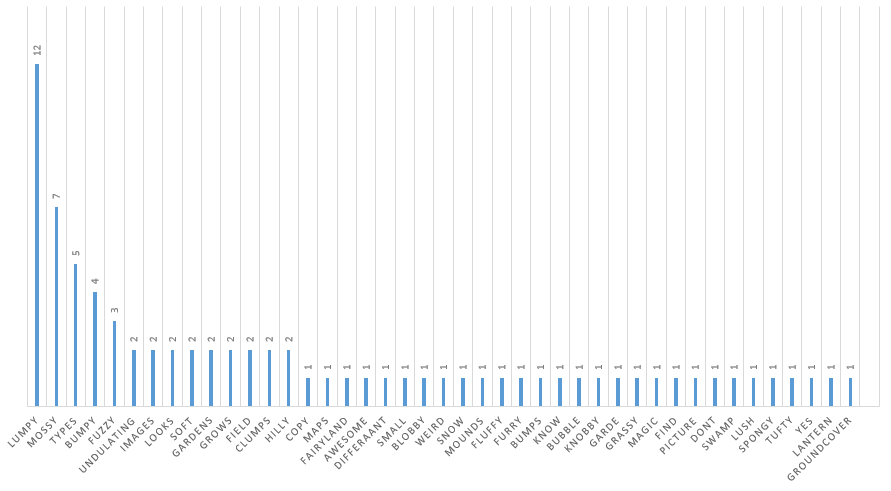
This meta-keyword-ception isn’t here to give you a headache. Its practical application is in keyword clustering and prioritisation of new themes or concepts when considering what to introduce into your content.
In order to drive new organic traffic, the grass page we analysed could add a new section which describes the visual properties of the product using natural language. Same content page, no extra authority building, more organic traffic. Combine this with optimising your alt=”attribute” to gain additional traffic in image search.
Another opportunity would involve creation of a new article which discusses the types of grass with a gallery of images. This page would be helpful to those starting their research with a broad new tail query such as “types of grass” and those who prefer to dive into image search instead.
A more advanced solution would involve running tangential keyword research by pursuing each new concept vector, extrapolating from the existing pool of keywords in a derivative manner. Since this may result in a large number of new tail search terms it would be practical to evaluate keyword importance based on metrics such as search volume, commercial value, conversion rates and keyword difficulty.
Note: As tempting as it may be, don’t stuff every possible keyword into your product pages. Contents’ ultimate purpose is lost if it’s unreadable by human beings.
Google Surveys output contains valuable demographic data which can be used to further cater content to your target audience. For example:
Managing a 100-respondent survey isn’t a big deal. You can probably use Google’s own grouping tool and creating/saving your own views. When dealing with thousands of answers I recommend exporting to CSV and working with it in a spreadsheet instead.
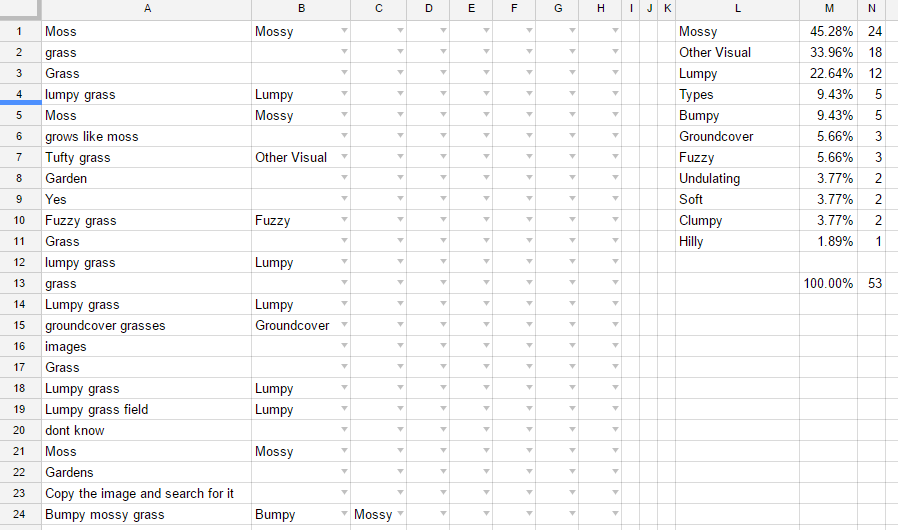
Column A is a raw list of responses. B:B through to H:H are data validation fields drawing from values listed in L:L. These are entered by a human, an easy Fiverr task. Note that a single open-ended response can in this case be assigned multiple tags (e.g. Bumpy mossy grass = “Bumpy”, “Mossy”) so it’s appropriate for the reviewer to tag a single answer by any number of categories listed in L:L.
Ignore any keywords already contained within the page copy, remember, we’re working on new tail keywords only. Things that we haven’t thought of before. In this instance terms like “grass” and “garden” are simply being ignored.
Column N fields count number of instances each term is tagged in the B:B – H:H validation fields, =COUNTIFS(B$1:H$100,L1). Column M is just a percentage of how frequently the tag has been used throughout the document.
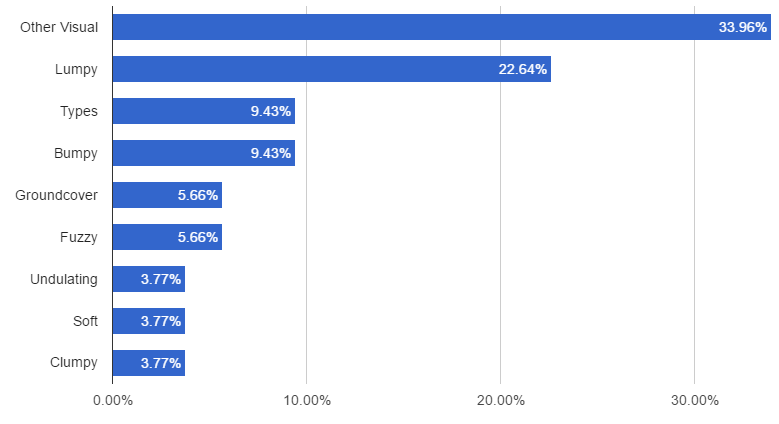
The list above is a great starting point when deciding about potential keyword introductions (e.g. “soft”), new sections (visual properties) or entire pages (types of grasses). Here’s a handy template to help you with categorisation.
Have fun!
John Mueller from Google comments on first-time queries, RankBrain, Search Console one-off keyword obscuring, Google’s understanding of unusual queries with synonyms and semantics. It starts at 1:17:52.
The survey above measures what a person types. In AI search a second author sits between the person and the query, because the assistant rewrites one prompt into several sub-queries of its own before it retrieves anything. That step is query fanout, and the sub-queries it writes never reach Search Console, so the vocabulary gap this article measures with a survey is now missing from analytics as well as from the page.
Assistants also run implicit queries, searches formed from on-device context that nobody typed. A photo, a screenshot, or a page already open in the browser can be the input. The 2016 survey question, “you’ve seen this grass somewhere, what do you type?”, is close in shape to the request people now make of a multimodal assistant, with the difference that the assistant supplies the wording.
The fix the grass page needed in 2016 is the fix it needs now. A page that describes visual properties in natural language matches more of the phrasings that reach it, from people and from models paraphrasing on their behalf. It also changes what a retrieval system can extract: a grounding snippet taken from a page that names the attributes carries those attributes into the generated answer, while a snippet from a page that only says “no mow” carries “no mow”. That is the same information bubble the 2016 content analysis found, measured at the level of the extracted passage rather than the whole document.
The crowdsourcing step now has a second population to sample. Give a model the same photo and the same question, sample it repeatedly, and the answer distribution is the model’s own vocabulary for the product. Where that distribution and the human survey disagree, the page has two vocabularies to cover.