
See who links to you, to any domain, and to your competitors but not to you
Backlinks pulls the backlink profile of your domain or any domain you name, and lists the sites that link to your competitors and not to you, so you have a link-building shortlist inside the same project as your AI visibility data.
Start at app.dejan.ai
The problem: the sites the tracked answers cite have links you cannot see from your project
Citation data tells you which domains the tracked answers cite. It does not tell you who links to those domains, who links to your competitors, or which of those sites already link to you. That data sits in a separate backlink tool, and matching the two by hand takes a spreadsheet per project.
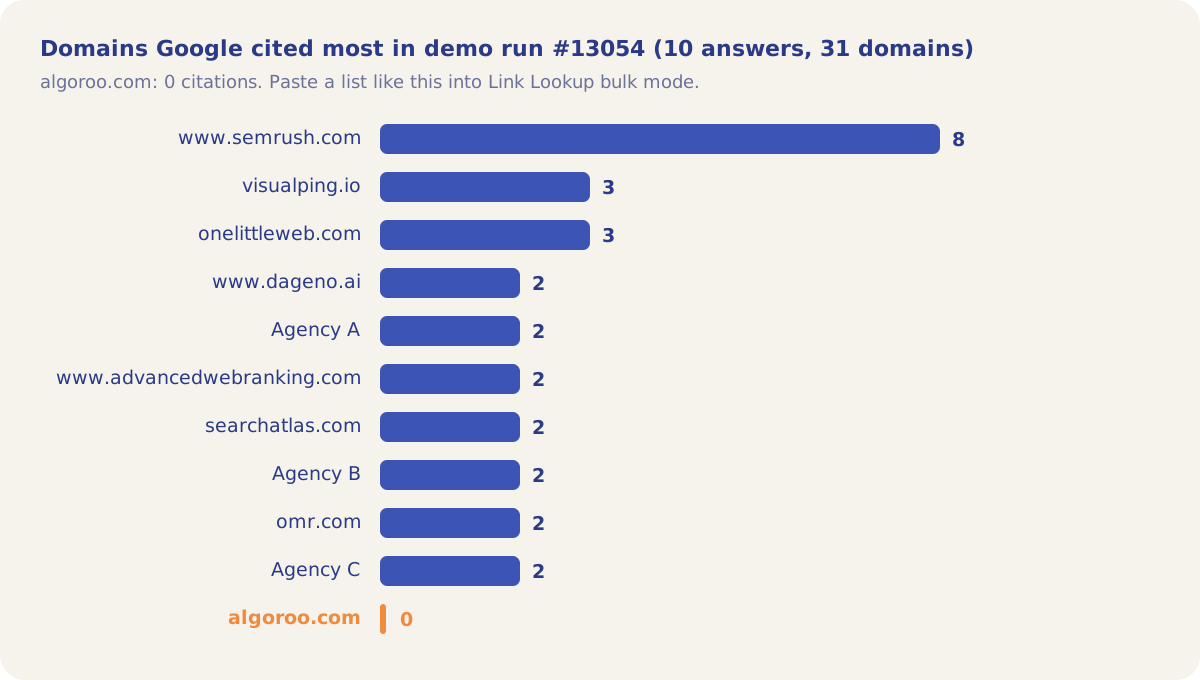
Here is an example from our public demo project. Algoroo tracks Google rank volatility. In the scheduled Citation Mining run #13054, Google cited 31 domains in 10 answers about tools that track algorithm updates. semrush.com was cited 8 times, visualping.io and onelittleweb.com 3 times each, and algoroo.com 0 times.
How Backlinks solves it
Backlinks puts backlink data from DataForSEO in the project, in three sub-tabs. Overview shows the profile of your own domain. Link Lookup shows the profile of any domain or URL, one at a time or up to 1,000 at once. Competitor Gap lists up to 100 referring domains that link to the competitors you pick and not to you.
Every result is saved with the date it was fetched. Opening the tab reads the saved result and calls nothing; a new fetch happens only when you click Fetch backlinks, Refresh, Run lookup or Find gap. Recent lookups lists past Link Lookups so you can reopen them.
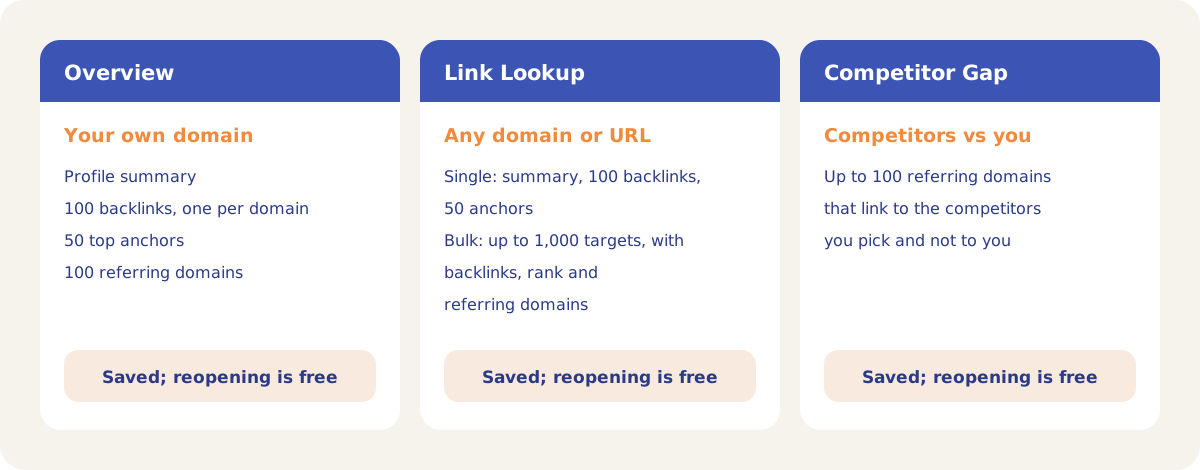
For the demo, the Competitor Gap would compare algoroo.com with the domains mapped to its competitors in Settings, and a bulk Link Lookup of the 31 cited domains would return the backlinks, rank and referring domains of each. Backlinks is available on Client [Standard] projects, and the demo project is not on that plan, so it has no saved Backlinks results to show.
How it works
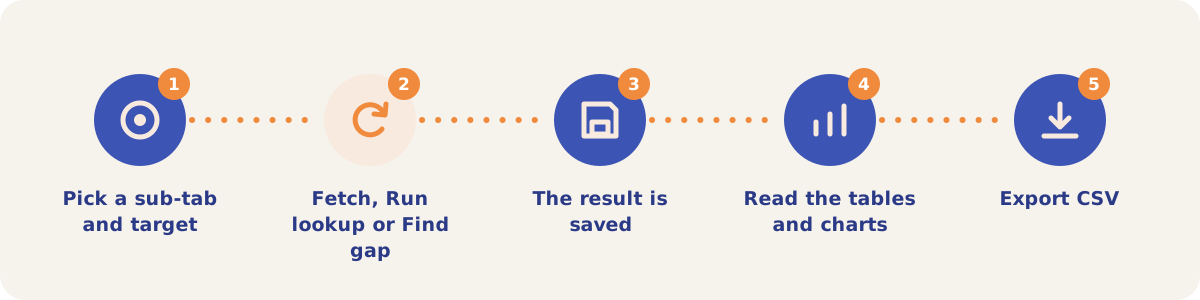
- Pick a sub-tab and target. Open Tools, then Backlinks. On Overview, the target picker starts on your primary owned domain; you can switch to another owned domain or type any target.
- Fetch, Run lookup or Find gap. Click Fetch backlinks (Refresh once a result exists) on Overview, Run lookup on Link Lookup, or Find gap on Competitor Gap.
- The result is saved. Each result is stored with its fetch date. Apart from DEJAN staff, the members of a project share a limit of 50 fetches per day across the three sub-tabs; the saved data stays on screen when the limit is reached.
- Read the tables and charts. Overview has the profile facts, dofollow and nofollow domains, top anchors, referring domains, and breakdowns by country, platform, link type and TLD. After your first Refresh it also draws referring domains over time from your saved fetches.
- Export CSV. Each table downloads as a CSV built from the saved result, with no new fetch.
Sub-tabs
| Sub-tab | Use it when |
|---|---|
| Overview | You want your own domain's backlink profile: backlinks, referring domains, dofollow and nofollow split, top anchors and a filterable backlinks table. |
| Link Lookup | You want the profile of any domain or URL. Single mode returns the full profile; Bulk mode takes up to 1,000 targets and returns backlinks, rank and referring domains for each, side by side. |
| Competitor Gap | You want the sites that link to your competitors and not to you. Pick competitors mapped in Settings, Competitor Domains, or type extra domains one per line. |
Owners and editors can run fetches. Viewers see the most recent saved data.
Strategies and use cases
- Look up the domains the tracked answers cite. Export the Domains list from Citation Mining and paste it into Link Lookup in Bulk mode. In demo run #13054 that list has 31 domains.
- Start outreach from the Competitor Gap. Each site on the list links to every competitor you picked and not to you.
- Map competitor domains first. Competitor Gap reads the domains in Settings, Competitor Domains. Brands with no mapped domain do not appear in the picker.
- Refresh Overview on a schedule you choose. Each Refresh adds a point to the referring domains line, so monthly refreshes give a growth chart without a separate tool.
- Reuse saved results. Saved results reopen at no cost, so share the tab with your team instead of fetching the same target twice.
How it connects to the rest of the app

Citation Mining
Lists the domains the tracked answers cite, the input for a bulk Link Lookup.

Link Monitor
Checks every week that the links you placed are still on the page.

Outreach
Writes guest articles that carry your link for the sites on your shortlist.

Link Integration
Finds the paid links on a page and the places where a new link would look natural.
Open the Domains sub-tab of demo run #13054 to see the 31 domains Google cited for Algoroo's topics.
Find the sites that link to your competitors
Backlinks is included on Client [Standard] projects. Talk to us about access.