
Get an alert when a link you placed on another site disappears
Link Monitor checks every week that the links you placed on other sites are still there, and tells you which links were removed or whose pages are gone.
Start at app.dejan.ai
The problem: placed links disappear and nobody notices
A guest article or a sponsored placement is worth something only while the link is on the page. Publishers edit old articles, change their templates, add rel="nofollow" or delete the page. Nothing tells you when that happens, and checking each page by hand does not scale past a few dozen links.
Here is an example from our public demo project. Algoroo tracks Google rank volatility. On 7 October 2026 the Outreach Writer was asked for 19 guest articles with a link to algoroo.com. 14 were written, and all 14 passed the detector check. Each one that gets published is a link that can later be removed or changed. The demo project does not publish them, so its Link Monitor watches no links.
How Link Monitor solves it
You record each placement once: the page that carries the link, the page it should point to, the anchor text you expect, and whether the link must point at that exact page or at any page on your domain. A crawler called DejanBot visits each page, reads its links and records one of six results. Only a missing link or a missing page counts as Lost and raises an alarm. A site that blocks the bot is recorded as "Could not check", so a refusal never shows up as a lost link.
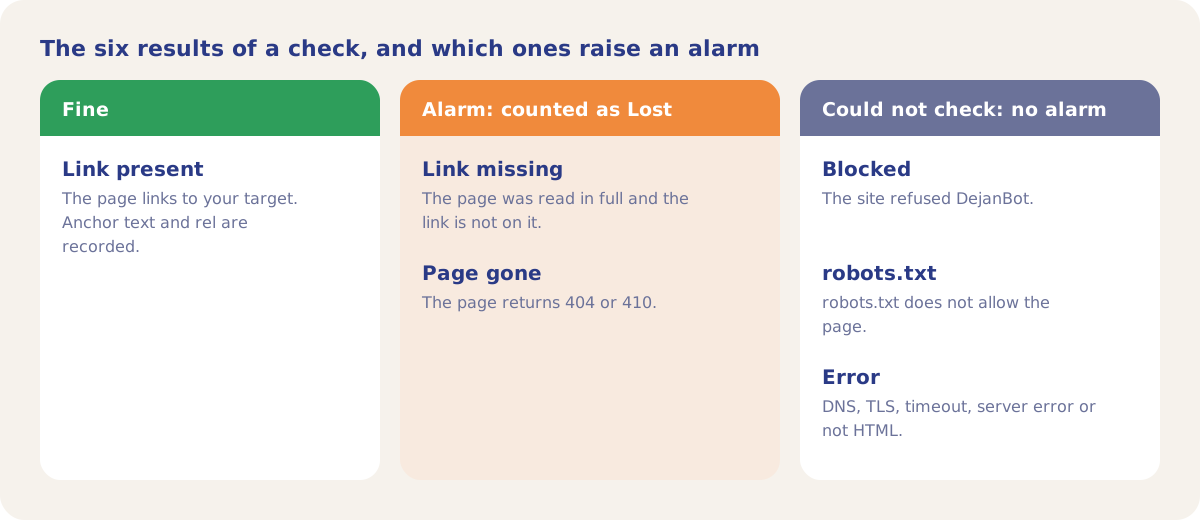
When the link is found, the check also records its anchor text and its rel attribute. If you set an Expected anchor and the link is found with a different one, the row flags it, and History shows the anchor found at each check. When a page has fewer than 3 links in its HTML, a missing link is noted as possibly built by JavaScript and worth a manual look.
Each watched link also shows the DA (Domain Authority) of the site that carries it, from the AI Brand Authority Index.
How it works
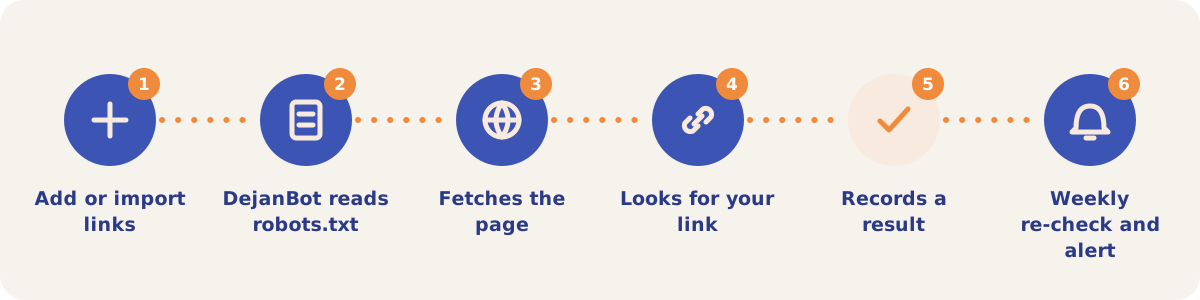
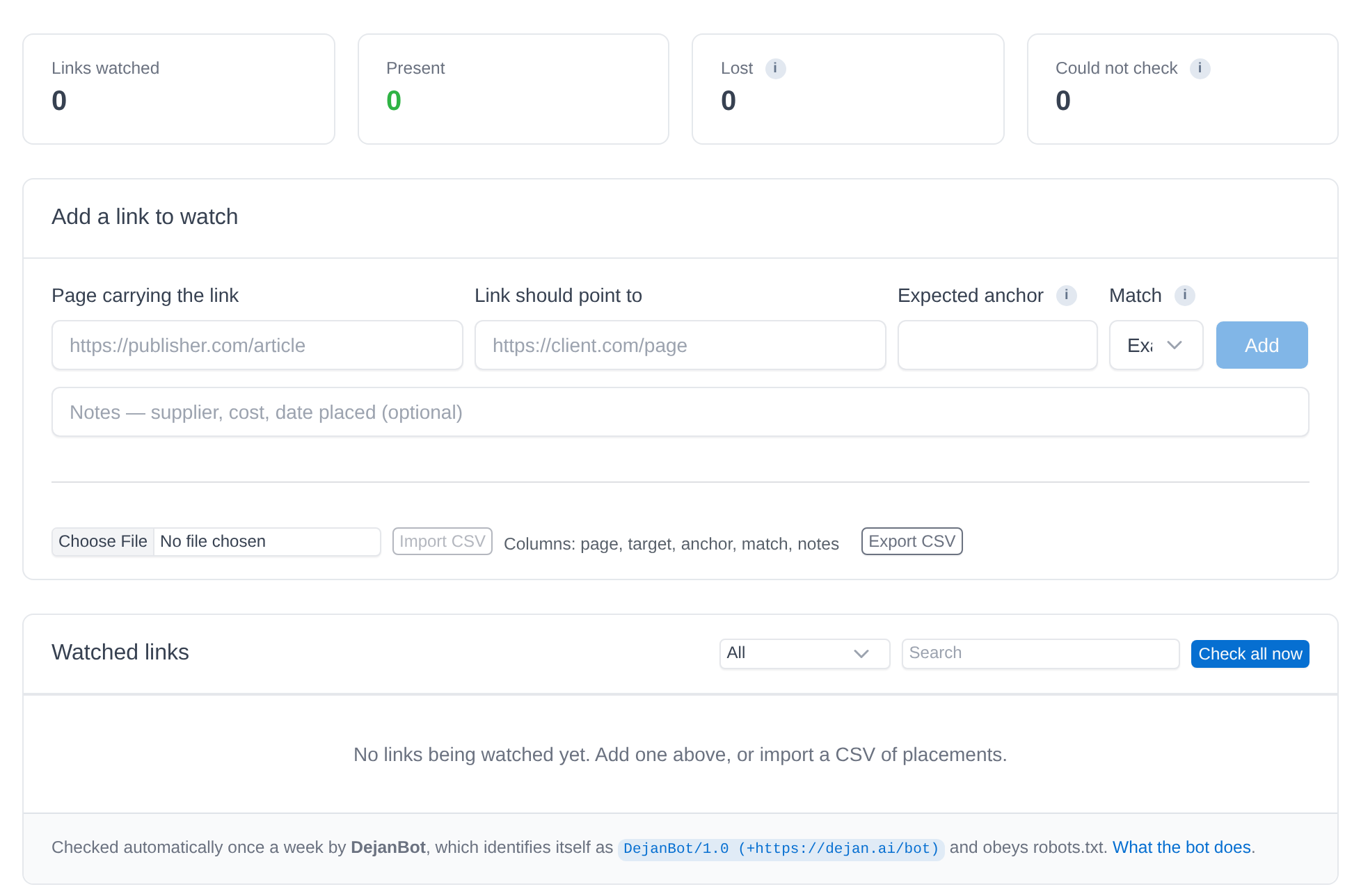
- Add or import links. Open Outreach, then Link Monitor. In Add a link to watch, enter the Page carrying the link, where the Link should point to, an optional Expected anchor and the Match rule (Exact page or Any page), with optional notes. For many links, use Import CSV with the columns page, target, anchor, match (url or domain) and notes, in that order.
- DejanBot reads robots.txt. The bot identifies itself as DejanBot/1.0 and reads the site's robots.txt before each page. A page that robots.txt does not allow is recorded as robots.txt and not fetched.
- It fetches the page. Requests to one site go one at a time, with the site's own Crawl-delay between them (2 seconds by default, 30 seconds at most).
- It looks for your link. With Exact page, a link counts when it points at the same host and path as your target; campaign tags the publisher appended are ignored. With Any page, any link to your domain counts.
- It records a result. The row shows the result, the HTTP status and the time of the check. History opens every past check of that link.
- Weekly re-check and alert. Every Monday the bot re-checks each active link that was not checked in the past 7 days. A lost link, and a link that comes back, posts a message to the notification bell. Check runs one link now, and Check all now runs the whole list.
Controls on the Link Monitor sub-tab
| Control | What it does |
|---|---|
| Links watched, Present, Lost, Could not check | Counts of all links by their latest result. |
| Add a link to watch | Records one placement. Notes hold the supplier, cost or date placed. |
| Import CSV, Export CSV | Import reads the columns page, target, anchor, match (url or domain) and notes, in that order. Export adds status and check dates, so remove those columns before you import an export. |
| All, Lost only, Present only, Never checked | Filters the Watched links table. A search box narrows it by text. |
| Check, History, Pause, Delete | Row actions: check one link now, open its past checks, stop checking it (Resume restarts it), or remove it. |
| Check all now | Checks every link in the list. |
Strategies and use cases
- Add each link the day it goes live. The first check confirms the publisher placed the link with the anchor and target you agreed.
- Use the Notes field for the deal. Record the supplier, the cost and the date placed, so a Lost row tells you whom to contact and what the link cost.
- Read "Could not check" rows by hand. A site that blocks bots or times out may still carry the link. Open the page and look.
- Set the Expected anchor. A link can stay on the page with a rewritten anchor. With an Expected anchor set, the row flags the change while the result stays "Link present".
- Use Any page when any link to your site counts. When a deal only requires a link to your domain, Any page counts a link to any URL on it.
- Watch the articles from Outreach. Once the guest articles from the Writer are published, put their URLs in a CSV and import them here.
How it connects to the rest of the app

Outreach
Writes guest articles that carry your link and checks articles for a detectable paid link.

Backlinks
Shows the full backlink profile of your domain and the domains that link to competitors and not to you.

Link Integration
Finds the paid links on a page and the places where a new link would look natural.

Citation Mining
Lists the sites the tracked answers cite, a source of placement targets.
Open the Link Monitor sub-tab in the demo project to see the form and the table, and dejan.ai/bot for what DejanBot does.
Start watching your placed links
Your first project includes a complimentary visibility baseline. No card required.