
See which pages AI answers cite for your topics, and which they read and skip
Citation Mining asks AI platforms your prompts with web search on and records the pages they cite and the brands they name, so you can see which sources the answers to your prompts use.
Start at app.dejan.ai
The problem: you do not know which sources AI answers use for your topics
When an AI platform from Google, OpenAI or Anthropic answers a question with web search on, it runs its own searches, reads a set of pages and cites a few of them. A rank tracker shows none of this: the searches the model ran, the pages it read, and the pages it cited are only visible in the answer data.
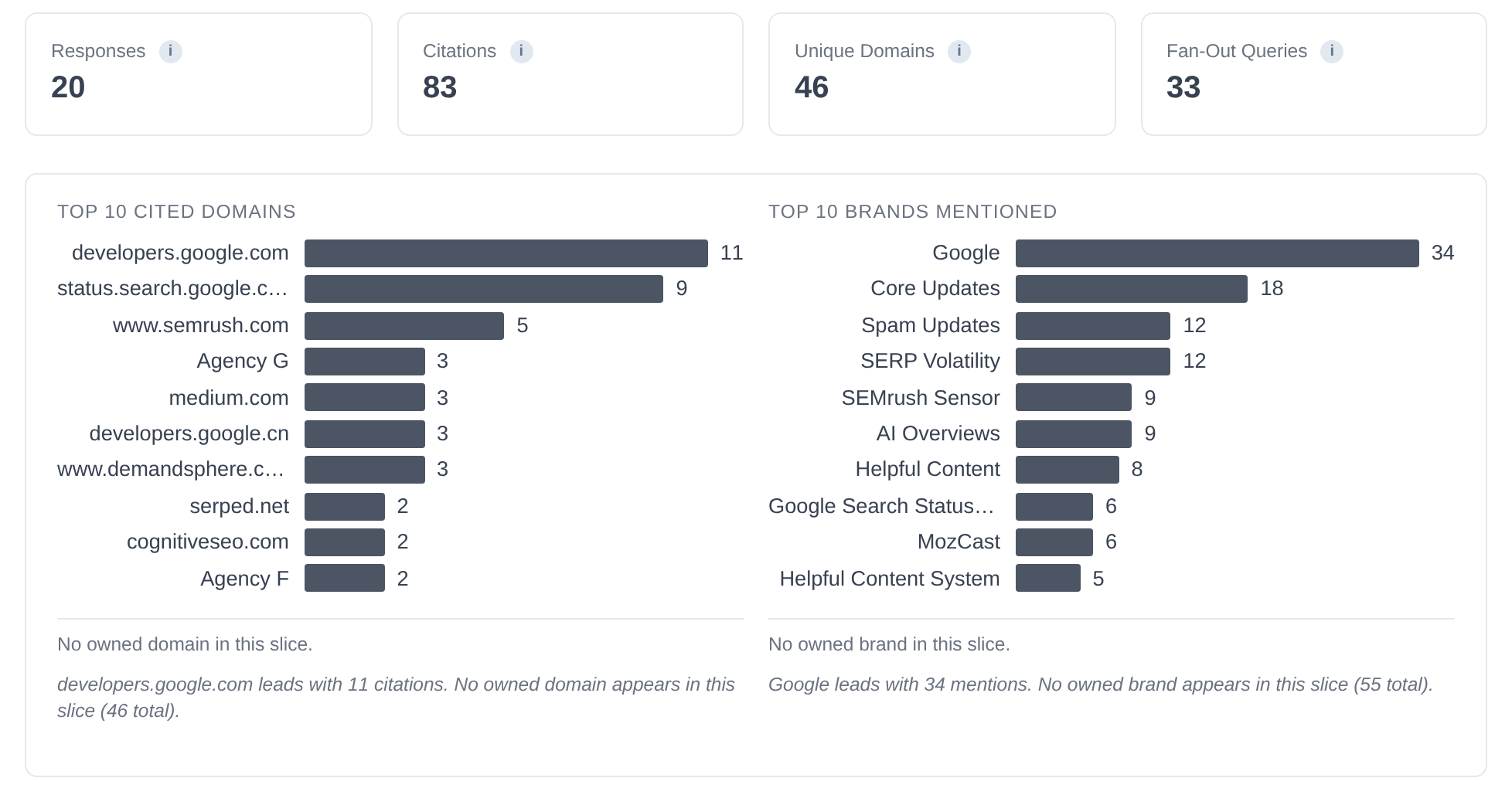
Here is an example from our public demo project. Algoroo tracks Google rank volatility. On 29 September 2026 the demo asked Google and OpenAI about 10 of its topics, including "rank volatility". The 20 answers cited 83 pages from 46 domains. None of them was on algoroo.com, and none of the answers named Algoroo.
How Citation Mining solves it
Citation Mining sends your prompts to each platform with web search on and stores the full answer. From each answer it extracts the pages cited in the answer ("selected"), the pages its searches returned that it did not cite ("unselected", reported by OpenAI and Anthropic only), the searches it ran (fan-out queries) and the brands it named. The Insights view then adds these up by domain, page, brand and entity.
The demo run #11615 shows the result for Algoroo's 10 topics. The Overview gives the totals and the most-cited domains, and it states that no owned domain and no owned brand appear in the run.
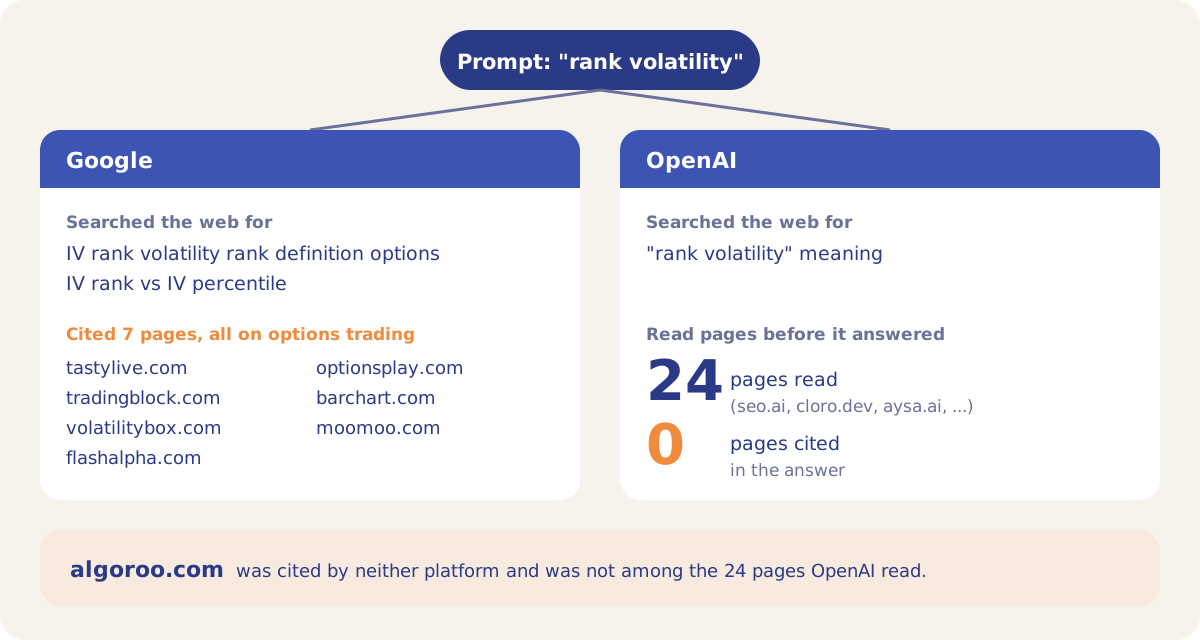
The fan-out queries explain part of the gap. For "rank volatility", Google searched for "IV rank volatility rank definition options" and cited 7 pages about options trading. OpenAI searched for "rank volatility" meaning, got 24 pages back and cited none of them. algoroo.com was not among the pages either platform found.
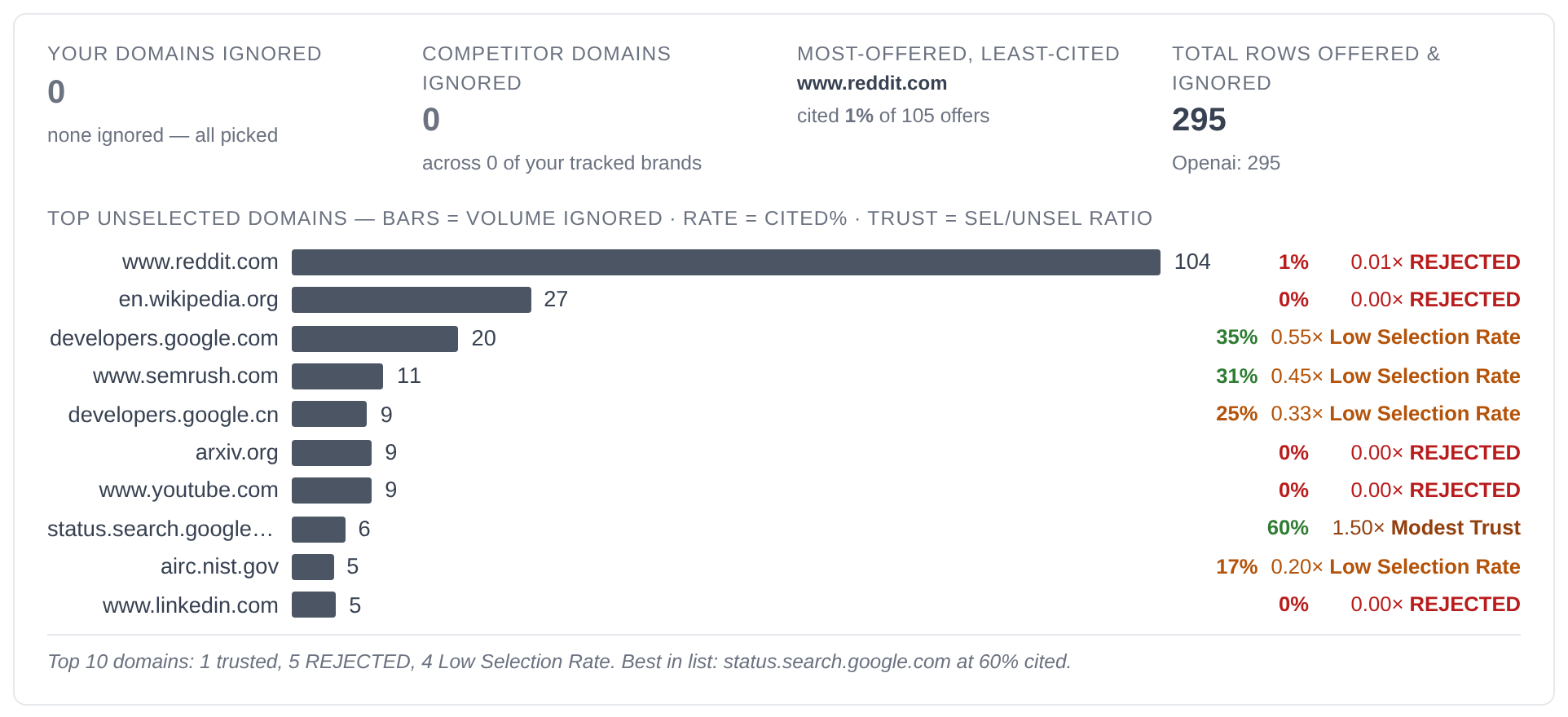
The Unselected view shows what the model read and skipped. In run #11615, OpenAI's 10 answers read and skipped 295 sources. reddit.com was offered 105 times and cited in 1% of them, while status.search.google.com was cited in 60% of its offers. "Your domains ignored" is 0 because algoroo.com was never offered, so for these topics the site is missing from the search results the model reads.
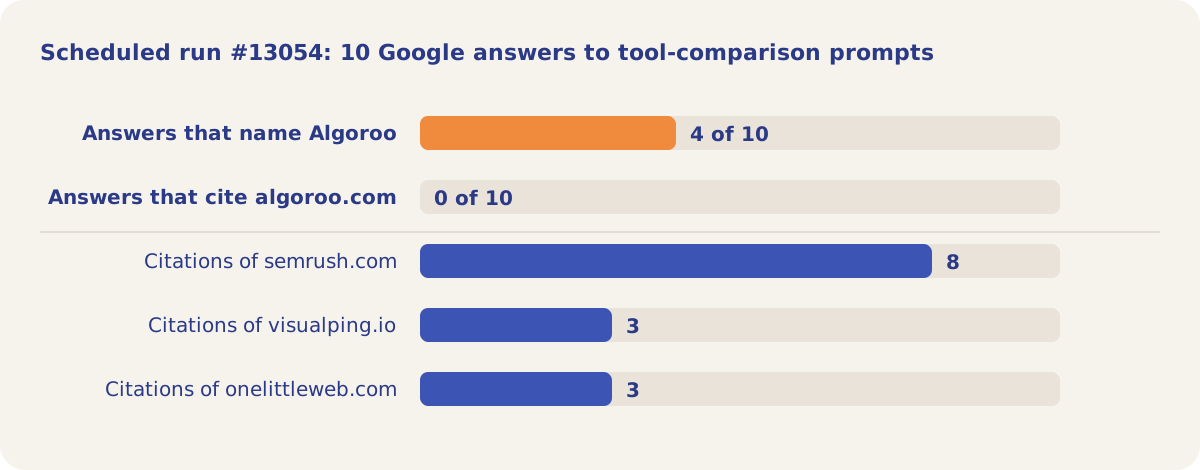
A brand can be named without being cited. In the scheduled run #13054 (5 October 2026), Google answered 10 prompts that ask which tools track algorithm updates and rank volatility. 4 of the 10 answers named Algoroo, and 0 cited algoroo.com. The answers cited semrush.com 8 times.
How it works
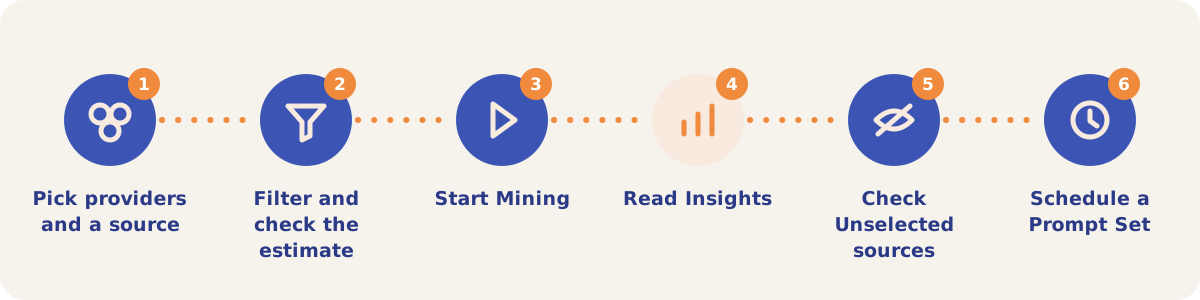
- Pick providers and a source. Open ARC, then Citation Mining, then New Run. Tick the Providers (Google is ticked by default) and pick a Source: Citation Prompts, Queries or Entities. Each option shows its item count.
- Filter and check the estimate. Narrow the items by Location, Include tags, Exclude tags and Category. The Start Mining button shows the estimate at about $0.10 per call, and the line below the form says how many items match.
- Start Mining. A one-off run makes at most 100 calls. The limit is shared across platforms, so with two platforms it mines up to 50 items. When more items match, it mines the first ones in the list. Clone Past Run copies the setup of an earlier run into the form.
- Read Insights. Pick the run in the Filter results card. Overview has the totals and top 10 charts; Domains, Pages, Brand Mentions, Entities, Fanouts and Responses hold the full lists.
- Check Unselected sources. On Domains or Pages, switch from Selected to Unselected to see the pages the searches returned and the model did not cite, with a cited rate and a trust label for each domain.
- Schedule a Prompt Set. Save Preset turns the current filters into a Prompt Set. In Scheduled Runs, set it to run Daily, Weekly or Monthly (every 28 days) on the platforms you choose.
Modes and sub-tabs
| Mode | Use it when |
|---|---|
| Insights | You want the results of past runs, filtered by run, source, provider, category, entity, query text, location or tag. |
| New Run | You want to mine a set of prompts, queries or entities once. |
| Scheduled Runs | You want a Prompt Set to run on its own. Scheduled runs send every prompt to every chosen platform and are not held to the 100-call limit, but your plan's citation quota still applies. |
| Settings | You want to add, import, generate, tag or exclude prompts in your citation prompt library. |
| Insights sub-tab | What it shows |
|---|---|
| Overview | Responses, Citations, Unique Domains and Fan-Out Queries, the top 10 cited domains and brands, and preview tables. |
| Domains and Pages | Every cited domain or URL with counts per provider. Click one to see the entities, queries, prompts and fan-outs that led to it. The Selected / Unselected switch is here. |
| Brand Mentions | Brands named in the answers, matched against your brand list. |
| Entities | Per entity: Answers, Site appeared and Brand appeared, sorted weakest site coverage first. |
| Fanouts | The web searches the models ran, with how often each ran. |
| Analysis | Brand Co-occurrence: brand pairs named in the same answer, as a heat map and a table. |
| Responses | The individual answers, with a search box. |
| Classification | The page type of every cited URL (Reddit thread, documentation page, PDF and others), from the URL pattern alone and at no cost. |
Strategies and use cases
- Start with the Entities sub-tab. It sorts your topics by Site appeared, lowest first. In run #11615 all 10 Algoroo topics scored 0% for site and brand.
- Read the fan-outs before you edit a page. The searches a model runs show which meaning of your term it looked up. Google's searches for "rank volatility" were about options trading, so a page that targets that citation has to state the SEO meaning.
- Separate "not found" from "found and skipped". This works for OpenAI and Anthropic answers only, because Google does not report unselected pages. If your domain is missing from the Unselected view as well, the search never returned your page and the fix is in search visibility. If it is in the Unselected view, the search returned the page and the model cited another one.
- Compare named and cited. In run #13054 Algoroo was named in 4 of 10 answers and cited in none. The pages those answers cite in place of algoroo.com are the pages to compete with.
- Use the cited domains as an outreach list. The Domains sub-tab lists the sites the tracked answers cite. Export it to CSV and check which of them link to you.
- Schedule a fixed set of prompts. A Prompt Set run Weekly or Monthly gives you the same questions over time, so a change in citations reflects a change in the answers.
How it connects to the rest of the app

Visibility Tracking
Asks your tracked entities on a schedule; its answers appear in Insights under the Visibility Tracking source.

Content Optimizer
Tests edits to your page against the pages that compete for a query.

Prompt Generator
Writes citation prompts in bulk and saves them to the prompt library that Citation Mining runs.

Prompt to Query
Reduces long prompts to the short queries a search system runs.

Pages
Shows each page of your site with its AI citations and Search Console traffic over time.
Backlinks
Looks up the sites that link to any domain, including the domains the tracked answers cite.
Open the demo project's run #11615 in Citation Mining to see the Overview, the Unselected view and the fan-outs for Algoroo's topics.
Mine the citations for your topics
Your first project includes a complimentary visibility baseline. No card required.