
Find the paid links on a page and the places where a new link reads as native
Link Integration reads a page in two passes, one that picks out the money links from the filler links around them and one that scores every word as possible anchor text, so you can see how a placed link looks to a classifier and where a new link fits.
Start at app.dejan.ai
The problem: a placed link can look placed
Links from other sites are a ranking signal in Google Search, and Google's AI features draw their sources from Search. A guest article or a sponsored mention is the usual way to get such a link. Google's spam policies list links bought for ranking as link spam. A placed link has a pattern: it points at a small commercial site, it sits on an anchor that a reader would not expect to be linked, and it is padded with links to large, well-known sites to make the article look natural. A classifier can be trained on that pattern.
The writer of the article sees none of this. The draft reads well to a person, and the link is in a sentence that mentions the brand. Whether the anchor sits where links on real pages sit, or whether the neighbouring links read as cover, is not visible in the text.
Here is an example from our public demo project. One of its runs read a long SEO pricing guide with 24 links in the article body. The Money links pass marked 1 of them as a money link: a link to an SEO agency, in a sentence about requesting a client case study. It listed 3 other links as regular links.
How Link Integration solves it
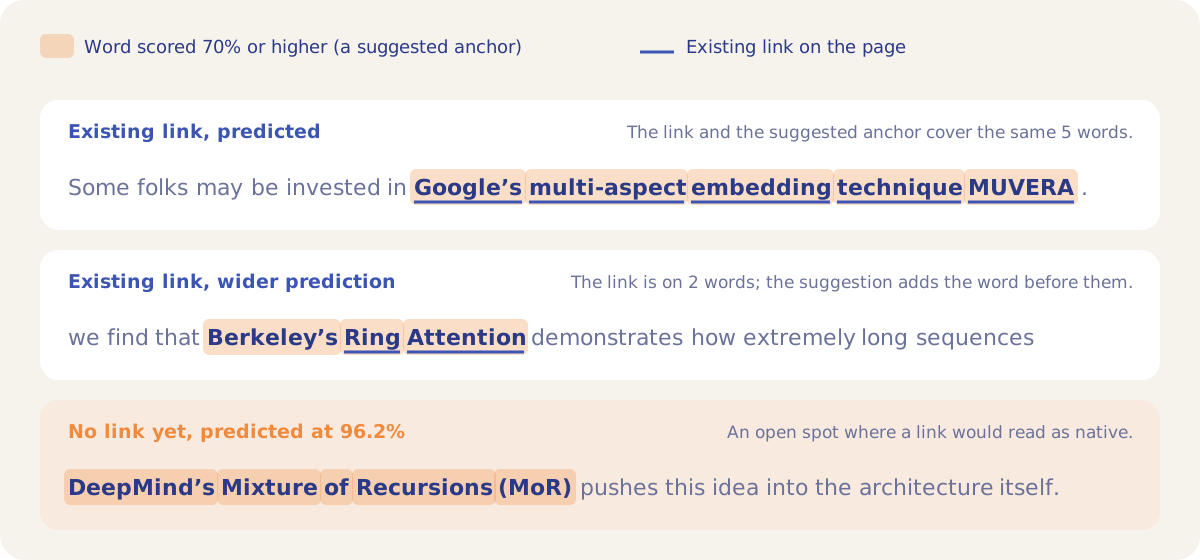
Link Integration runs two independent passes over the same main content of a page. The Money links pass sends the page to a Google model with instructions that describe money links and filler links, and it returns each money link and each regular link with its anchor, its target and the sentence it sits in. The Anchor suggestions pass scores every word with an anchor-prediction model for how likely it is to sit inside anchor text. Consecutive words at or above the Anchor confidence setting (70% by default) form one suggested anchor.
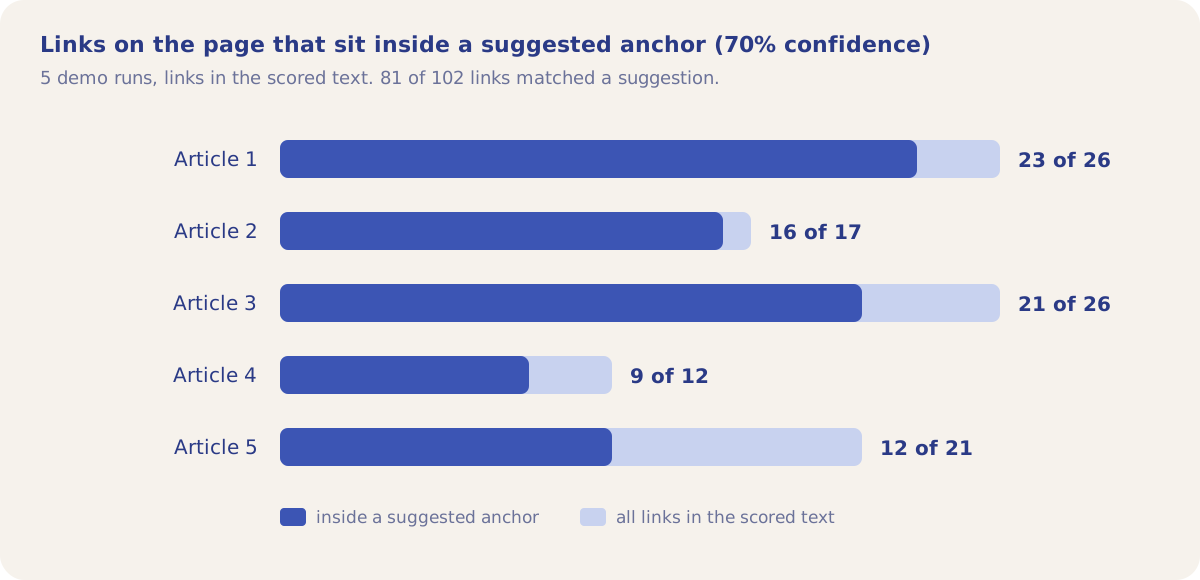
Both passes read the same flattened text, so the result shows the page with its existing links in place, money links flagged with a "money link" chip, and the suggested anchors highlighted on top. The demo project holds five runs on published articles. On a demo article about chunking (Article 3), the anchor pass matched the links the author had already placed:
The same check holds across all five demo runs. At the default 70% setting, 81 of the 102 links in the scored text sit inside a suggested anchor. The words outside a suggestion are the spots where a link would stand out; the high-scoring phrases with no link are the spots where a new one would read like the links around it.
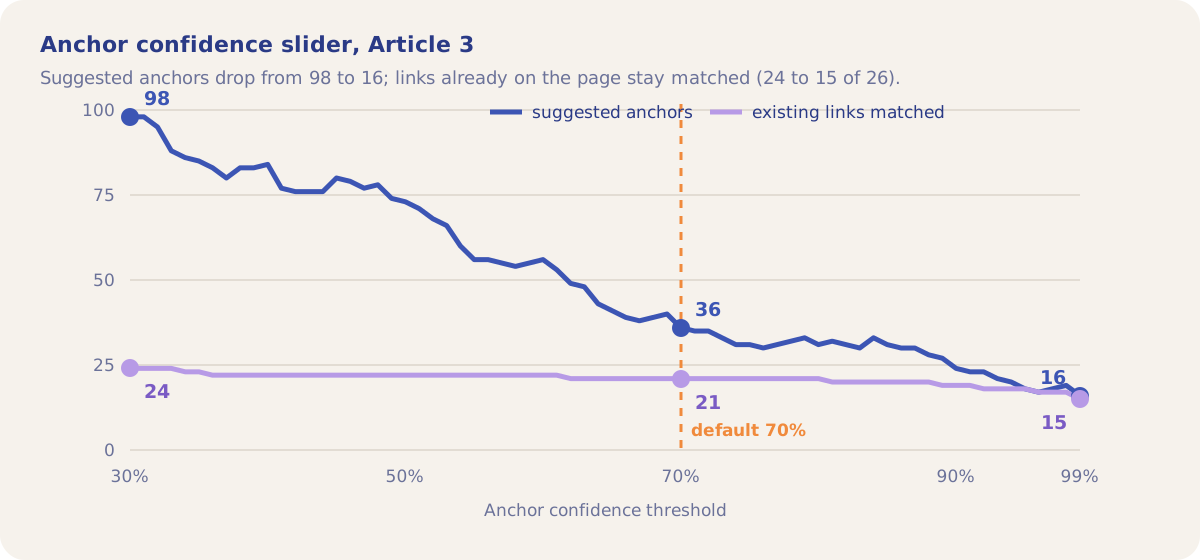
The Anchor confidence slider runs from 30% to 99% and redraws the result on the page without a new call, because every word score is stored with the run. On the Article 3 run, moving it from 30% to 99% cuts the suggested anchors from 98 to 16, while the existing links that stay matched drop from 24 to 15. A high setting gives a short list of the strongest spots; a low setting shows every candidate.
How it works
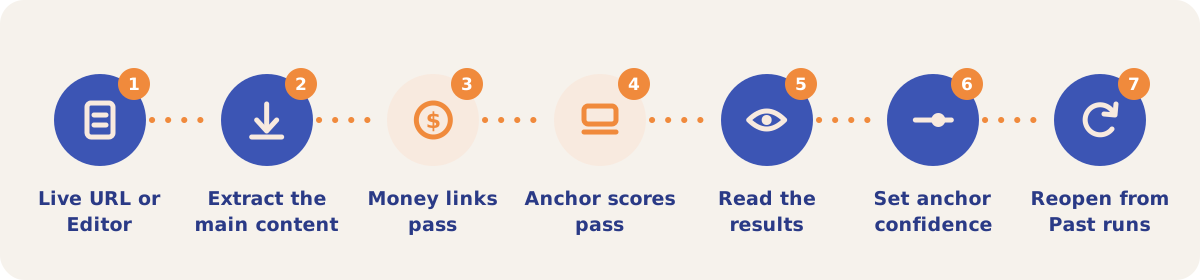
- Pick the input. Open Tools and then Link Integration. On Live URL, enter one page address. On Editor, paste a draft straight from your CMS or document with its links, or select text and use the link button to add one. Fill in the optional domain so internal links are told apart from external ones.
- Extract the main content. Click Analyze. A live page is fetched and reduced to its article body with the links kept. Tick Use Firecrawl for a site that blocks the fetch or builds its content with JavaScript; it is billed per page from your credit balance. If a plain fetch fails, the result offers Try again with Firecrawl.
- Money links pass. The article body goes to a Google model, which lists the money links and the regular links, each with its anchor, target and sentence.
- Anchor scores pass. At the same time, the first 20,000 characters are scored word by word. If the scoring service does not answer, the run still returns the money link results.
- Read the results. The result shows the counts of money links, regular links and suggested anchors, the page text with links and suggestions marked, and three tables: Money links, Regular Links and Suggested anchors (up to 40, with confidence and word count).
- Set the anchor confidence. Move the Anchor confidence slider, and use Show existing links and Show predicted links to see one layer at a time.
- Reopen saved runs. Every run is saved to the project. Past runs below the form lists them with their money and regular link counts, and Open redraws a run, slider included, without another call.
Inputs and settings
| Setting | Use it when |
|---|---|
| Live URL | The article is published, or you want to check a page that links to you or to a competitor. |
| Editor | The article is a draft. You can add, move and remove links and run it again before it goes to the publisher. |
| Use Firecrawl | The plain fetch is blocked or returns no readable text. Firecrawl renders the page first and is billed per page. |
| Anchor confidence | You want fewer, stronger suggestions (move it up) or every candidate (move it down). The default is 70%. |
| Show existing links / Show predicted links | You want to compare the links on the page with the suggestions, or see one of them alone. |
| Content Optimizer, History, Links | You want the same list of runs from inside the Content Optimizer. |
On a pay-as-you-go project, the Money links call is billed from the credit balance at its token cost, and a Firecrawl fetch is billed per page. On Demo projects the tool shows a padlock and a prompt to add credits.
Strategies and use cases
- Check a guest article before it goes live. Paste the draft into the Editor. If the Money links pass flags your link, change the anchor or the sentence and run it again.
- Move your link onto a predicted anchor. Lower the slider until your brand or topic phrase shows as a suggestion, then put the link on that phrase. In the demo, 81 of 102 links that authors placed sit on a suggested anchor.
- Find open spots on a partner page. Run the live URL and read the suggestions with no link on them. On the Article 3 run, "DeepMind's Mixture of Recursions (MoR)" scored 96.2% and had no link.
- Audit the links pointing at you. Run pages that link to your site. A page where your link is the only one flagged as a money link is a page where the placement shows.
- Study a competitor's placements. Run articles that link to a competitor and read which links the Money links pass separates from the filler.
- Use Firecrawl only when a fetch fails. Four of the five demo runs used a plain fetch and one used Firecrawl.
How it connects to the rest of the app

Outreach
Writes guest articles that carry your link and checks articles for a link a detector can single out.

Link Monitor
Watches the links you placed and alerts you when one goes missing.

Backlinks
Lists the sites that link to you and to your competitors, which gives you pages to run.

Content Optimizer
Lists every Link Integration run under History, Links.
Open the demo project's Links history to see its five runs with their money and regular link counts.
Check your next placement
Your first project includes a complimentary visibility baseline. Link Integration uses credits.