
Label every search query by intent or by your own entities
Intent Classification tags each of your Search Console and AI fan-out queries with intent labels or with your entities, so a list of hundreds of raw queries becomes groups you can filter, count and act on.
Start at app.dejan.ai
The problem: a query list mixes brand demand with topic demand
Search Console gives you a flat list of queries. Citation Mining adds more: the searches AI platforms ran when answering your test prompts. A flat list does not say which queries come from people who already know your brand and which come from people who are looking for a topic you could own. Totals, CTR curves and content plans built on the whole list mix both groups.
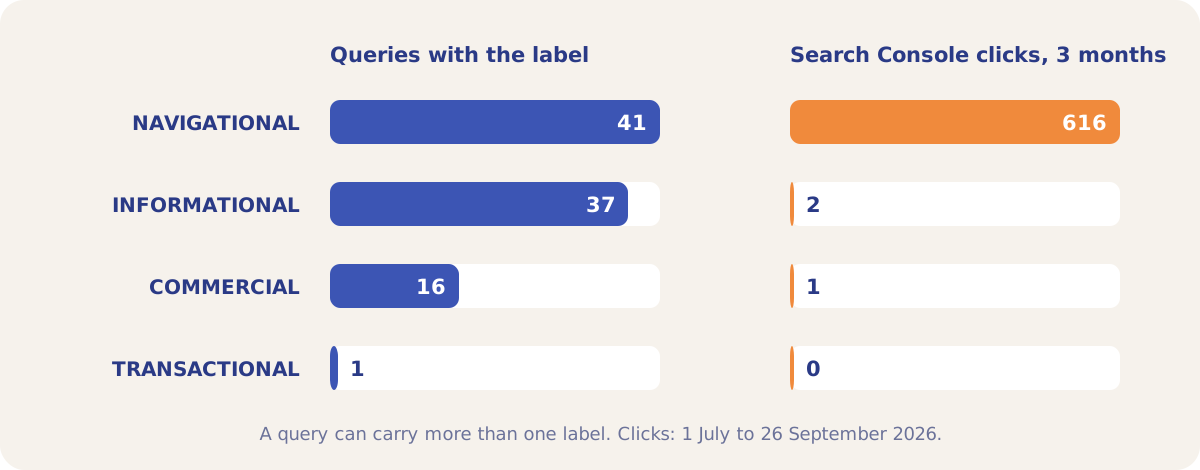
Here is an example from our public demo project. Algoroo tracks Google rank volatility. In the 3 months from 1 July to 26 September 2026, Search Console recorded 189 queries and 619 clicks for algoroo.com. Of those clicks, 615 came from 29 queries that only name the brand, most of them misspellings such as "algaroo", "alguroo", "algoroq" and "алгоро". Topic queries such as "serp volatility checker" and "google algorithm tracker" brought 1 click and 0 clicks, and the split stays hidden until each query has a label.
How Intent Classification solves it
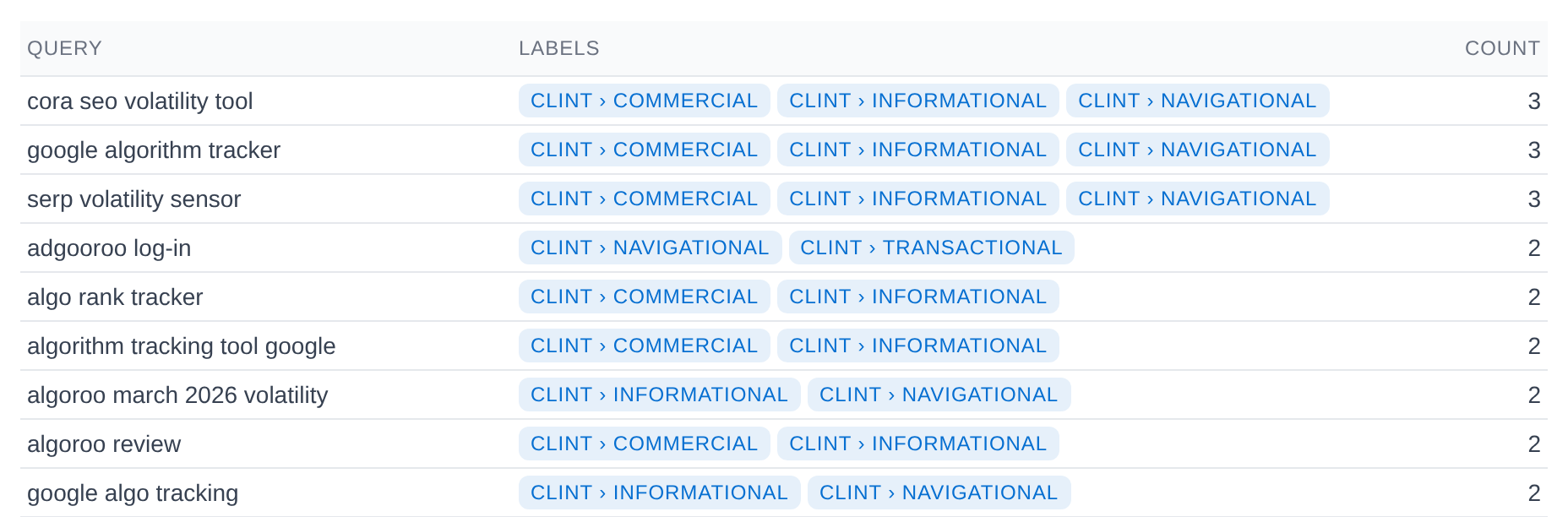
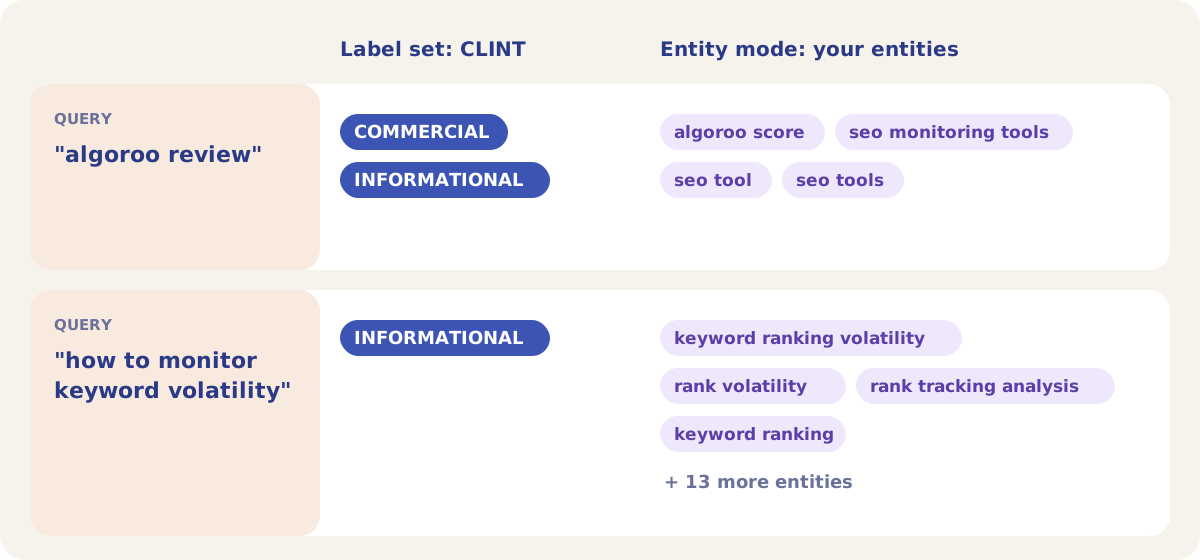
Intent Classification sends your queries to an AI model in batches of 10, together with a set of labels and their descriptions, and stores every label that applies to each query. A query can carry more than one label. You can classify by a label set (an intent taxonomy such as Search Intent or Funnel Stage) or by your own entity list, and the labels then appear as badges and filters across the Organic tab.
In the demo project the CLINT label set has five labels: COMMERCIAL, LOCAL, INFORMATIONAL, NAVIGATIONAL and TRANSACTIONAL. One run on 29 September 2026 classified 67 Search Console queries in 7 batches, with an average of 1.4 labels per query. No query received LOCAL.
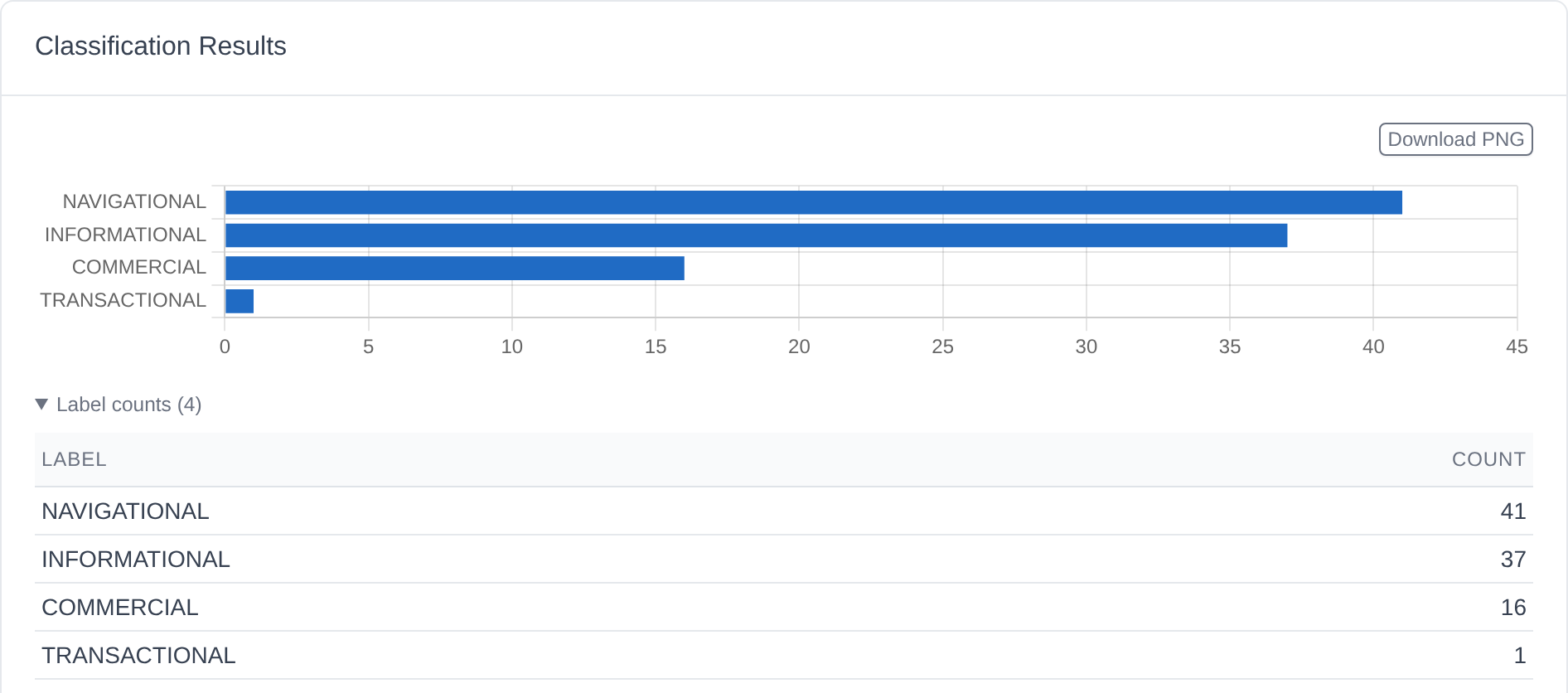
Counted by query, the labels look balanced. Counted by clicks, they are not: queries labelled NAVIGATIONAL account for 616 of the 619 clicks in the 3-month window. The INFORMATIONAL and COMMERCIAL queries are the topic demand that Algoroo does not yet earn clicks for.
The same queries were also classified against Algoroo's entities. In entity mode, 56 queries matched at least one entity, 11 matched none, and each matched query was mapped to 25.9 entities on average. 52 of the 63 entities received at least one query. The 11 entities with no query include backlink analysis, link building and link analysis, which tells you that Algoroo's search traffic has no link-related demand yet.
How it works
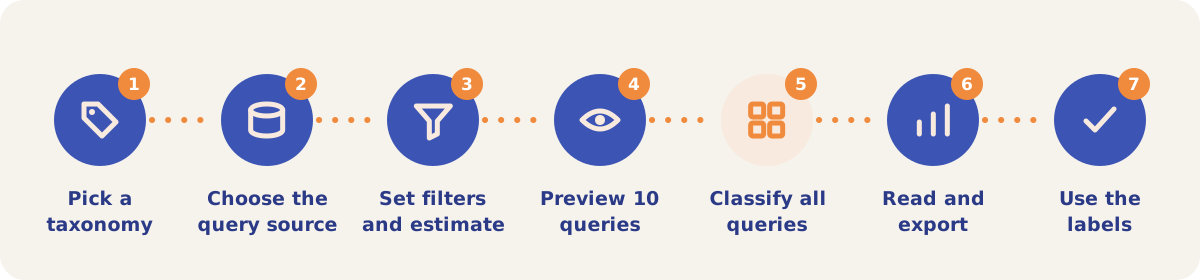
- Pick a taxonomy. Open Organic → Intent (or Settings → Intent) and use the "Classify queries by" list. Choose Entity, one of your label sets, a template (Search Intent, Funnel Stage, Content Type or CLINT), a blank set, or "Generate with AI".
- Choose the query source. Under Run classification, pick GSC (your Search Console queries), Fanout (the search queries AI systems ran in your Citation Mining runs) or Both. The line next to the list shows how many queries each source holds.
- Set filters and estimate. Set Min clicks/freq (10 by default when Search Console data exists) and keep Filter explicit on to tag explicit queries as EXPLICIT_CONTENT without sending them to the model. Click Estimate matching queries to see how many queries the run covers.
- Preview 10 queries. Preview (10 random) classifies a sample with the current labels, so you can fix label descriptions before the full run.
- Classify all queries. Pick "Only classify queries not yet classified" or "Re-classify all queries in this set", then click Classify all queries. The run works in the background in batches of 10 queries, with up to 100 batches in parallel, and a progress bar shows the batch count.
- Read and export. Classification Results shows a bar chart and the count for each label, then every query with its labels. Search the queries or filter by one label. Export CSV downloads the set, and "Export all (all sets)" downloads every set. Download PNG saves the chart.
- Use the labels. The labels become filters and badges on the other Organic sub-tabs, described below.
Label sets, templates and entity mode
| Option | Labels | Use it when |
|---|---|---|
| Search Intent | INFORMATIONAL, NAVIGATIONAL, TRANSACTIONAL, COMMERCIAL_INVESTIGATION, OTHER | You want the classic four intents, with OTHER as a fallback. |
| Funnel Stage | TOFU, MOFU, BOFU, OTHER | You plan content by funnel stage. |
| Content Type | QUESTION, COMPARISON, HOW_TO, REVIEW, LIST, OTHER | You want to know which page format each query asks for. |
| CLINT | COMMERCIAL, LOCAL, INFORMATIONAL, NAVIGATIONAL, TRANSACTIONAL | You want the intent badges and intent filters in CTR Modelling. It has no fallback label, so an unlabelled query is a signal in itself. |
| Generate with AI | Your own | Your queries need labels specific to your market. The Taxonomy Designer packs your queries, highest clicks first, into a 500,000-token budget and a Google model proposes labels with a description and examples. Custom instructions steer it, and Preview prompt shows how many queries fit. |
| Blank set or Bulk add labels | Your own | You already have a taxonomy. Paste it as "LABEL_NAME | Description", one label per line. |
| Entity | Your active entities | You want every query mapped to the entities you track. Edit the labels on Settings → Entities. |
The label description does most of the work, because the model reads it for every batch. Labels can be added or deleted on the set's label card. "Clear this set's classifications" deletes the results and keeps the labels. On a pay-as-you-go project, taxonomy generation, preview and classification are billed from the credit balance.
Strategies and use cases
- Separate brand traffic before you read a CTR curve. Tick NAVIGATIONAL under Branded Query Tags in CTR Modelling → Settings, and the Branded and Non-branded toggle catches misspellings that an owned-brand match misses. In the demo, 29 brand-only queries include spellings such as "algroo" and "algeroo".
- Find topic demand you do not convert. Filter the results to INFORMATIONAL or COMMERCIAL. In the demo, queries such as "serp volatility checker" and "seo volatility tool" are COMMERCIAL and INFORMATIONAL. The 37 queries with either label brought 2 clicks in 3 months, which makes them candidates for a Content Optimizer run.
- Classify AI fan-out queries as well as Search Console queries. Set the source to Fanout or Both to see what intent the searches behind the answers to your Citation Mining prompts carry, next to what people type into Google.
- Find entities with no search demand. Run entity mode and compare the entity counts with your entity list. In the demo, 11 of 63 entities matched no query.
- Clean the query reports. Exclude labels such as EXPLICIT_CONTENT or NAVIGATIONAL with the Query Exclusion Filter on Query → URL Mapping and Cannibalization.
- Preview before every full run. If the 10-query sample comes back with the wrong labels, rewrite the label descriptions first, then classify.
How it connects to the rest of the app

Organic Search
Supplies the Search Console queries and shows the labels as CTR Modelling badges and filters.

Citation Mining
Collects the fan-out queries AI platforms ran for your test prompts, which you can classify as the Fanout source.

Visibility Tracking
Tracks the entities that entity mode uses as labels.

Content Optimizer
Tests page edits for the topic queries that the labels expose.
Open the demo project's CLINT results or its entity classification, and see the intent badges in CTR Modelling.
Classify your own queries
Your first project includes a complimentary visibility baseline. Intent Classification uses credits.