
Test page edits against an AI ranker until it ranks your page first
The Content Optimizer simulates how an AI search system picks the page it quotes for a query, then tests edits to your page until the AI ranker places it above the competing pages.
Start at app.dejan.ai
The problem: AI answers quote one or two pages, and you cannot see why
When someone asks Google AI Mode, ChatGPT search or Perplexity a question, the system runs a web search, pulls a handful of pages and quotes one or two of them in the answer. A page in position 5 of the classic results can be in that handful and still never be quoted. The ranking that decides which passage gets quoted happens inside the model, so it does not show up in any rank tracker.
The usual workaround is to edit the page, publish it and wait weeks to see whether AI answers change. That loop is slow, and the answers vary from one run to the next, so a single before and after check proves little.
Here is an example from our public demo project. Algoroo tracks Google rank volatility. For the query "rank volatility", an AI ranker placed the algoroo.com homepage 8th among the competing pages. The homepage described its own "roo" metric and the daily status of the rankings, but it never said what rank volatility is.
How the Content Optimizer solves it
The Content Optimizer models that hidden step. It takes the top Google results for your query, gives them to an AI ranker along with your page, and records where your page lands. Then it proposes one edit at a time, re-ranks the set, and keeps the edits that move your page up. Each edit is tested against the same competitors with the same ranker, so you know which change moved the simulated rank before you touch the live page. A higher simulated rank is a signal to test on the live page, not a guaranteed place in AI answers.
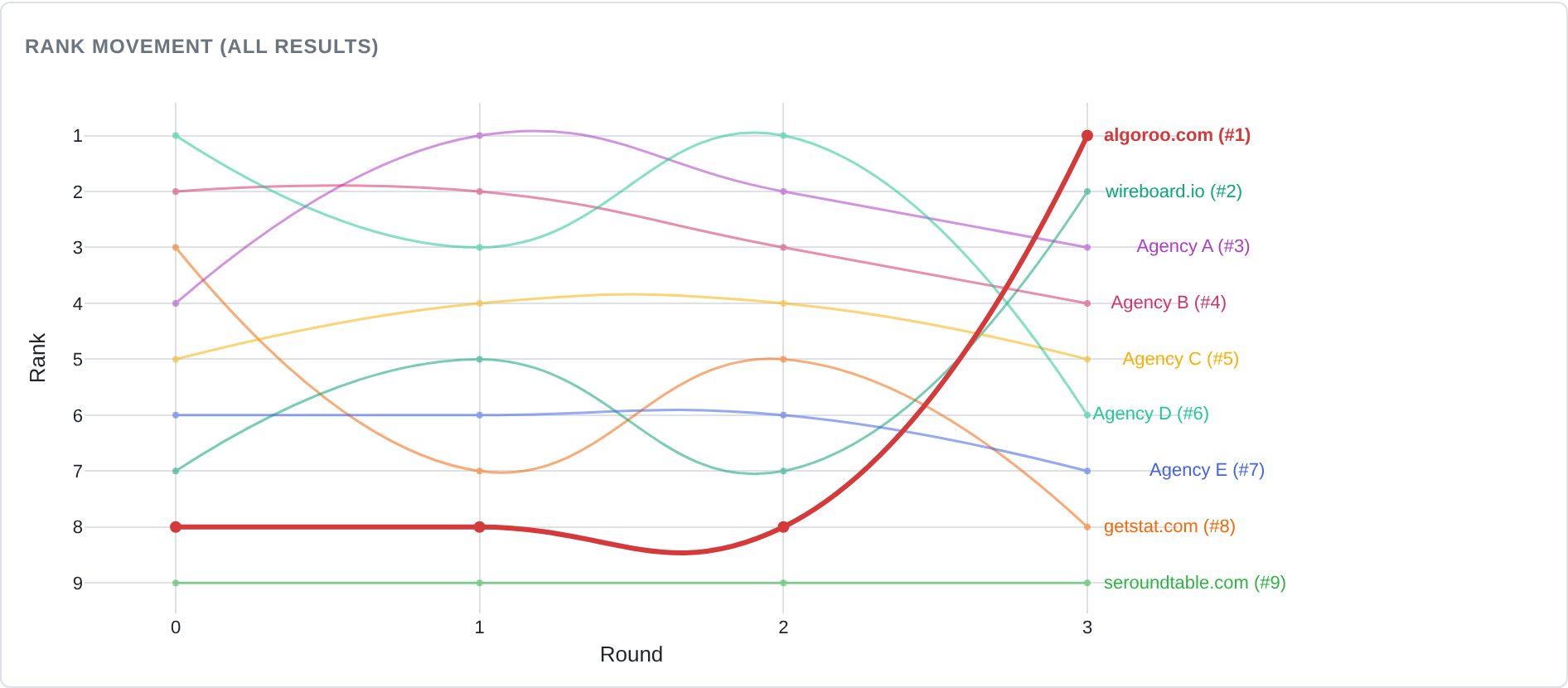
In the Algoroo run for "rank volatility" the ranker was a Google model, and the run took three rounds.

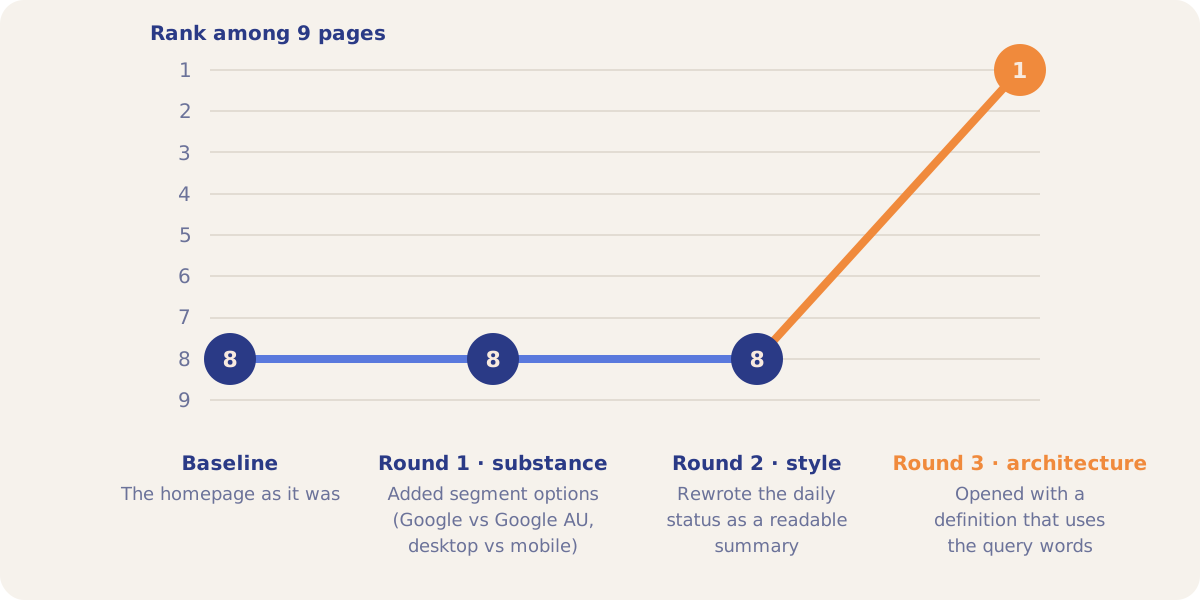
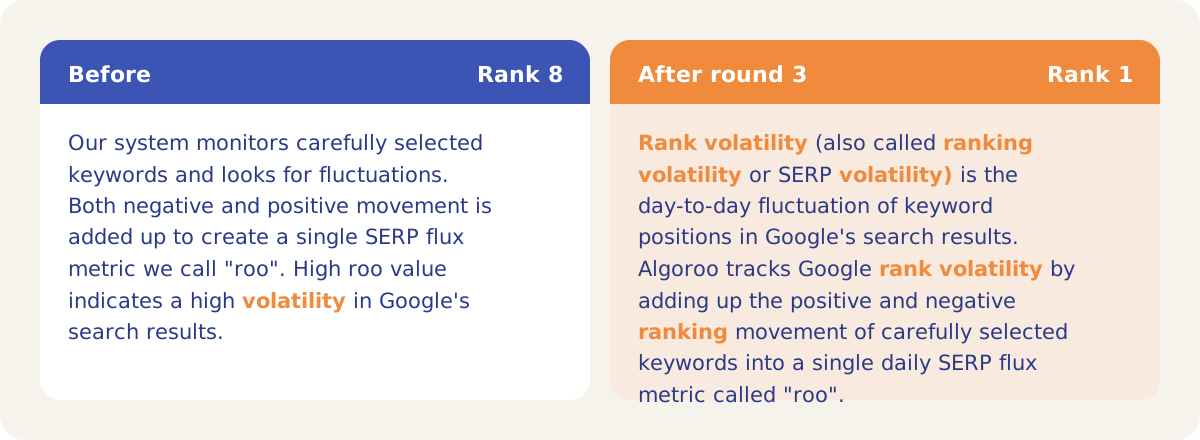

The two rounds that failed carry information too. Feature detail and a cleaner status readout did not help on a two-word head term. The page was missing the query term and its synonyms, and adding them moved it seven places.
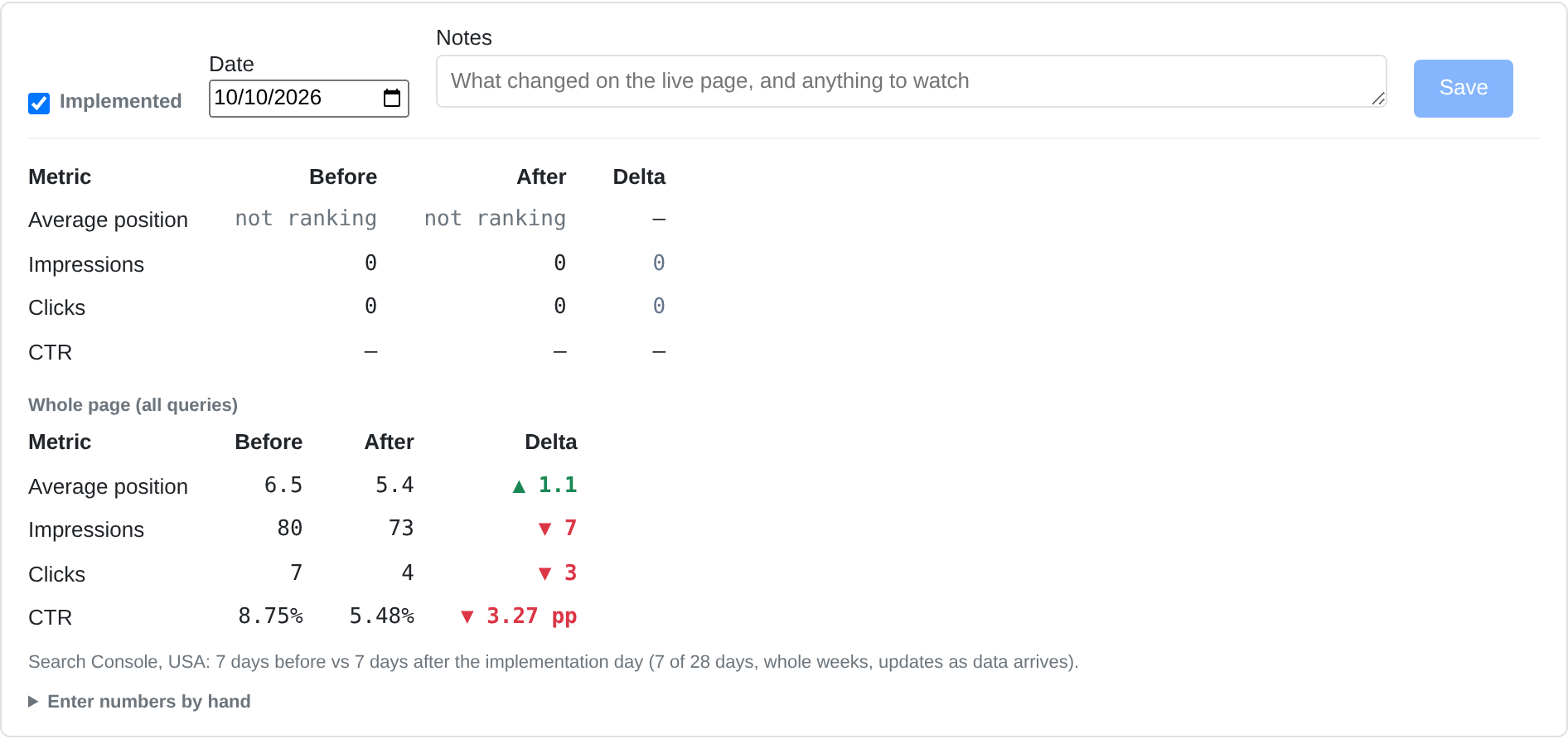
The run was marked Implemented on 10 October 2026. With Search Console connected, the run shows the page's United States figures for the 7 days before and after the change: average position went from 6.5 to 5.4, impressions from 80 to 73 and clicks from 7 to 4.
How it works
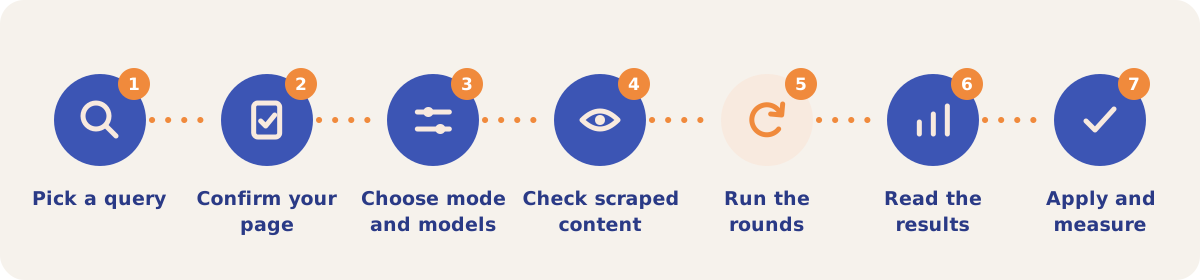
- Pick a query. On the Single sub-tab, pick a tracked entity (the list is sorted by AI Relevance Score, weakest first) or switch on Custom Query Mode and type a query. Custom Query Mode suggests your highest-potential Search Console queries and fills in their page.
- Confirm your page. A pre-flight check pulls the search results for the query and looks for your domain. Green means it found your page, purple means it used a fallback page, and red means you enter the URL yourself.
- Choose the mode and models. Snippet mode optimizes the passage an AI system would lift from your page. Page mode edits the page body line by line. Pick the ranker model and the number of rounds.
- Check the scraped content. Manual Content Review is on by default. The run pauses after scraping so you can check your page and the competitors. Thin pages (paywalled, geo-blocked, script-only) can be pasted in, sent to the AI browser agent, accepted or skipped.
- Let the rounds run. Each round proposes a claim: an edit tied to a rank factor such as alignment, substance, architecture, style, framing or proof. The ranker re-ranks the set and the best version is kept. The Main tab shows baseline rank, best rank and the round-by-round chart.
- Read the results. When the run ends you get a Narrative of what worked and what did not, a Content Brief with page edits, every tested snippet with a Diff view, and the Ranker Rationales for each competitor.
- Apply and measure. Apply the winning edit on your site and mark the run Implemented. The change appears on the Dashboard chart and on the Pages tab, and with Search Console connected the run shows clicks and impressions before and after.
Modes and sub-tabs
| Sub-tab | Use it when |
|---|---|
| Single | You want to optimize one page for one query. Snippet mode is the fast first pass; Page mode returns line edits you can apply directly. |
| Batch | You want to sweep many entities or query and URL pairs in one go. Pages shared across targets are scraped once. Needs credits. |
| Draft | The page is not published yet. Paste the text, and it is ranked against live competitors. |
| Solo | There is no useful set of competitors. The page is ranked against edited versions of itself. |
| Ablation | You want to know how many rank places each part of a cited source is worth. |
| Image | You want a product image caption that matches the image more closely. |
| Substance | You want to know whether a title or an article is substance or fluff. |
| Rank Factors | You want to see which kinds of edit win or lose for a given ranker, across all your runs. |
| History | You want every run, its baseline and best rank, its cost, and the runs grouped by page. |
Strategies and use cases
- Start with your weakest entities. The entity list is sorted by AI Relevance Score, lowest first, so the queries where the relevance probes score you lowest are at the top.
- Run Snippet mode first, then Page mode. Snippet runs are faster and cheaper and find the phrasing that wins. A Page run then turns that phrasing into line edits on the real page.
- Check that an edit holds across rankers. Tick "Rank with all platforms" or repeat the run with another ranker. In the demo project, "Algorithm Change Tracking" reached rank 1 with a Google ranker and with an OpenAI ranker.
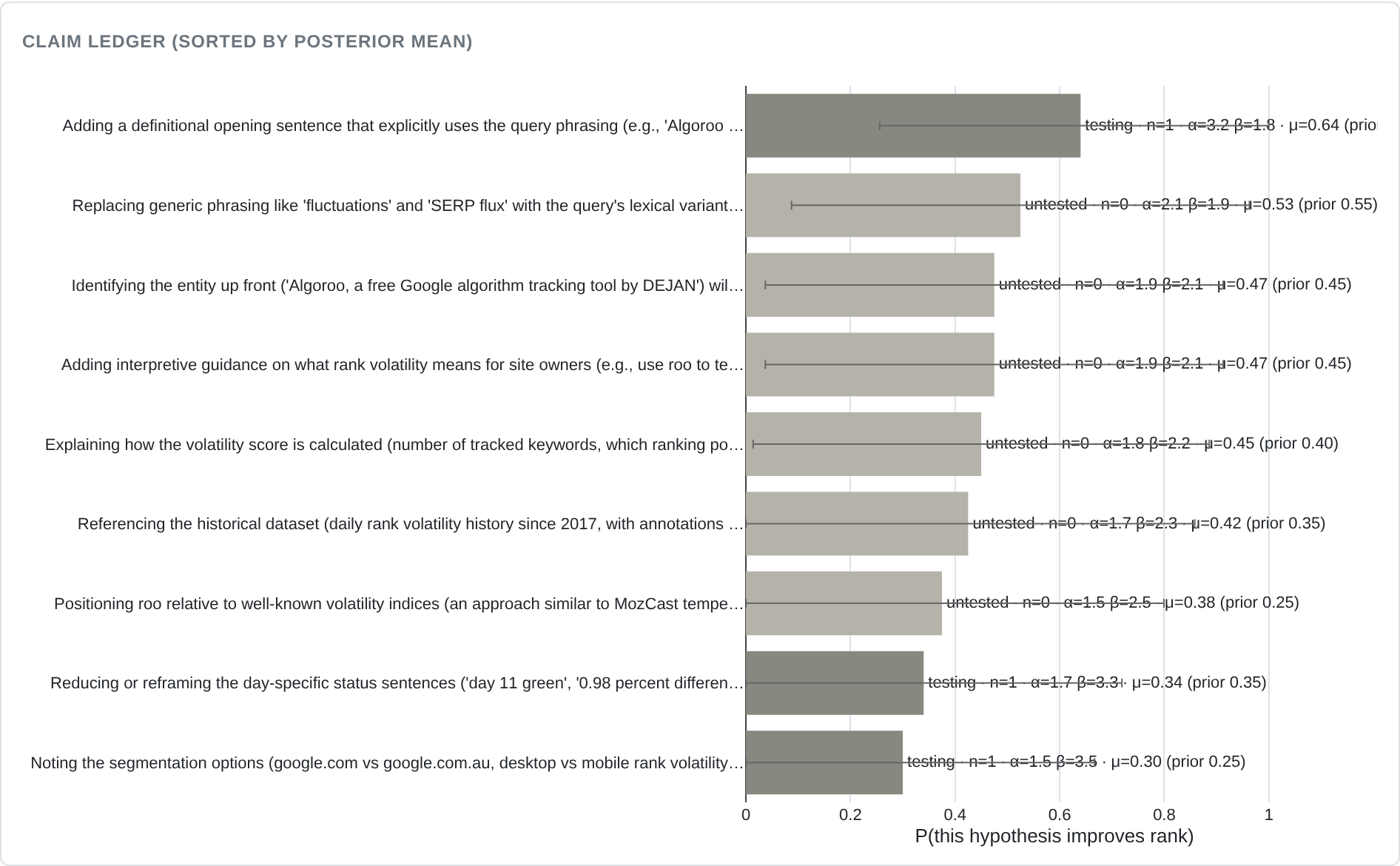
- Read the failed rounds. The Ledger tab lists every claim with its rank factor and the rank it reached. Edits that do nothing tell you what the ranker ignores for that query.
- Treat a stalled run as a signal about the page. In the demo, "Google Algorithm Changes" went from rank 10 to rank 7 in five rounds and stopped. When a page cannot climb, the query may need a different page, or a new one tested in Draft.
- Run Batch for a content program. Sweep a category or a tag of entities, then work through the Content Briefs in order of rank gain.
How it connects to the rest of the app

Visibility Tracking
Shows which entities the tracked answers link to your brand. "Optimize this entity" opens a run.

Measuring Relevance
Produces the AI Relevance Score that orders the entity list.

Organic Search
Supplies the Query Potential suggestions in Custom Query Mode.

Citation Mining
Shows which pages the tracked answers cite now, before you start a run.

Pages
Lists implemented runs as updates, next to citations and Search Console clicks.

Dashboard
Marks each implemented change on the visibility trend line.
Open the demo project's run history to see all of its Content Optimizer runs, including the ones that stalled.
Run your first optimization
Your first project includes a complimentary visibility baseline. The Content Optimizer uses credits.