
Record which brands AI answers name for your topics, and which pages they cite
Visibility Tracking asks Google and OpenAI, and Anthropic if you turn it on, the same test question about each of your topics on a schedule and records the brands they recommend and the pages they cite, so you can see whether your work changes your share of the tracked answers over time.
Start at app.dejan.ai
The problem: you cannot see which brands AI answers recommend for your topics
Ask an AI assistant for the best tool in your category and the answer names a handful of brands and cites a handful of pages. The answer differs between platforms and changes from one day to the next. A single manual check tells you what one platform said once.
Here is an example from our public demo project. Algoroo tracks Google rank volatility. On 26 October 2026 an Anthropic answer about "serp volatility" named nine brands. Algoroo was fourth, after Semrush, Moz and AccuRanker. The answer cited 10 pages, and none of them was on algoroo.com.
How Visibility Tracking solves it
Visibility Tracking is a test, not a measure of demand. It asks each AI platform the same question about each tracked entity on a fixed schedule, so you can see whether your work, such as a Content Optimizer run or an outreach campaign, changes which brands the platforms choose and how they describe yours. The figures show how often your brand appears in those test answers. They do not show how many people ask about a topic, what they type, or how often a real user sees your brand.
Visibility Tracking asks the same question for every tracked entity on every active platform, with web search on, and stores each answer. The question asks the platform to recommend brands for the entity and to wrap each brand name in [[ ]] markers, so the app can read the brands in the order they appear. Each cited page is stored with its domain. A nightly job runs each project on its cadence: daily, weekly or monthly.
Open the "serp volatility" answer from 26 October 2026 to see the full text, the 9 parsed brands and the 10 cited pages.
![Diagram in three columns. The question: tracked entity "serp volatility", asked of Anthropic on 26 October 2026 with web search on. The answer: brands in [[ ]] markers, Semrush, Moz, AccuRanker, then Algoroo. What is stored: 9 brands in order, Algoroo at rank 4 marked owned, and 0 of 10 cited pages on algoroo.com.](/media/images/auxy/guides/visibility-tracking/probe-parse.svg)
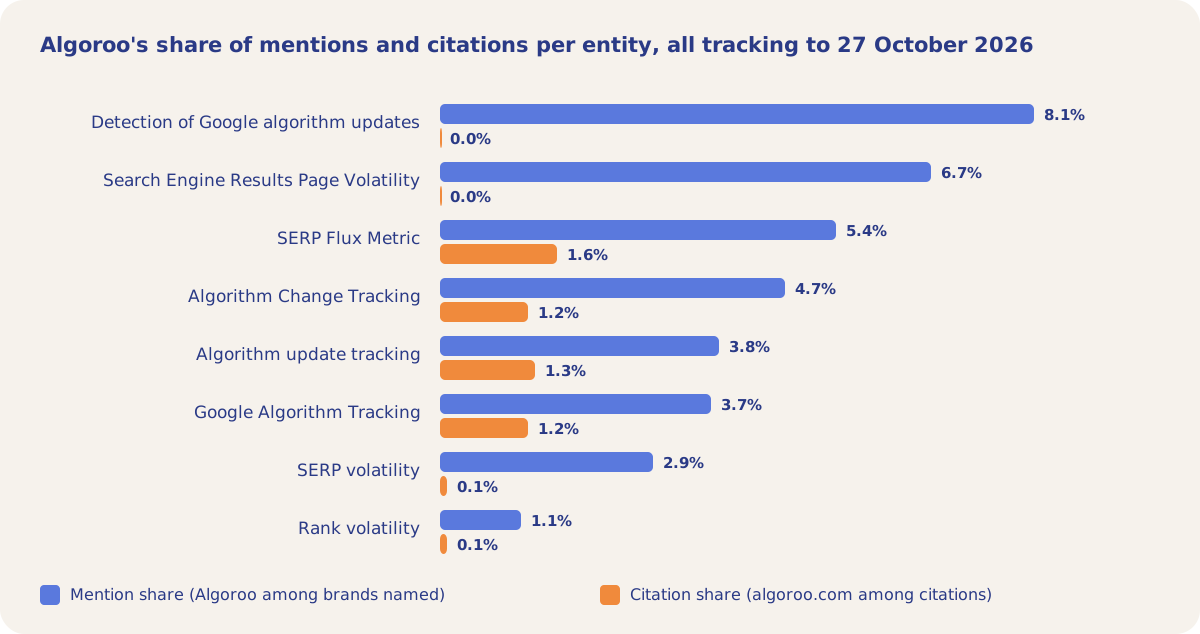
One answer is a sample of one. Over all tracking to 27 October 2026, the tracked answers about "SERP volatility" named a brand 1,508 times and Algoroo 44 times (2.9%). They cited 910 pages, and 1 was on algoroo.com (0.1%). The Entities sub-tab shows the same split for each of the 63 entities.
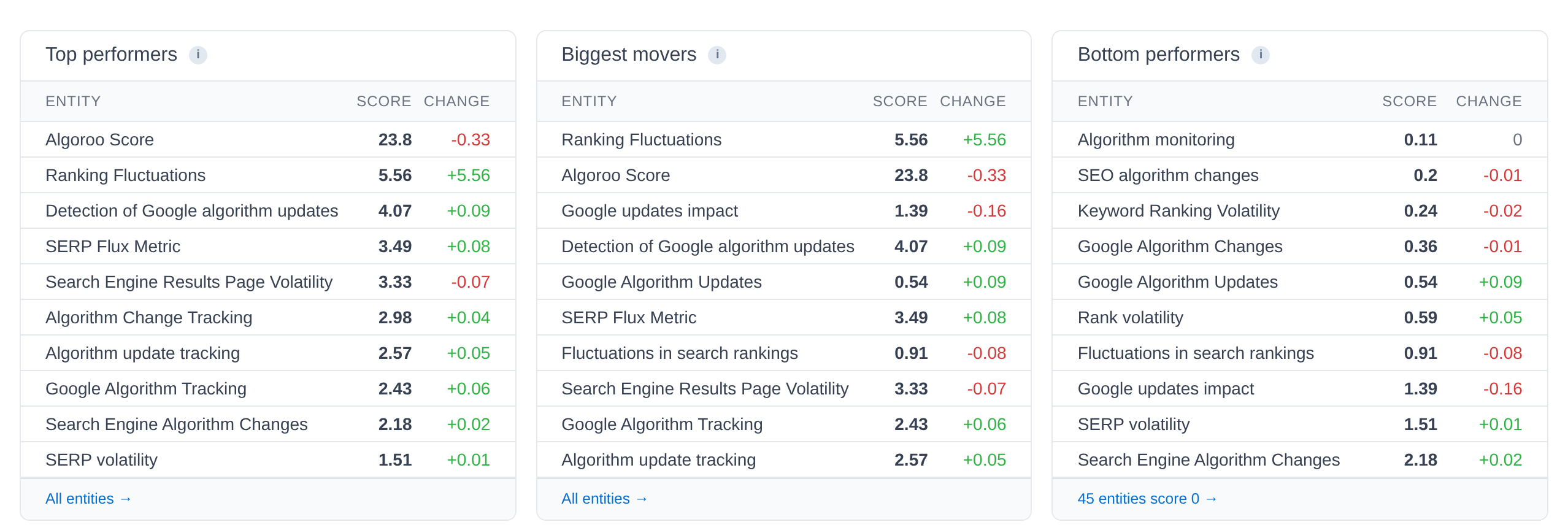
The Visibility sub-tab ranks the entities by visibility score, the entity's Share of Voice: the average of its Mention Share and Citation Share. In the demo, 45 of the 63 entities scored 0, which means the tracked answers about them named and cited other brands only.
How it works
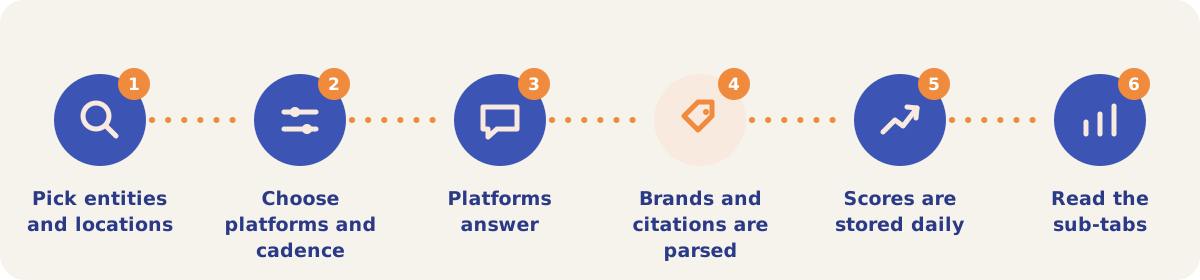
- Pick entities and locations. The first time you open the tab, the tracking setup wizard opens. Pick the entities to track (System selected proposes them from your website), then the target locations, and click Save & Run. The Global pill runs probes without a location.
- Choose platforms and cadence. In Tracking Settings, pick the AI platforms and the cadence. Google and OpenAI are on by default and Anthropic is off. Paid plans can change this. The default cadence is monthly, so a project is probed about every 28 days unless you change it.
- Platforms answer. Each run asks each active platform, with web search on, to recommend brands for each tracked entity. If Parametric Tracking is on, each run also asks the same question with web search off.
- Brands and citations are parsed. The app reads each brand with its rank (the order of first appearance) and the blurb written about it, and stores every cited page.
- Scores are stored daily. Results are saved as daily snapshots per entity, location and brand, which feed the Dashboard and every sub-tab.
- Read the sub-tabs. Start on Visibility, then open Entities, Mentions, Citations or Pages. Click Manual Run to run outside the schedule; the first manual run also runs 5 extra rounds dated to the previous 5 days, so the charts have a starting line.
Sub-tabs
| Sub-tab | What it shows |
|---|---|
| Visibility | Overall visibility with Location and Provider filters, and the Top performers, Biggest movers and Bottom performers tables. |
| Mentions | Brand mention trends with share and rank, By AI Platform cards and the All Brands table. Each brand name opens its brand page, which compares that brand with yours over time. |
| Citations | Top cited domains, brands and pages. In the demo the most cited page was advancedwebranking.com/free-seo-tools/google-algorithm-changes, with 505 citations. |
| Entities | Score, change, mentions and citations per entity. Click a row for its daily trend; "Optimize this entity" opens the Content Optimizer. |
| Pages | Visibility by Page for your own pages: citations, citation rate, average rank and updates. |
| Context | Every mention of your brand with the blurb the platform wrote about it. |
| Brand Perception | A per-platform reading of how each AI platform describes your brand, built from the Context blurbs. Run Analysis is billed per run. |
| Responses | Every stored answer, with a memory or grounded badge, tokens and latency. |
| Cost | The cost of tracking for the project, per run and per month, by platform. Owners and editors only. |
| Tracking Settings | Entities, target locations, platforms, cadence and Parametric Tracking. |
The Visibility, Mentions, Citations, Entities, Pages, Context and Responses sub-tabs share a date range picker with From and To dates and presets from Last 7 days to All time. Change columns compare the range with the same number of days just before it.
Strategies and use cases
- Track unbranded topics as well as your brand terms. In the demo, the branded entity "Algoroo Score" scored 23.8, and the unbranded topic "SERP volatility" scored 1.51.
- Separate naming from citing. Compare Mentions with Cites on the Entities sub-tab. "Detection of Google algorithm updates" named Algoroo in 8.1% of brand mentions and cited algoroo.com in 0.0% of citations, so the work for that topic is a page that AI systems can cite.
- Study the pages that win the citations. The Citations sub-tab lists the pages the tracked answers cite. Those are the pages your content competes with.
- Read the zero-score entities as a content gap. 45 of the 63 demo entities scored 0. Each is a topic where the tracked answers recommend competitors only.
- Pick the slowest cadence that catches the change you care about. A higher cadence costs more, because every run asks every platform about every entity.
- Turn on Parametric Tracking to compare memory with search. The Showing switch toggles the figures between Grounded and Parametric. In the demo, the memory-only Mention Share was 0.54% after 15 rounds.
How it connects to the rest of the app
Dashboard
Sums up the tracked answers as Share of Voice, per platform and per entity.

Content Optimizer
"Optimize this entity" on the Entities sub-tab opens a run for that topic.
Pages
Shows how many tracked answers cited each of your pages, before and after a change.

Citation Mining
Runs your own prompts once or on a schedule, beyond the tracked entities.
Measuring Relevance
Asks whether AI systems would recommend your brand for each entity at all.
Running Association Probes
Asks which brands AI systems associate with each entity, from memory.
Open the demo project's Entities sub-tab to see the score, mentions and citations for all 63 tracked entities.
Start tracking your AI visibility
Your first project includes a complimentary visibility baseline. No card required.