
Rank your Search Console queries by the traffic they could win
The Organic tab imports your Google Search Console data and ranks every query by its audience and its position, so you can pick the queries and pages to optimize first.
Start at app.dejan.ai
The problem: Search Console lists every query and does not tell you which ones to work on
Search Console sorts queries by clicks. The queries that already earn clicks go to the top, and the queries where you appear but rank too low to be clicked go to the bottom. Those low queries are the ones an optimization can move.
Search Console also does not separate the long, full-sentence questions that people now type into search from short keyword searches. These questions are the same kind that AI search systems answer.
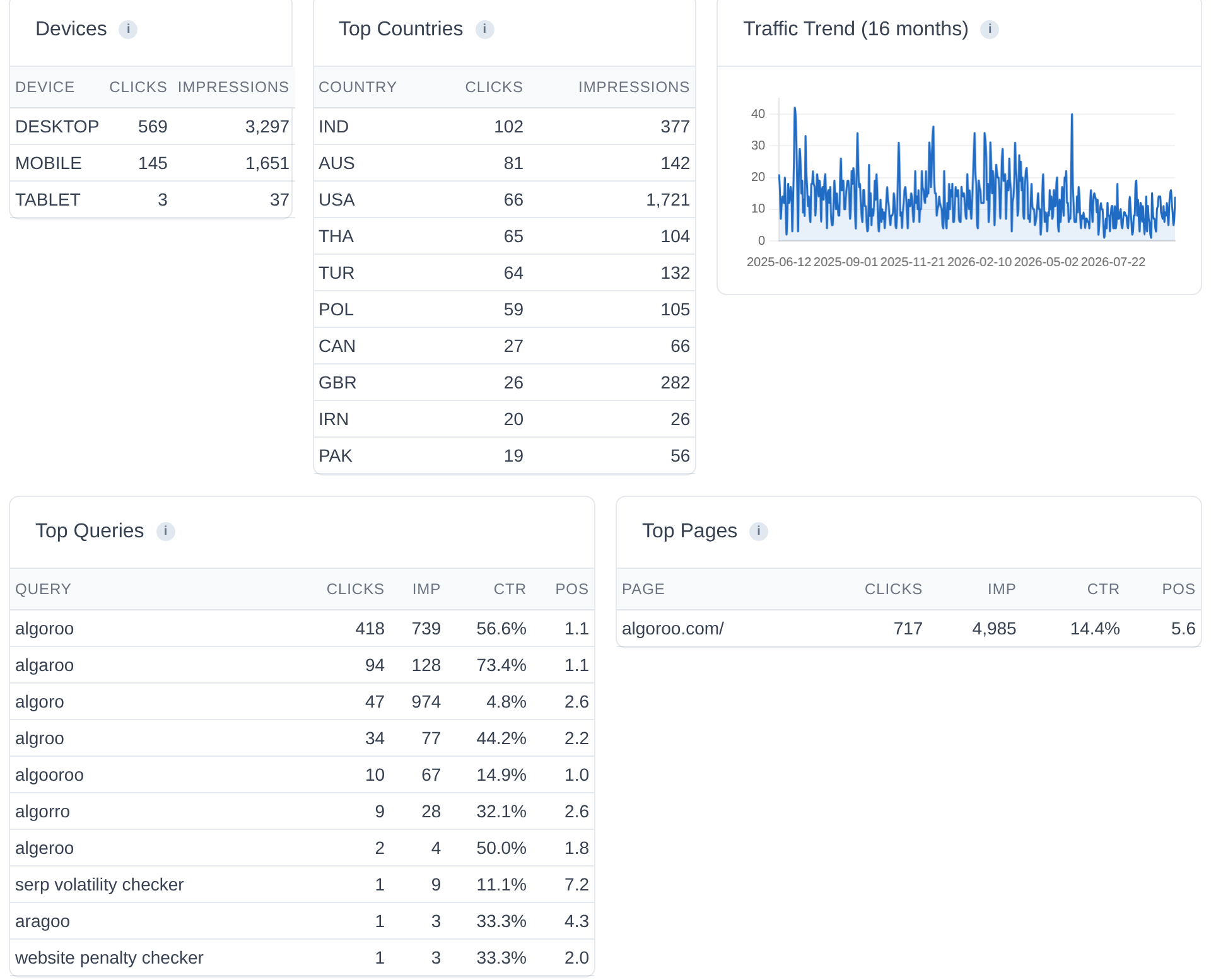
Here is an example from our public demo project. Algoroo tracks Google rank volatility. From 1 July to 26 September 2026 its homepage had 717 clicks from 4,985 impressions. Seven of the ten top queries are "algoroo" or a misspelling of it, and they account for 614 of the 717 clicks. The first query about the product category, "serp volatility checker", has 1 click.
How Organic Search solves it
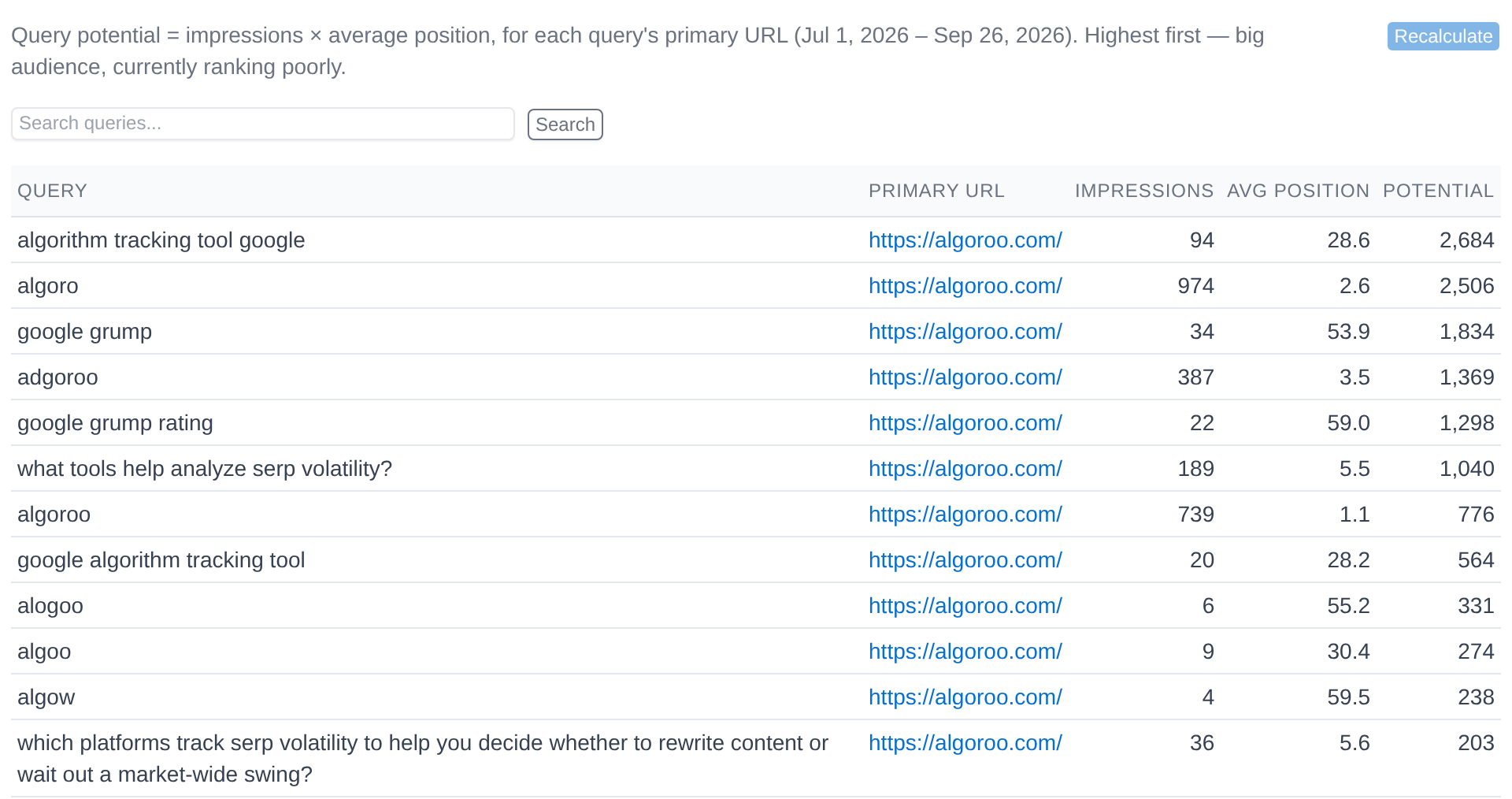
The Organic tab imports your Search Console data and builds analyses on top of it. The main one is Query Potential. For each query it takes the page that earns the most clicks and multiplies the impressions by the average position. A query with a large audience and a poor position gets the highest score, so the list starts with the queries where a ranking gain is worth the most.
For Algoroo, the top query is "algorithm tracking tool google": 94 impressions at an average position of 28.6, a score of 2,684, and 0 clicks. In the Search Console order it is far down the list. Position 6 is "what tools help analyze serp volatility?" with 189 impressions at position 5.5, also with 0 clicks.
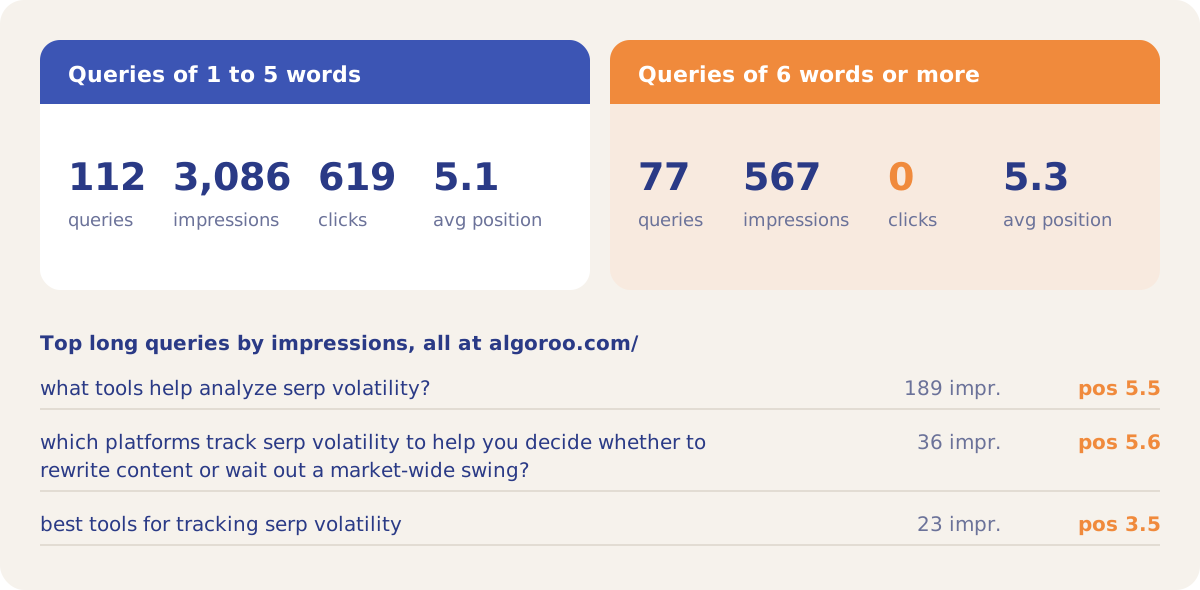
The list also shows how many long questions reach the site. In the same 90 days, 77 of Algoroo's 189 queries are six words or longer. Together they had 567 impressions and 0 clicks, at an average position of 5.3. Two of them start with the text "context: location:" followed by an instruction and a question, which is the format of a prompt.
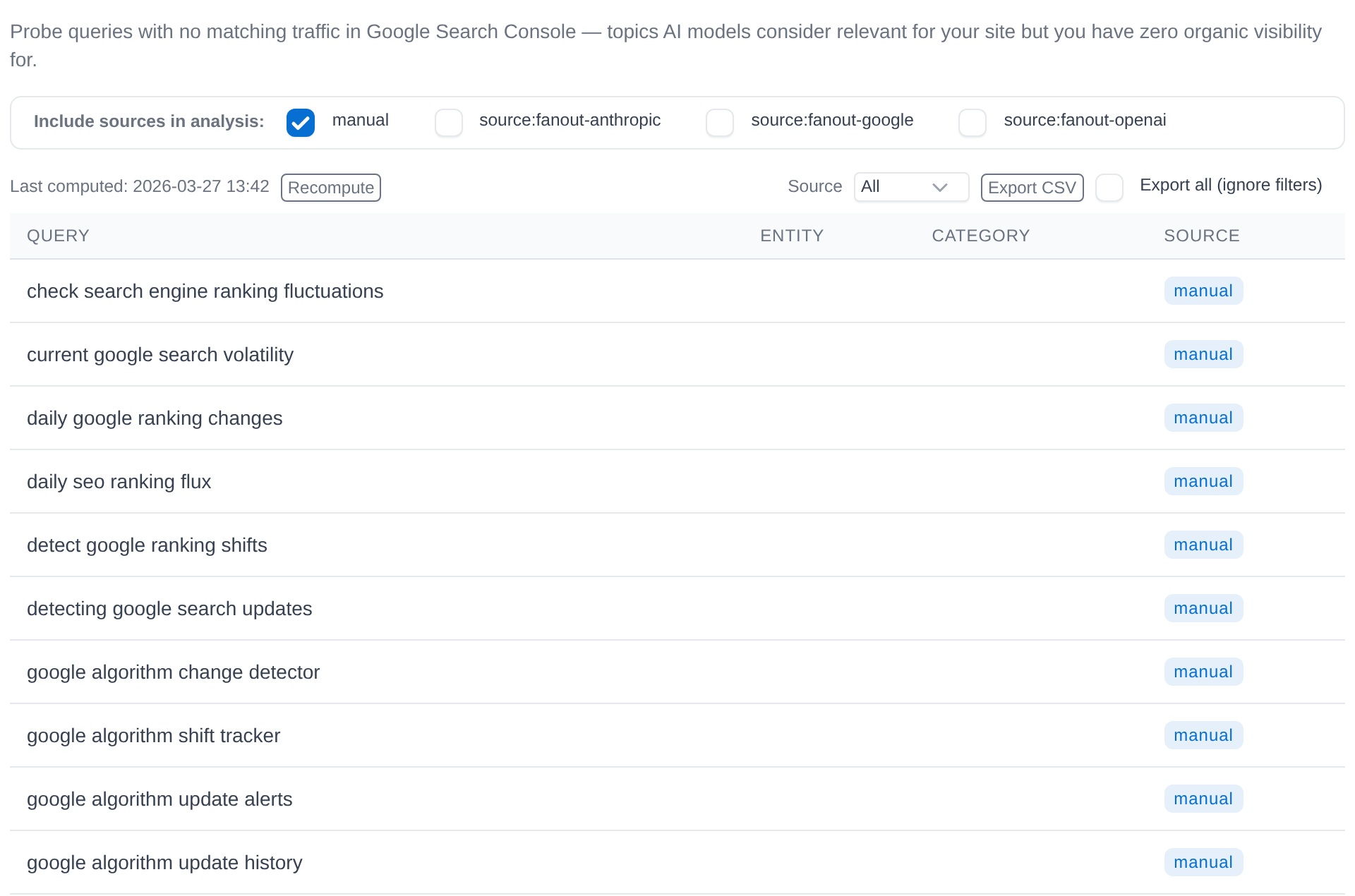
The Query Gaps sub-tab covers the queries that do not appear in Search Console at all. It compares the queries you track for AI visibility with your Search Console data and lists the tracked queries whose exact wording never appears as a Search Console query. For Algoroo, 48 tracked queries have no exact match, such as "current google search volatility" and "google algorithm update alerts".
How it works
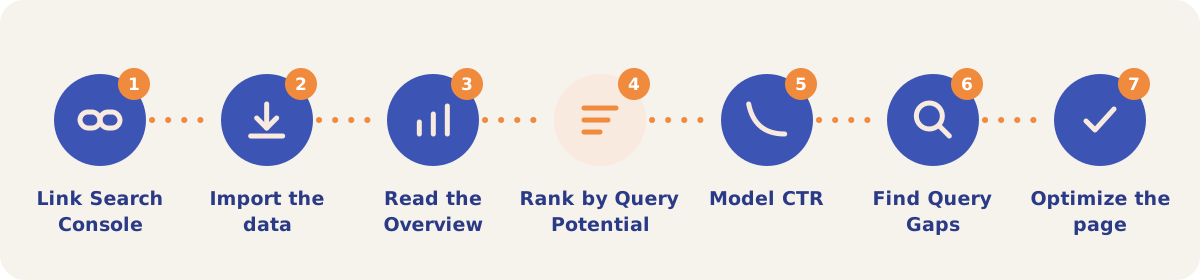
- Link Search Console. On the GSC sub-tab, click Connect Google Account (read-only access), then select and Link the Search Console site for the property. Linking starts a 90-day import.
- Import the data. Click Import. It runs a 3-month CTR Modelling import, then a 90-day summary by query and page, then recalculates the Query Potential scores. A progress bar shows on the Overview. Imports read Search Console only and do not spend credits.
- Read the Overview. The Overview sub-tab shows devices, top countries, a 16-month traffic trend, top queries and top pages on one screen.
- Rank by Query Potential. Query Potential lists every query with its primary page, impressions, average position and score, highest first. Use the search box to find one query.
- Model CTR. CTR Modelling builds your site's own click-through-rate curve and shows the clicks each query or page could gain at a better CTR or a higher position.
- Find Query Gaps. Tick the query sources and click Compute Query Gaps to list tracked queries with no Search Console traffic. Export downloads the list.
- Optimize the page. In the Content Optimizer, Custom Query Mode suggests your highest-potential queries from the same scores and fills in their page.
Sub-tabs
| Sub-tab | Use it when |
|---|---|
| Overview | You want a one-screen read of Search Console performance: devices, countries, the 16-month trend, top queries and top pages. |
| GSC | You want to connect Search Console, link a site or import fresh data. |
| Intent | You want to label queries with an intent taxonomy or map them to your entities. |
| Query → URL Mapping | You want each query with the page that earns the most clicks for it, and the other pages that compete for it. |
| Cannibalization | You want the queries where more than one of your pages gets clicks, ranked by the clicks that land on the non-primary pages. |
| Query Potential | You want every query ranked by impressions × average position. |
| CTR Modelling | You want your site's CTR curve and the clicks a better CTR or a higher position would add. Views: CTR Potential, Rank Potential, Combined Potential, History and Settings. |
| Query Gaps | You want the tracked queries that have no Search Console traffic. |
Strategies and use cases
- Work from the top of Query Potential. For Algoroo, "algorithm tracking tool google" and "google algorithm tracking tool" sit at positions 28.6 and 28.2 with 114 impressions between them. One page built for that topic covers both.
- Treat long questions as AI search targets. Search the Query Potential list for words such as "what", "which" or "tools". The 77 long queries in the demo rank at an average position of 5.3 and earn no clicks, so they are candidates for the Content Optimizer.
- Filter out the brand. Tag brand misspellings in CTR Modelling under Branded Query Tags, then switch the views to Non-branded. In the demo, brand spellings take 614 of the 717 clicks.
- Use Query Gaps to plan new pages. A gap is a tracked query whose exact wording has no Search Console row. The topic may still get traffic under other wording, and the app writes the tracked queries, so a gap shows missing coverage, not proven demand.
- Merge pages that split clicks. Run the Cannibalization analysis after each import. A query with many cannibalized clicks across several pages is a candidate for one consolidated page. The demo site has one page with clicks, so its list is empty.
- Check a SERP before you commit. In CTR Modelling, a paid live SERP check on a query row shows the SERP features on the result page, which affect the clicks a position can earn.
How it connects to the rest of the app

Content Optimizer
Custom Query Mode suggests your highest Query Potential queries and fills in their page.

Intent Classification
Labels your Search Console queries, for the intent badges and filters in the Organic tab.

Visibility Tracking
Tracks the AI visibility queries that Query Gaps checks against Search Console.

Pages
Shows each page's Search Console clicks next to its AI citations and optimization events.

Gap Analysis
Combines Search Console data with probe data and optimizer results to find content gaps.
Open the demo project's Query Potential list to see all 189 Algoroo queries ranked by score.
Rank your own Search Console queries
Your first project includes a complimentary visibility baseline. No card required.