
Test whether AI models would recommend your brand for each of your topics
Measuring Relevance asks AI models a yes or no question, many times per topic, about whether they would recommend your brand, answered from memory without web search, so you can see which topics the models do not connect with you.
Start at app.dejan.ai
The problem: you do not know which of your topics AI models connect with your brand
A brand can rank in classic search for a topic and still not be one that an AI model would suggest for it. One question to a model gives one answer, and the next answer can be different, so a spot check does not tell you whether a model connects your brand with a topic.
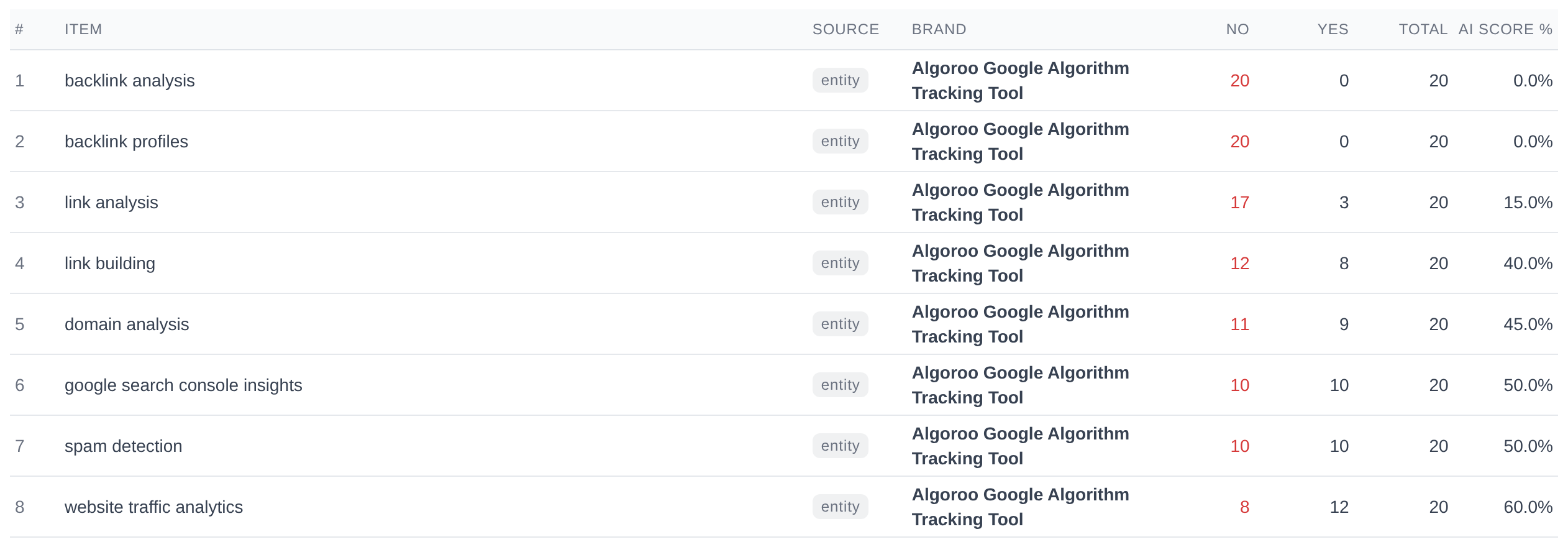
Here is an example from our public demo project. Algoroo tracks Google rank volatility, and its project tracks link topics such as "backlink analysis" alongside volatility topics. Asked 20 times whether they would recommend the Algoroo Google Algorithm Tracking Tool for someone interested in backlink analysis, Google and OpenAI answered "no" every time, 10 times each.
How Measuring Relevance solves it
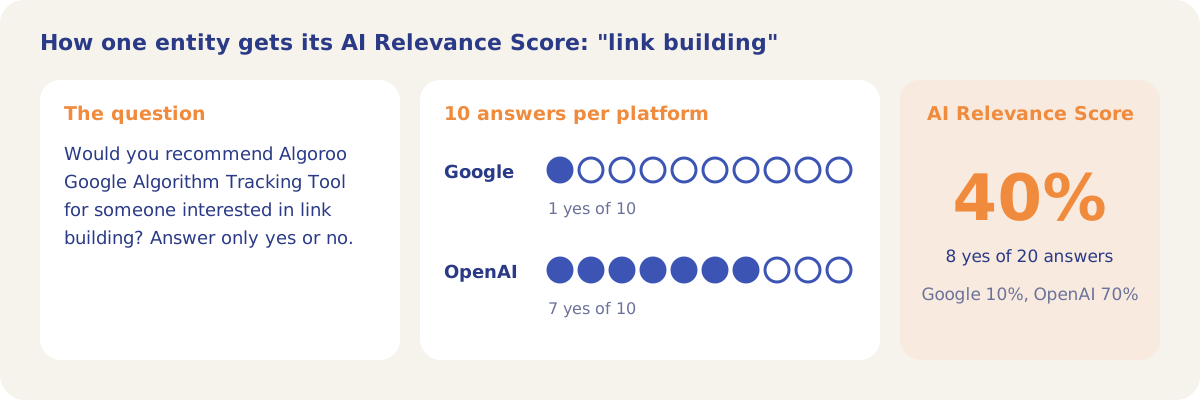
The Relevance Probing tab asks each platform the same question for every pair of your owned brand and a tracked entity, with an instruction to answer with a lower case yes or no. The question is: "Would you recommend {brand} for someone interested in {entity}? Answer only yes or no." Each pair is asked N times as independent samples, and the share of "yes" answers is the AI Relevance Score.
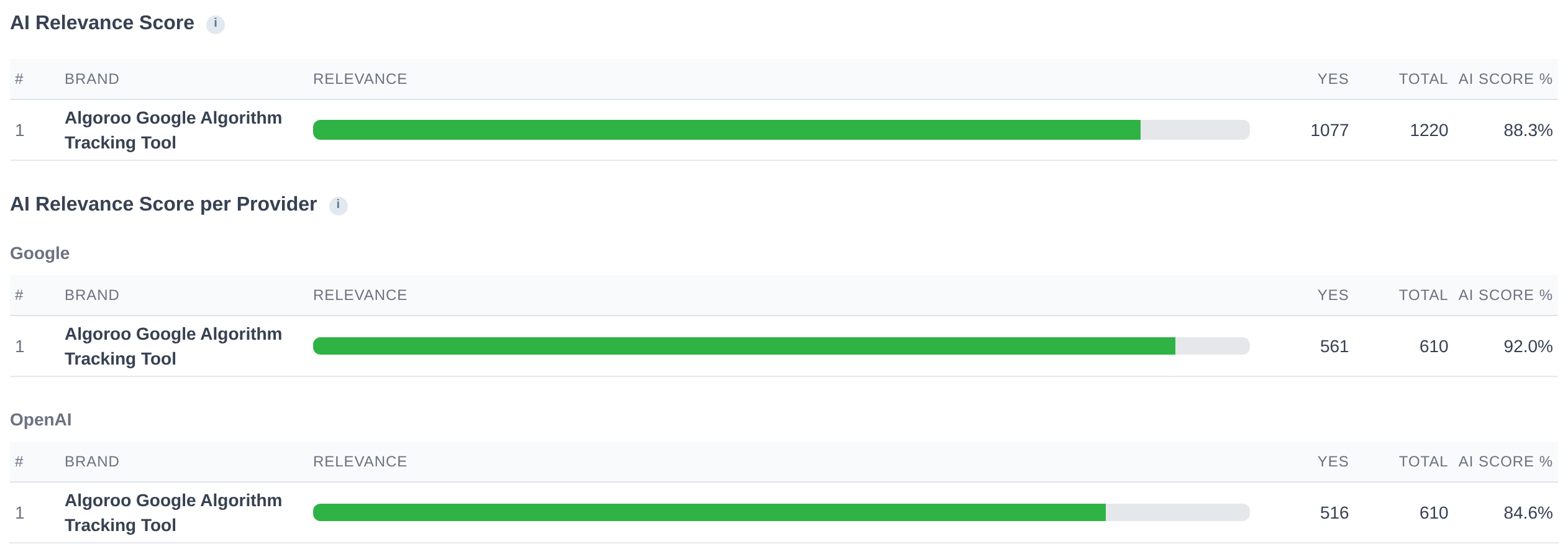
In the demo's Relevance run #301, each of 61 entities was asked 10 times on Google and 10 times on OpenAI. The brand got 1,077 "yes" answers out of 1,220, an AI Relevance Score of 88.3%. Google said yes in 92.0% of answers and OpenAI in 84.6%.
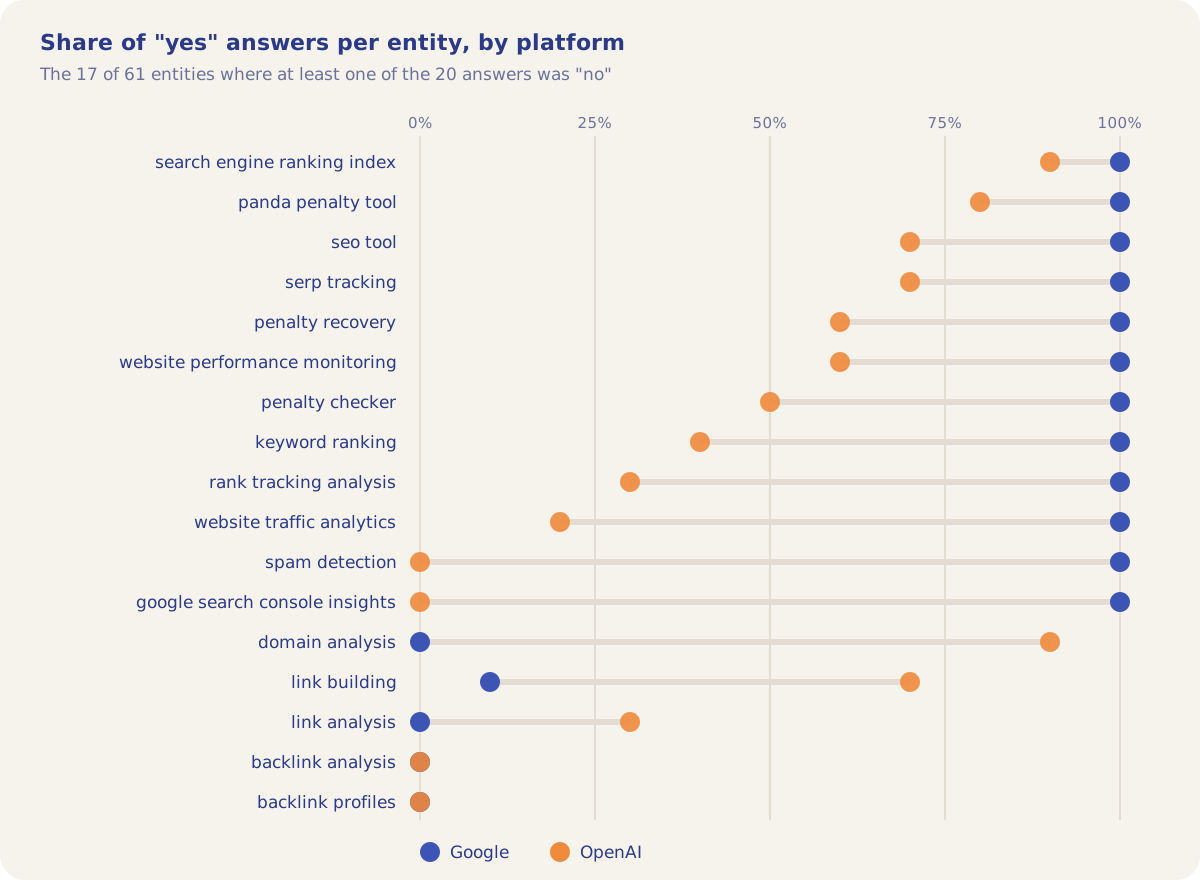
The overall score hides where the "no" answers are. 44 of the 61 entities got "yes" in all 20 answers. The other 17 split two ways: on 12 entities Google said yes every time and OpenAI did not, and on the other 5 (domain analysis and four link topics) Google said yes in at most 1 of 10 answers.
How it works
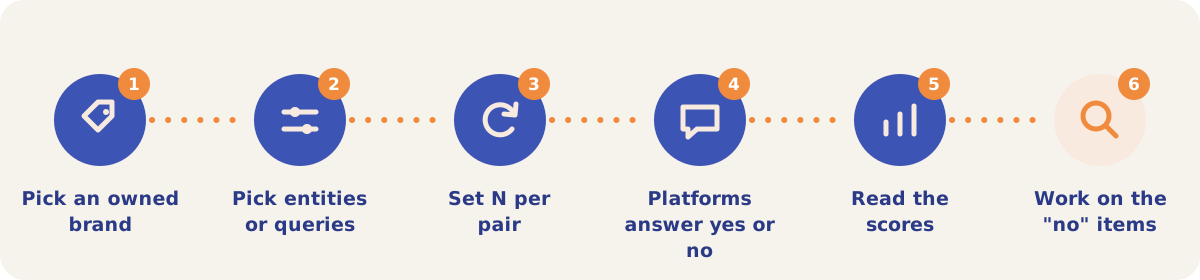
- Pick an owned brand. Only owned brands can be tested. If no brand is marked as owned, the tab offers Auto-detect from site.
- Pick entities or queries. In Relevance, choose Entities (the default) or Queries, and optionally a Location.
- Set N per pair. N is the number of independent samples for each brand and item pair, from 1 to 100. A higher N gives more statistical confidence and costs more. Add an optional Label.
- Check the estimate and run. The tab shows the estimated cost before you click Run.
- Read the scores. The AI Relevance Score (called QRS, Query Relevance Score, for queries) comes first, then the score per provider, then the score per entity across platforms, with cells under 50% flagged.
- Work on the "no" items. Items Not Relevant to Owned Brands lists every item where at least one answer was "no".
Results on the tab
| Section | What it shows |
|---|---|
| AI Relevance Score (QRS for queries) | The brand, a relevance bar, the yes count, the total probes and the score. |
| AI Relevance Score per Provider | The same score for each AI platform, with all of that platform's answers pooled. |
| AI Relevance Score per Entity | A grid of the brand's score for each entity, one column per platform and an Overall column. Click a column header to sort. |
| Items Not Relevant to Owned Brands | Each item with at least one "no", with the no and yes counts. |
Filter by run picks one run or all runs combined, and Export CSV downloads the results. The AI Relevance Score for entities is the same figure that orders the entity list in the Content Optimizer and fills the Entity Relevance cards on the Dashboard.
Strategies and use cases
- Use 0% entities to check your topic list. In the demo, "backlink analysis" and "backlink profiles" scored 0%. Check whether your product serves the topic. If it does not, the entity measures something outside your market and can leave the tracked set.
- Treat a platform split as a content signal. On "spam detection" and "google search console insights" Google said yes 10 times out of 10 and OpenAI 0 times. A split like this shows which platform does not connect your brand with the topic.
- Raise N before you act on a borderline score. With N at 10, one answer moves a platform score by 10 points. Repeat the run with a higher N for entities between 40% and 60%.
- Test each owned brand name. The demo project has three owned brands. Run the probe for the short name and the full product name and compare the scores.
- Start optimization at the bottom of the list. The Content Optimizer sorts entities by AI Relevance Score, weakest first, so the low-scoring topics you do serve are the first ones offered.
How it connects to the rest of the app

Content Optimizer
Orders its entity list by AI Relevance Score, weakest first.

Dashboard
Shows your highest and lowest relevance entities in Entity Relevance.

Running Association Probes
Asks the open question: which brands does the model list for each topic?

Visibility Tracking
Measures whether the tracked answers name and cite your brand with web search on.
Open the demo project's Relevance Probing tab to see the score for each of the 61 entities on both platforms.
Measure how AI models see your brand
Your first project includes a complimentary visibility baseline. Measuring Relevance uses credits.