
See the topics Google, OpenAI and Anthropic find in your page
Page Focus gives one page to Google, OpenAI and Anthropic and shows what each platform reads it as being about, so you can check that AI systems match your page to the topic you wrote it for.
Start at app.dejan.ai
The problem: you cannot see which topics an AI system matches your page to
An AI search system quotes a page when it judges the page relevant to the question. That judgement is made inside the model, and each platform makes it separately. A page written for one topic can be read as being about a different one, and Google, OpenAI and Anthropic do not list the same topics for the same text.
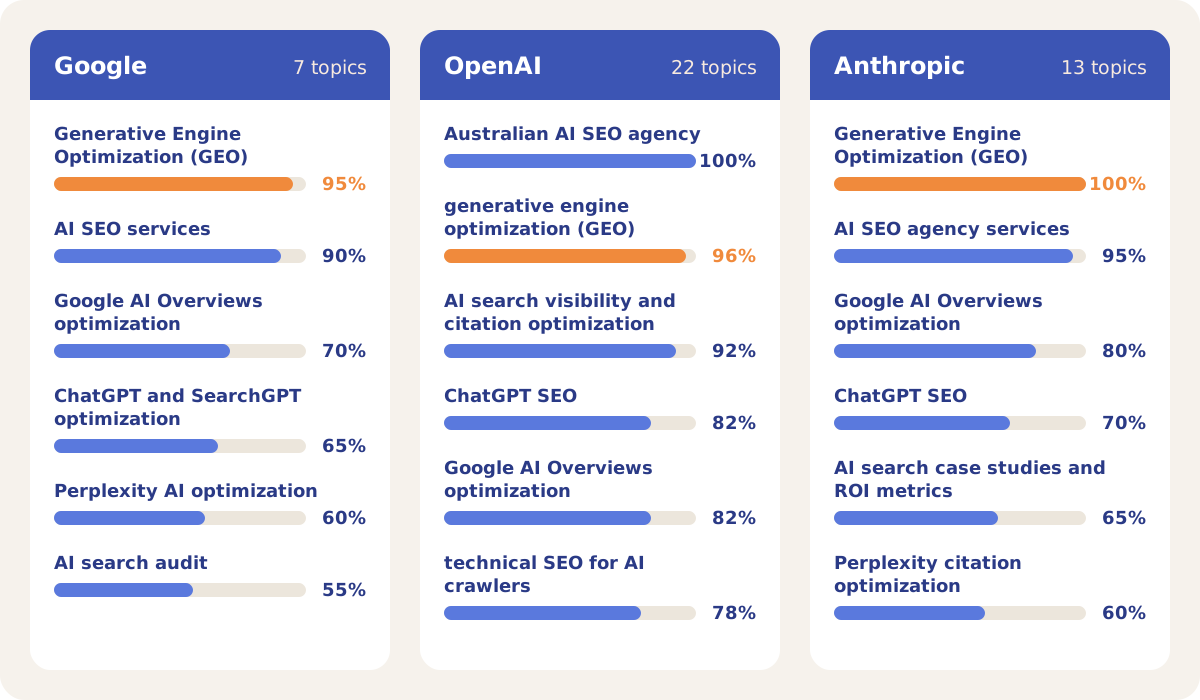
Here is an example from our public demo project. A Page topics run on the dejan.ai homepage gave all three platforms the same page text. Google listed 7 topics, Anthropic 13 and OpenAI 22. Google and Anthropic put "Generative Engine Optimization (GEO)" first. OpenAI put "Australian AI SEO agency" first, at 100%, and GEO second. "Technical SEO for AI crawlers" was 78% central for OpenAI, 50% for Anthropic, and not on Google's list.
How Page Focus solves it
Page Focus sends the same page text to each platform, on the model that Visibility Tracking uses for that platform, and shows the three results side by side. The Page topics sub-tab lists every topic a platform finds, with a centrality score from 0 to 100% and one sentence on what in the page made it see that topic.
Click any topic in the result to set up a Topic relevance run for it on the same page. In the demo project the follow-up run scored the dejan.ai homepage for the topic "AI SEO". Google gave it 88%, OpenAI 96% and Anthropic 97%. Each platform also listed what would raise the score, and each change carries a type: presence, absence, format, feature or other.
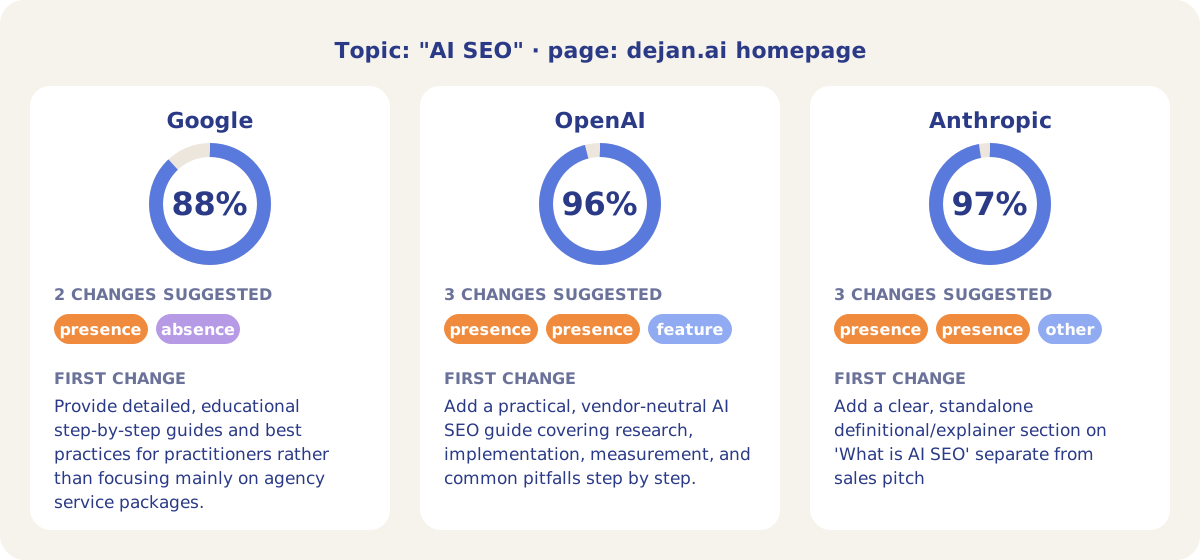
The three platforms scored the page within 9 points of each other, and the first change on each list asked for the same thing: a practical or definitional section on AI SEO that is separate from the service packages. Google also listed an absence change, to reduce the promotional copy, pricing and calls to action.
How it works
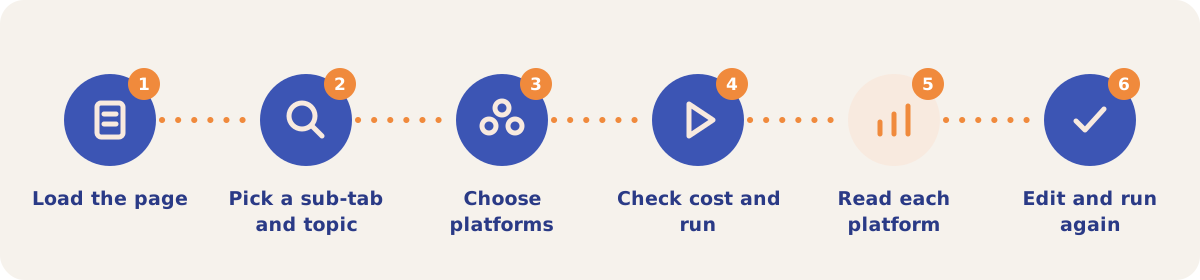
- Load the page. Open Page Focus from the Tools menu and pick Page address or Paste text. In the address field, type part of an address to pick one of your project's pages, or enter any address. Pasted text can be up to 100,000 characters.
- Pick a sub-tab and topic. Page topics needs no input. On Topic relevance, enter a Topic: a topic, entity, theme or search query of up to 300 characters.
- Choose the platforms. Under Platforms, turn off any of Google, OpenAI and Anthropic you do not want. At least one stays on.
- Check the cost and run. The line next to the Run button shows the estimated cost before you click it.
- Read each platform. A page address is fetched once, and every platform gets the same text. If a platform receives an error page or a block notice, its result says "This platform could not read the page content."
- Edit and run again. The page stays loaded as the source for the next run, so a second run does not fetch it again. Click Use a different page to change it. Every run is saved under Saved runs for everyone on the project, and opening a saved run costs nothing.
Sub-tabs and settings
| Option | What you get |
|---|---|
| Page topics | Each platform's list of topics, ordered from most to least central, with a centrality score and a one-sentence reason for each. |
| Topic relevance | Each platform's relevance score from 0 to 100% for your topic, a short rationale, and the changes under What would raise the score. |
| Compare with another page | A switch on Topic relevance. Fill in Page B and every platform scores both pages. Each platform also compares the two pages directly, twice with the order swapped, then an analyst model reads all the results and both page texts. The result shows Overall (Page A wins, Page B wins or Tie), the changes the losing page needs to win, each platform's score and winner, and both pages side by side. |
| Platforms | Google, OpenAI and Anthropic, each on the model that Visibility Tracking uses for that platform. |
Each result shows its run number and cost, with Download JSON and a copy button. On a pay-as-you-go project each run is billed from the credit balance under Page Focus, and a run is blocked with "Not enough credits for this run" when the balance does not cover the estimate.
Strategies and use cases
- Check a page against the topic it targets. Run Page topics first. If the topic you wrote the page for is missing or low on a platform's list, the page is not being matched to it. In the demo, "Technical SEO for AI crawlers" was on OpenAI's and Anthropic's lists and missing from Google's.
- Turn a topic into a to-do list. Click a topic in the Page topics result to run Topic relevance on it, then work through What would raise the score. Changes that all three platforms list are the ones to start with; in the demo, all three first changes asked for educational content on AI SEO.
- Find out why a competitor is quoted instead of you. Switch on Compare with another page, put the competitor's page in Page B, and read the changes the losing page needs to win.
- Test a draft before it goes live. Paste the draft text and run Topic relevance for its target topic. Edit and run again until each platform scores it where you want it.
- Spot a page that covers too much. A long topic list with low centrality scores means the page spreads across many subjects. OpenAI found 22 topics on the dejan.ai homepage, 7 of them under 50% central.
How it connects to the rest of the app
Content Optimizer
Tests edits to the page against the competing pages until an AI ranker places it first.

Visibility Tracking
Runs your test prompts on each platform with the same models that Page Focus runs on.
Measuring Relevance
Measures how relevant AI models consider your brand to each query or entity.

Pages
Lists the project's pages that you can pick in the Page address field.
Open the demo project's Pages tab to see the pages a Page Focus run can start from.
See how AI platforms read your page
Your first project includes a complimentary visibility baseline. Page Focus uses credits.