
Turn long AI prompts into the short search queries behind them
Prompt to Query converts between long AI prompts and the short keyword queries a search system is likely to run, so you can match AI prompts to the keywords you already track and target.
Start at app.dejan.ai
The problem: AI prompts are long, but AI search runs short queries
A prompt typed into an AI assistant is a paragraph. Before the assistant answers with web search on, it turns that paragraph into a few short searches and reads the results. Your keyword research, rank tracking and page targeting work on short queries, so you need to know which short query a prompt becomes.
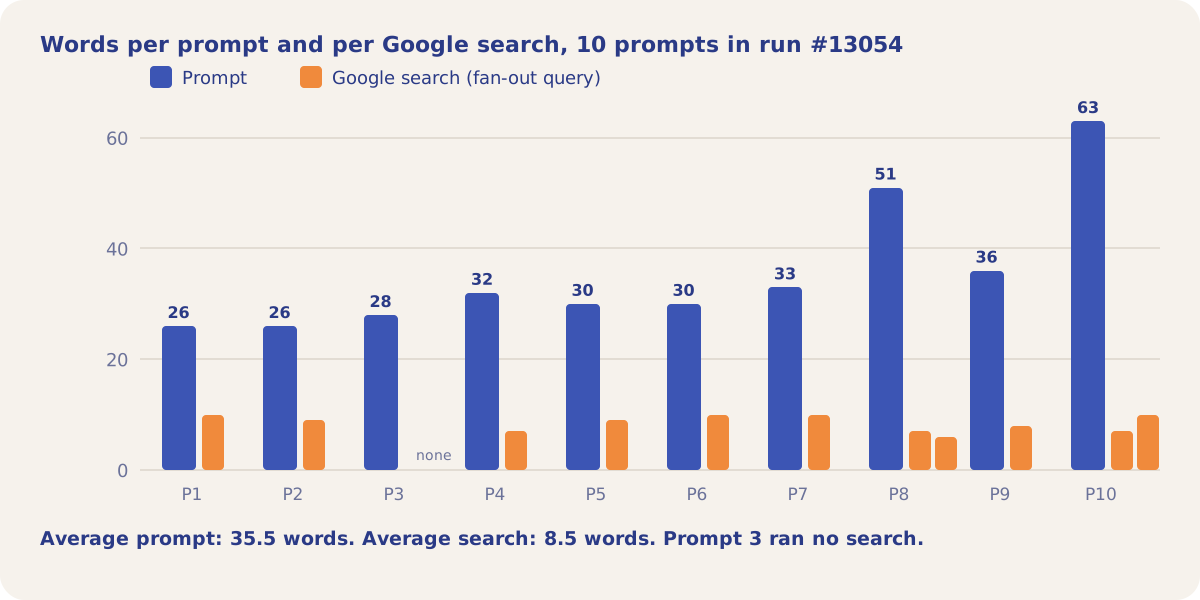
Here is an example from our public demo project. Algoroo tracks Google rank volatility. In the scheduled Citation Mining run #13054, Google answered 10 test prompts from the demo's prompt set about tools that track algorithm updates. The prompts averaged 35.5 words. The 11 web searches Google ran for them averaged 8.5 words.
How Prompt to Query solves it
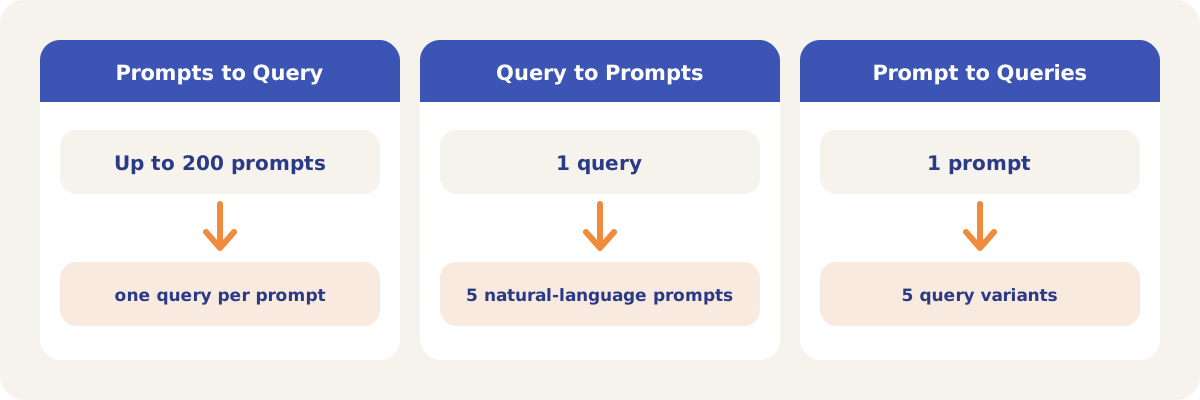
Prompt to Query does the reduction for any list of prompts you paste, without running an AI search. Each prompt comes back as one short query, the model's estimate of the main search: the single main intent of the prompt in lowercase keywords, with filler words removed. A batch of up to 200 prompts runs in one call.
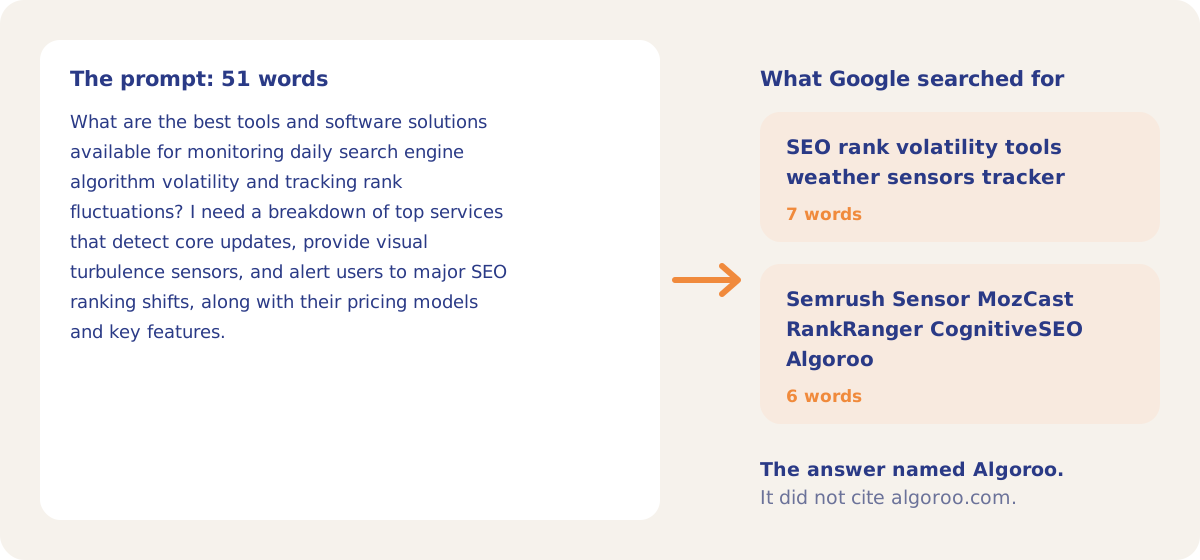
The demo run shows Google making the same kind of reduction. The 51-word prompt below asks for a breakdown of volatility trackers with pricing. Google turned it into two searches of 7 and 6 words, and the second one named Algoroo.
Across all 10 prompts the pattern holds. Every prompt was 26 to 63 words long, and every search Google ran was 6 to 10 words long. One prompt produced no search at all.
The tool also works in the other direction. Query to Prompts expands one keyword into 5 prompts written the way a person might ask, which you can add to your citation prompts and track. Prompt to Queries turns one prompt into 5 distinct query variants with the same intent.
How it works
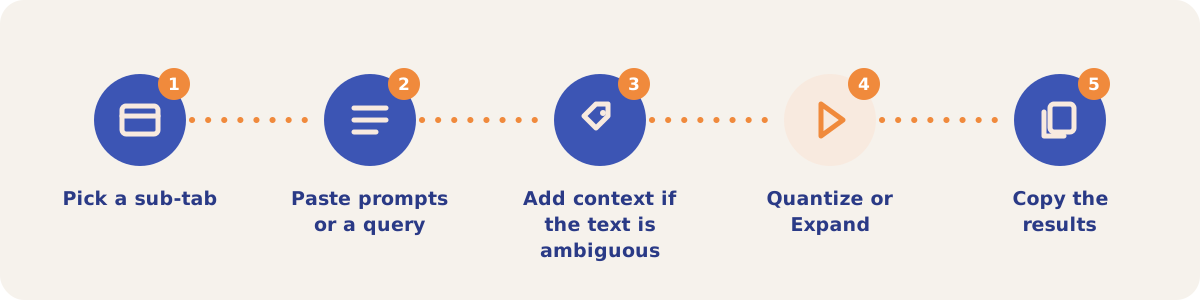
- Pick a sub-tab. Open Tools, then Prompt to Query, and choose Prompts to Query, Query to Prompts or Prompt to Queries.
- Paste prompts or a query. On Prompts to Query, paste one prompt per line, up to 200 lines. A spreadsheet paste works.
- Add context if the text is ambiguous. Extra tab- or pipe-separated columns on a line, such as a brand or a category, are read as context. Context is added to the query only when the prompt is ambiguous without it. Prompt to Queries has its own Context box.
- Quantize or Expand. Click Quantize on Prompts to Query, or Expand on the other two sub-tabs. Each call is billed to the project you opened the tool from.
- Copy the results. Copy queries or Copy prompts puts the list on your clipboard. Results are not saved, so copy them before you leave the page.
The rules each query follows
| Rule | What it means |
|---|---|
| One main intent | A prompt that asks two things becomes one query built on the noun both questions share. It is never split into two queries. |
| No bare category | The query is never a broad category on its own. It names the specific thing the prompt asks for. |
| Context only when needed | A brand or category from the context columns is added only when the prompt is ambiguous without it. |
| Keyword form | Lowercase, no punctuation, no question words or filler unless they carry the meaning. |
Strategies and use cases
- Map your citation prompts to keywords. Paste the prompts you track in Citation Mining and compare the queries with your Search Console queries. A prompt whose query you do not rank for is a content gap.
- Check the tool against the searches platforms actually ran. Citation Mining stores the searches each platform ran. Compare them with the tool's queries for the same prompts, as in run #13054 above.
- Write prompts from your keyword list. Query to Prompts gives 5 prompts per keyword. Add them to your citation prompts so Citation Mining and Visibility Tracking test more phrasings of the same topic.
- Find query variants for one page. Prompt to Queries returns 5 variants of one prompt. Use them as the headings and phrasing a page needs to match more than one search.
- Add context for short prompts. A prompt such as "which plans are available?" needs the brand or product in a context column to produce a useful query.
How it connects to the rest of the app

Citation Mining
Stores the searches each AI platform ran for your prompts, to compare with the tool's queries.

Prompt Generator
Writes citation prompts in bulk, which you can reduce to queries here.

Organic Search
Holds your Search Console queries, the keyword side of the comparison.

Visibility Tracking
Asks AI platforms about your topics on a schedule and records the brands they name.

Intent Classification
Classifies Search Console queries and fan-out queries into an intent taxonomy you define.
Open the fan-outs of demo run #13054 to see the searches Google ran for each prompt, and Prompt to Query in the demo project to see the tool.
Map your prompts to queries
Your first project includes a complimentary visibility baseline. Prompt to Query uses credits.