
See what Google's AI model remembers about your website, and what it almost said
Treewalker lists what an AI model associates with your website from memory and with web search, and follows the words it nearly chose instead, so you can find the associations that are out of date or missing.
Start at app.dejan.ai
The problem: AI models describe your brand from memory, and the memory can be out of date
When an AI model answers without searching the web, it describes a brand from what it learned in training (its parametric memory). No page is cited, so these answers do not show up in a citation report. A single answer also hides the alternatives the model nearly wrote, and those alternatives are part of what it associates with you.
Here is an example from our public demo project. Algoroo is a Google rank volatility tracker. Asked for the top 10 products and services of algoroo.com without web search, a Google model listed 9 different penalty, Penguin and Panda items across 4 of 5 runs, among them "Penguin Penalty Tool" at 99.1% average token confidence. The same prompt with Google Search returned no penalty items at all.
How Treewalker solves it
Treewalker runs the same prompt in two paired sessions. The Ungrounded session uses memory only and records the probability of every token. The Grounded session runs the prompt with Google Search. Each session repeats the prompt several times, so every item gets an appearance rate.
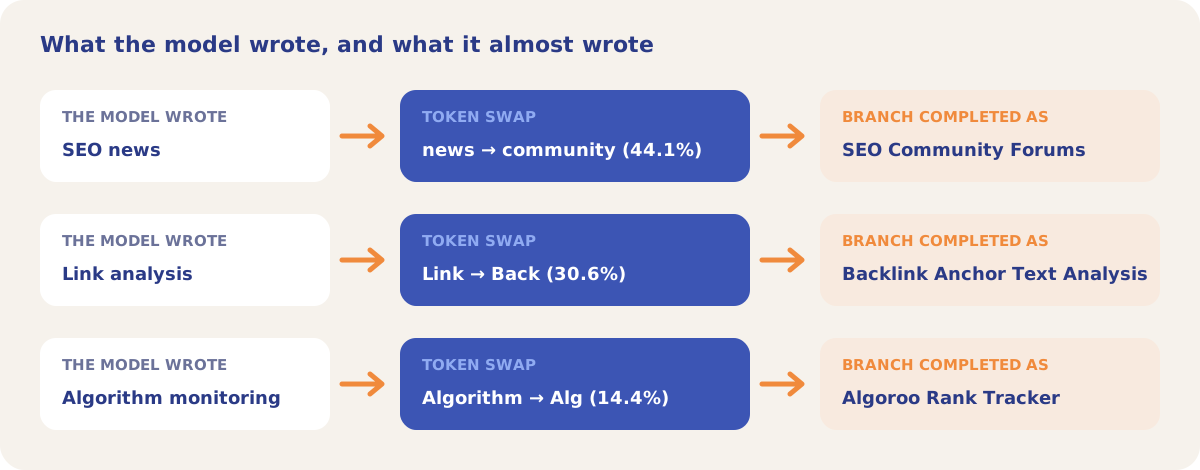
In the Ungrounded session, the model reports the top 5 alternative tokens at each position. Where an alternative passes your threshold, Treewalker swaps it in and has the model complete the item from that point. Each completion is a branch: an item the model would have listed on a slightly different path.
The demo session for algoroo.com ran on 15 March 2026 with 5 runs and a 10% threshold. The Ungrounded session produced 42 distinct items and 118 branches.
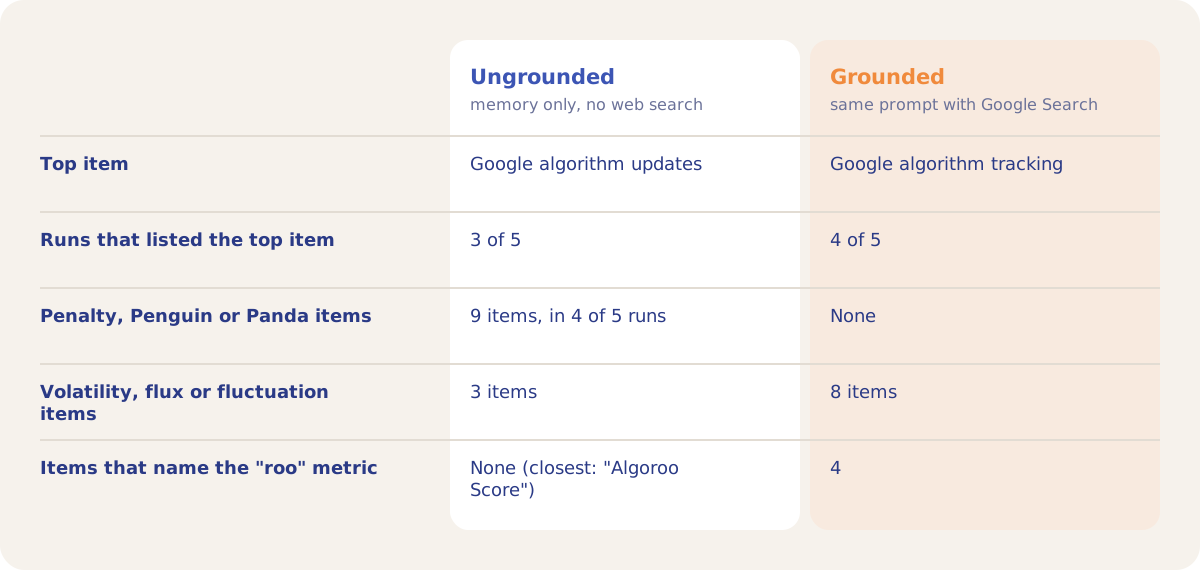
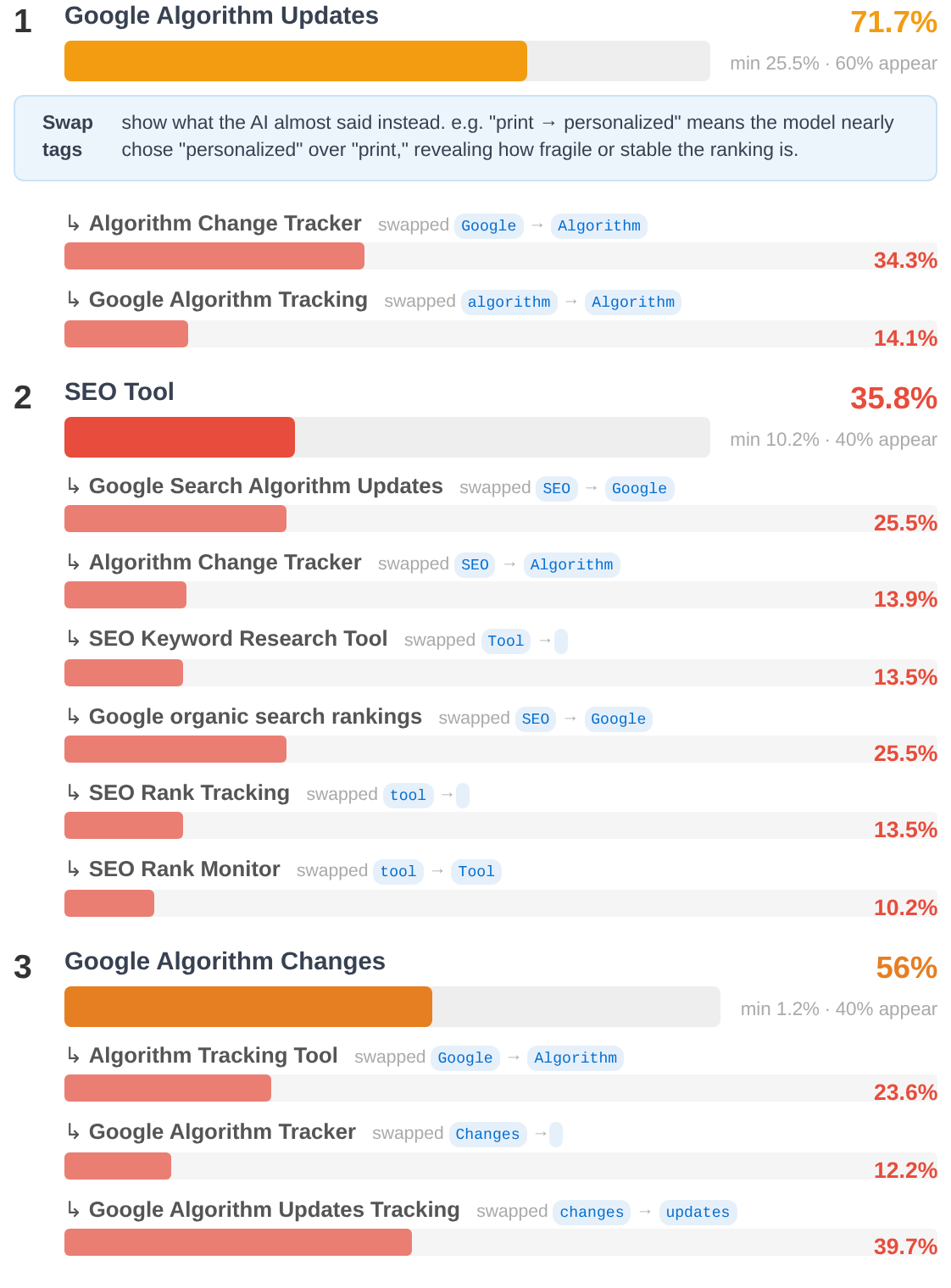
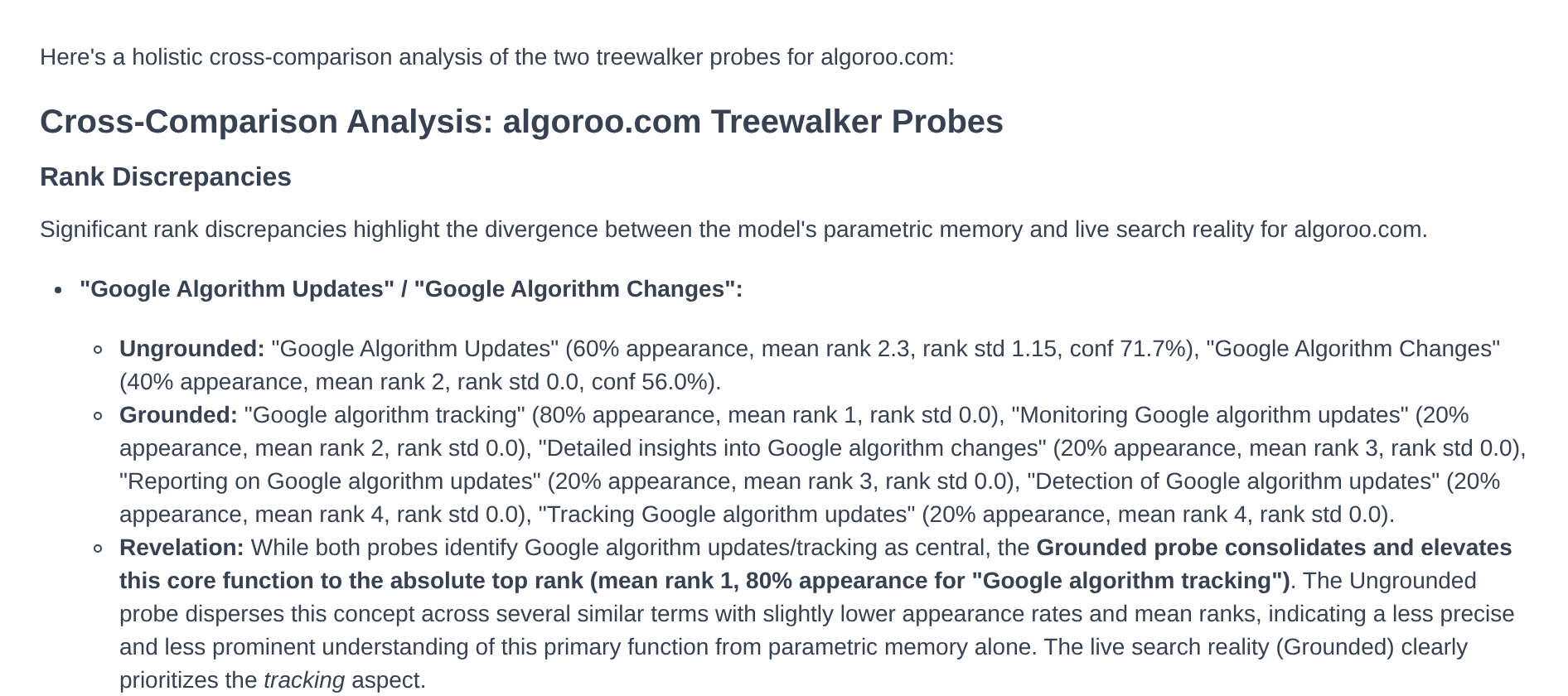
Once both sessions finish, the Holistic Analysis compares them item by item. In the demo it notes that the Grounded session puts "Google algorithm tracking" first in 4 of 5 runs, while the Ungrounded session spreads the same idea across several similar terms.
Every item from both sessions is listed under Discovered Entities (81 in the demo). 43 of the demo project's 63 entities were added from that list.
How it works
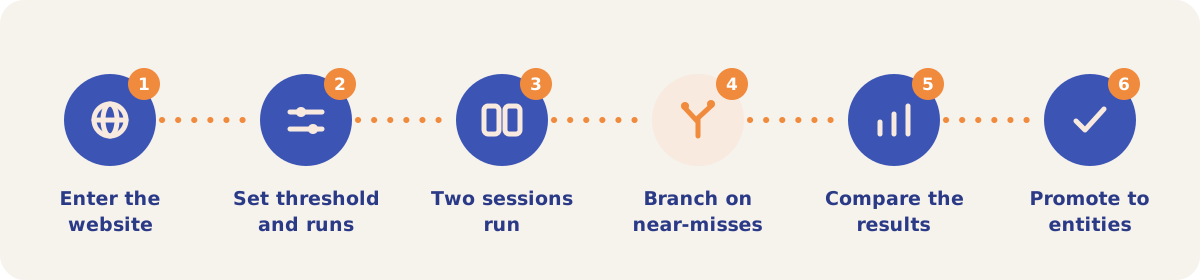
- Enter the website. Open Treewalker from the Tools menu and click New Analysis. Website URL starts filled with the project's URL.
- Set the threshold and the runs. Threshold % goes from 1 to 50 (default 10) and Number of runs from 1 to 20 (default 5). A threshold of 5 produces many more branches and weaker associations; 20 keeps only the strongest near-misses.
- Click Analyse. Two progress bars track the Ungrounded and the Grounded session.
- Branching runs on its own. For each token whose alternative passes the threshold, the app builds a fragment with the alternative swapped in and has the model complete the item.
- Compare the results. Treewalker Results has three tabs: Ungrounded, Grounded and Holistic Analysis.
- Promote items to entities. On the Discovered Entities sub-tab, click an item to add it to your Entities list and click it again to remove it. Green items came from Treewalker, purple items are already entities from another source, and white items are not entities.
Result tabs and views
| Tab | What it shows |
|---|---|
| Ungrounded | Overview: items ranked by average token confidence, with minimum confidence, appearance rate and swap tags. Rank: association strength, average rank and rank movement (needs 2 runs or more). Granular Details: Appears, Mean Rank, Std, Range, Conf %, Min Conf % and Branches. The AI analysis covers Primary Bias, Grounding Bias, Strongest Associations, Weakest Associations and Gap Analysis. |
| Grounded | The same three views, with the bar showing appearance rate. The AI analysis covers Grounded Brand Profile, Strongest Associations, Weakest Associations and Search Influence Observations. |
| Holistic Analysis | Rank Discrepancies, Grounded-Only Associations, Ungrounded-Only Associations, Convergence and Strategic Observations. |
On a pay-as-you-go project a Treewalker run is billed from the credit balance under Tree Walker once both sessions finish.
Strategies and use cases
- Find the out-of-date associations. Items that appear only in the Ungrounded session are what a model says when it does not search. For algoroo.com these were the penalty and Penguin tools.
- See what your pages add when they are retrieved. Grounded-only items come from live search. For algoroo.com, 4 grounded items named the "roo" metric and no ungrounded item did.
- Seed your entity list. Discovered Entities turns both sessions into candidate entities for Visibility Tracking. The demo project took 43 of its 63 entities from it.
- Read the swap tags for your brand name. A branch that completes as your brand shows how close the model came to naming you. In the demo, "Alg" at 14.4% completed as "Algoroo Rank Tracker".
- Set the threshold for the job. Use 5 to collect weak associations for research, and 20 for a short list of the strongest ones.
- Run it again after a content or PR push. Each run is kept in the Sessions list. Grounded results can change after your push. Ungrounded results change only when the model is updated.
How it connects to the rest of the app

Visibility Tracking
Tracks the entities you promote from Treewalker with fixed test prompts on a schedule.

Association Probes
Its Parametric Memory pill collects the facts each platform recalls about your brand.

Gap Analysis
Uses Treewalker results as one of its data sources.

Grounding Inspector
Shows the sources behind a grounded answer for one query.

Content Optimizer
Tests page edits for the entities where the tracked answers miss you.
Open the demo project's Treewalker sessions and click View to see both sessions for algoroo.com.
Probe what AI models remember about you
Your first project includes a complimentary visibility baseline. No card required.