
Download your whole AI visibility project as one print-ready file
The Report tab packs every metric in a project into one standalone HTML file, so people without a DEJAN App login can read your AI visibility results in a browser or as a PDF.
Start at app.dejan.ai
The problem: AI visibility results live in a dozen tabs that stakeholders cannot open
An AI visibility project spreads its results across the Dashboard, ARC, Citation Mining, Visibility and Settings tabs, each with its own filters. A client, a manager or a board member who has no login cannot open them, and a set of screenshots covers one filter at a time and dates quickly.
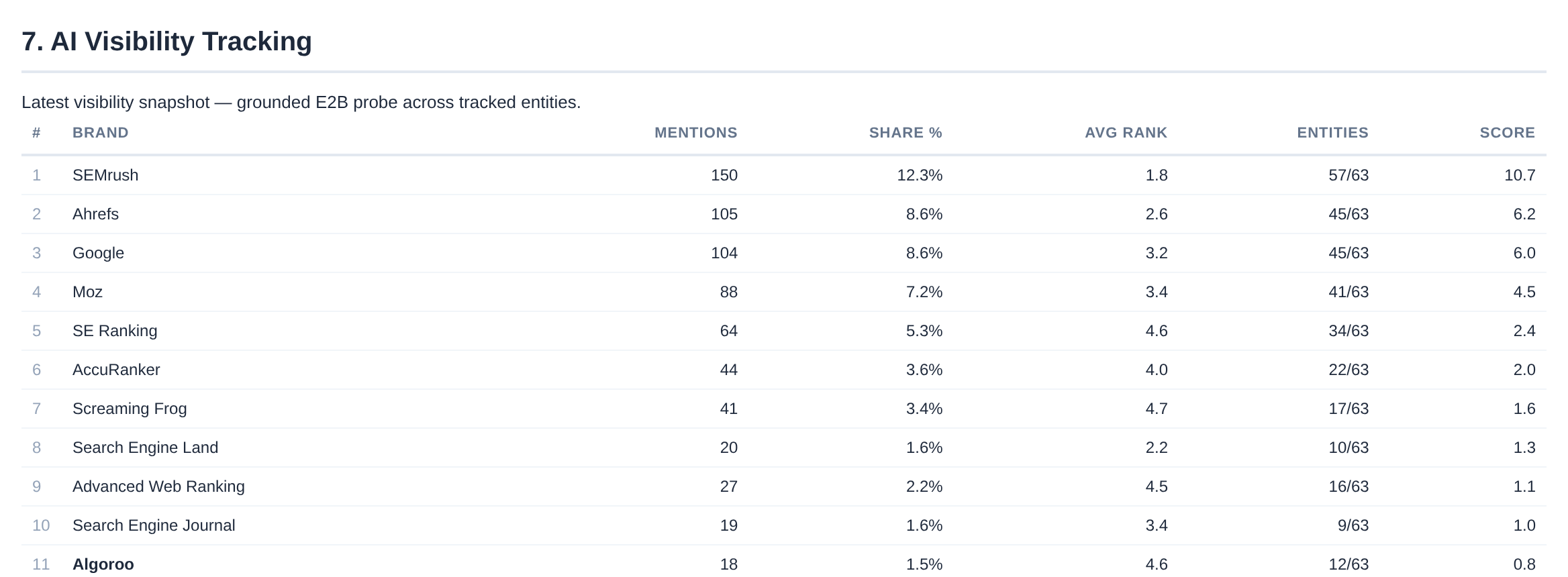
Here is an example from our public demo project. Algoroo tracks Google rank volatility. In the latest visibility snapshot, the tracked answers mention Algoroo 18 times across its 63 tracked entities, which puts it 11th among the brands mentioned, behind SEMrush with 150 mentions. In the citations data, algoroo.com is the 27th most cited domain with 91 citations. Those two facts sit on two different tabs.
How Reports solves it
The Report tab, in the Tools menu, builds a Full Property Report: one HTML file with all metrics across all categories, locations and AI models. The file has its own styles and a linked table of contents, so it opens in any browser without the app, and the browser's print dialog saves it as a PDF. Building the report reads stored results only. It makes no AI calls.
The report for the demo project, built on 27 October 2026, is a 1.6 MB file with 7 sections and 56 tables.

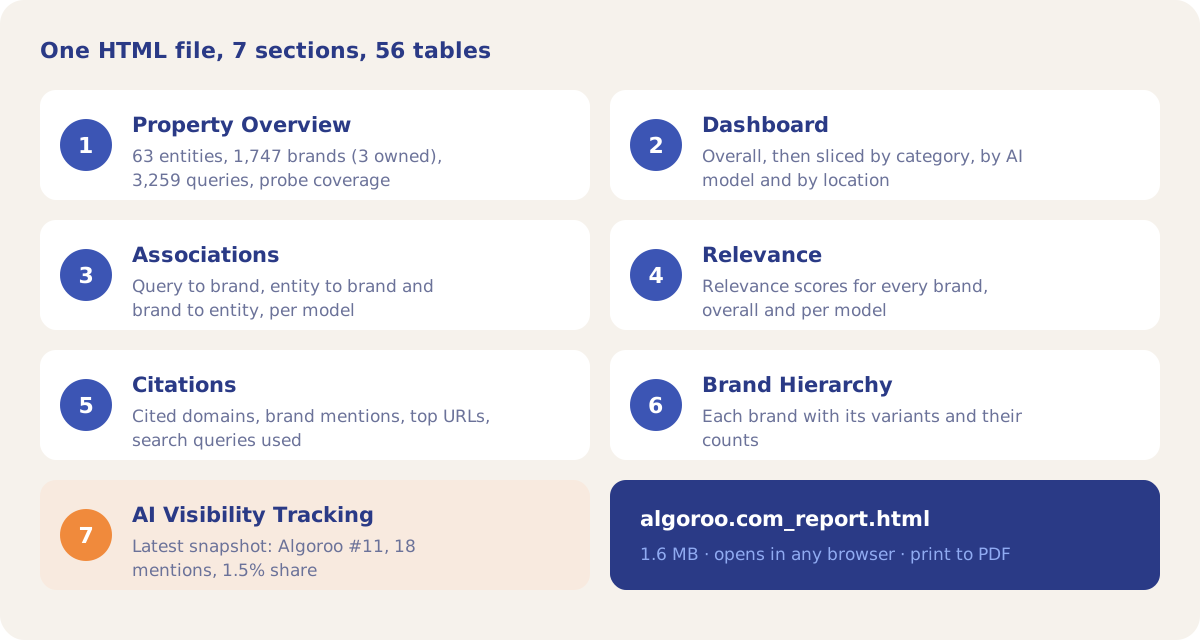
The report opens with the Property Overview: the counts of entities, brands and queries, and probe coverage, which shows how many association, relevance and citation runs the numbers come from. In the demo project that is 63 entities, 1,747 brands (3 owned) and 3,259 queries.

The last section, AI Visibility Tracking, lists every brand from the latest visibility snapshot with its mentions, share, average rank, the number of tracked entities it appeared for, and a score. Your owned brands are in bold, and a trend table of your owned brands follows.
How it works
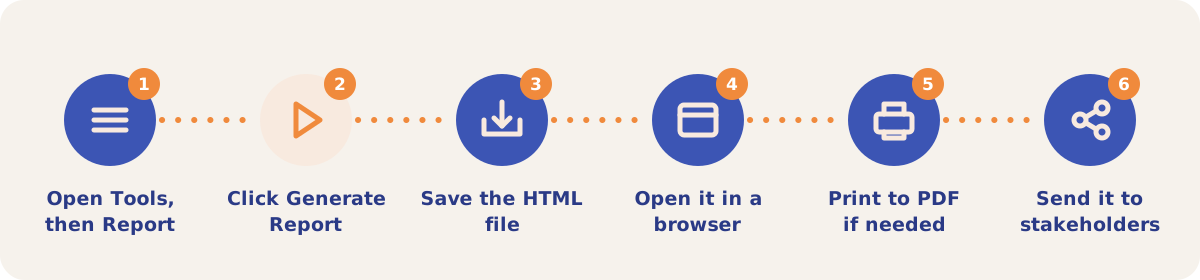
- Open the Report tab. In a project, open the Tools menu (the tools icon at the right of the tab bar) and pick Report.
- Click Generate Report. The app reads the project's stored results and builds the file. Nothing is re-run.
- Save the HTML file. The browser downloads it as {your domain}_report.html, for example algoroo.com_report.html.
- Open it in a browser. The table of contents at the top links to each section and to each category, AI model and location slice of the Dashboard section.
- Print to PDF if needed. Use the browser's print dialog and choose Save as PDF.
- Send it to stakeholders. The file is self-contained, so it can go by email or into a shared drive.
What each section contains
| Section | Contents |
|---|---|
| 1. Property Overview | Entity, brand and query counts, and probe coverage by run type. |
| 2. Dashboard | Summary tables: top Q2B and E2B brands, relevance, citation totals, top cited domains and brand mentions, overall and then per category, AI model and location. These are not the Dashboard tab's Share of Voice figures. |
| 3. Associations | Query to brand (Q2B), entity to brand (E2B) and brand to entity (B2E), with per-model tables and the top queries for your owned brands. |
| 4. Relevance | Relevance scores for all brands, overall and by model. |
| 5. Citations | All cited domains, with a total and Google and OpenAI columns (Anthropic is in the total only), brand mentions, top cited URLs and the search queries the models used. |
| 6. Brand Hierarchy | Each brand with its variants, and counts that include or exclude the variants. |
| 7. AI Visibility Tracking | The latest visibility snapshot for every brand and the trend for your owned brands. |
Other ways to get data out
| Option | Use it when |
|---|---|
| Report (Tools menu) | You want one readable document of the whole project. |
| Export (Tools menu) | You want CSV files for a spreadsheet. The downloads are grouped into Associations, Citations, Relevance, Tracking & Visibility, Run Log, Configuration and Module Outputs. |
| Data for Slides (Export page) | You want to build a deck. The ZIP holds one Markdown file per section (14 sections) with charts as Mermaid blocks, and a provenance file that flags which sections had data. |
| Export CSV buttons | You want the table on one tab, for example Query Gaps on the Organic tab. |
Strategies and use cases
- Send a monthly snapshot. Generate a report on the same day each month. The date and time of the build are printed at the top of the file, so each copy is a dated record.
- Check probe coverage before you send. The badges in section 1 show how many association, relevance and citation runs the report rests on, so a reader can see which data types are thin.
- Use the Dashboard slices for platform questions. Section 2 repeats its tables per AI model and per location, so a stakeholder who asks about one platform or one market can jump to that slice from the table of contents.
- Pair the report with Data for Slides. The report carries the full tables; the Markdown ZIP from the Export page is shorter and ready to turn into a presentation.
- Share the file with people who will never log in. To give someone live access instead, add them as a Viewer on the Members sub-tab.
How it connects to the rest of the app
Dashboard
Shows Share of Voice live in the app. The report's section 2 shares its name but holds association and citation tables.
Association Probes
Produces the Q2B, E2B and B2E tables in section 3.
Measuring Relevance
Produces the relevance scores in section 4.

Citation Mining
Produces section 5's brand mentions and search queries. Its domains and URLs also include Visibility Tracking citations.

Visibility Tracking
Produces the snapshot and owned-brand trend in section 7.

Sharing with Other Users
Gives people live access to the project instead of a file.
Open the demo project's Report tab to see where the report is built.
Build your first report
Your first project includes a complimentary visibility baseline. No card required.